
 Services
 Solutions
 Main platform
 Technology
 White Label
  Offshore
 Hire developers



Information technology is the backbone of every modern business, yet many small and medium enterprises treat IT as an afterthought or a constant source of headaches. When issues arise, the question is not just “how do we fix it?” but “why didn’t we see this coming, and what is it costing us right now?”
This dilemma often brings business owners to a choice: continue with traditional IT support, calling someone when problems occur, or switch to a Managed Service Provider, where systems are monitored and maintained continuously.
In this guide, we explore MSP vs Traditional IT Support, breaking down the key differences in cost, security, scalability, and overall return on investment. By the end, you will have a clear framework to decide which approach is right for your business.
Understanding MSP and Traditional IT Support
What is a Managed Service Provider (MSP)?
A Managed Service Provider, or MSP, is a third-party company that handles the ongoing management, monitoring, and maintenance of a business’s IT systems, usually for a fixed monthly fee. What sets MSPs apart is their proactive approach: instead of waiting for problems to happen, they work to prevent them before they disrupt your operations.
Typical services offered by an MSP include round-the-clock network monitoring, server management, cybersecurity oversight, software patching, helpdesk support, data backup and disaster recovery, and cloud infrastructure management. Some MSPs also offer guidance to help businesses meet compliance standards like ISO 27001, PCI DSS, or PDPA.
In practice, working with an MSP is like having an outsourced IT department, without the extra costs and responsibilities of hiring, training, and managing in-house staff.
What is traditional IT support?
Traditional IT support (also called break-fix support) is a reactive model where businesses call for IT help only when something goes wrong. You pay per incident, per hour, or retain a single in-house IT generalist. There is typically no ongoing monitoring, no scheduled maintenance, and no proactive security oversight.
For very small businesses or those with minimal digital dependency, the break-fix model can work. For most growing businesses, however, it creates a pattern of costly, disruptive outages and no way to predict or prevent them.
The cost of reactive IT: what downtime actually costs SMBs
Before comparing the costs of MSP and break fix services, it is important to consider what unplanned downtime really costs because that is the comparison that truly matters.
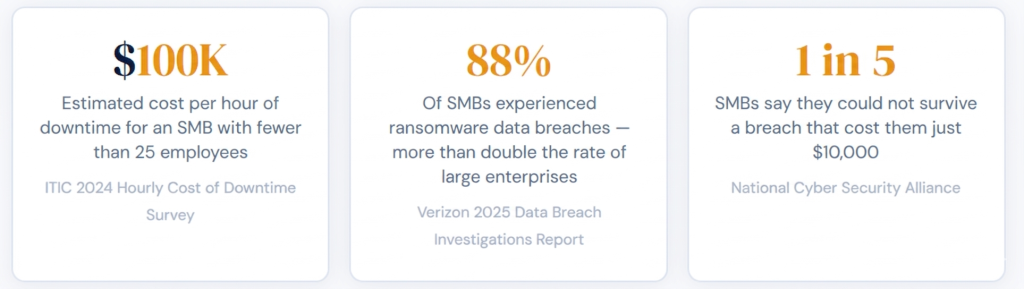
Sources: ITIC 2024 Hourly Cost of Downtime Report; Verizon DBIR 2025 SMB Snapshot
These numbers reframe the conversation. The real question is not whether MSP pricing is reasonable, but whether the cost of a single major incident could be higher than an entire year of MSP fees. For most small and medium businesses, the answer is yes.
Cost Comparison of MSP vs Traditional IT Support
Fixed monthly fee versus pay as you go
The most obvious difference between these two models is how you are billed. Break fix IT is charged per incident or per hour. While it may seem cheaper at first, costs can spike unpredictably, often at the worst possible time, like during a critical system failure.
Managed service providers, on the other hand, charge a predictable monthly fee, usually between $100 and $250 per user for SMBs, depending on the range of services. This fee typically covers monitoring, maintenance, security, helpdesk support, and updates, so you avoid unexpected invoices.
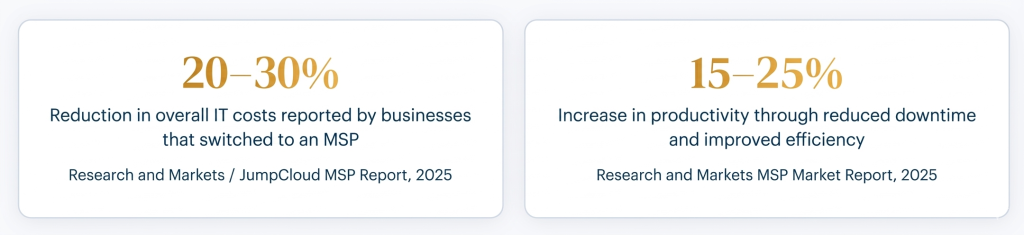
Source: JumpCloud Key MSP Statistics and Trends, 2025
CapEx versus OpEx: the long term financial picture
Traditional IT setups usually involve significant capital expenditures (CapEx), such as buying servers, networking gear, security tools, and software licenses upfront. These one time purchases depreciate over time and eventually need replacement, often at the worst possible moment.
Managed service providers shift IT costs into a monthly operational expense (OpEx). For SMBs, this offers several practical benefits: costs are predictable, service fees are often tax deductible in the year they are paid, there is no large upfront investment in hardware, and scaling your IT up or down is as simple as adjusting your service plan.
Expertise, availability, and response time
In-house generalist versus a team of specialists
One key difference that is often overlooked is depth of expertise. An in-house IT generalist, or even a small internal team, can handle day-to-day maintenance but has its limits. Areas like cybersecurity, cloud architecture, compliance, and advanced networking are each specialized disciplines on their own.
A managed service provider brings a full team of specialists: cybersecurity analysts, cloud engineers, compliance experts, network architects, and helpdesk staff all included in your service plan. Need a senior network engineer for a three-month infrastructure project? You don’t have to hire someone permanently; you can leverage the MSP’s bench of experts.
24/7 monitoring versus business-hours support
Traditional IT support usually operates during standard business hours, typically Monday to Friday, 9am to 5pm. If a server crashes at 11pm on Saturday, help won’t arrive until Monday morning, and every minute of downtime adds up.
MSPs provide continuous monitoring with automated alerts and on-call engineers. An issue detected at 2am can often be resolved before your team even starts work, keeping operations running smoothly.
This is especially important for businesses running e-commerce sites, SaaS products, or serving customers across multiple time zones, where downtime outside of business hours can be just as costly as a daytime outage.
Proactive versus reactive maintenance
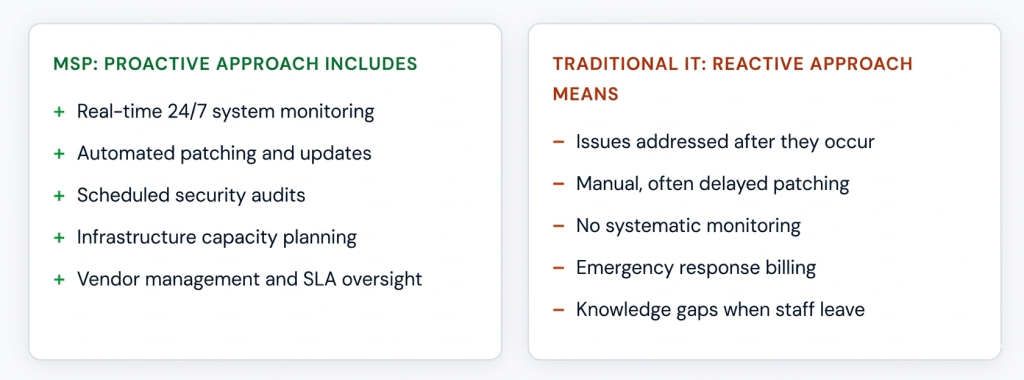
This represents the fundamental philosophical difference between the two models. Traditional IT is reactive: something breaks, someone fixes it. MSPs are proactive: systems are continuously monitored, patches are applied on schedule, and potential failure points are addressed before they become problems.
Research shows that in-house IT teams relying on a reactive approach can spend up to 20 hours per week on troubleshooting alone, hours that could be spent on strategic initiatives instead.
Cybersecurity and Compliance in MSP vs Traditional IT Support
Why SMBs are more often targeted?
Many people assume cybercriminals mainly go after large enterprises, but the opposite is true. SMBs are attacked more frequently because their defenses are often weaker. According to Verizon’s 2025 Data Breach Investigations Report, SMBs experience ransomware breaches at more than twice the rate of large enterprises 88% compared to 39%.
Traditional break fix IT typically offers basic antivirus and firewall protection. Managed service providers take a layered approach to security, including advanced endpoint protection, intrusion detection and prevention systems, continuous threat monitoring, email security, and regular vulnerability assessments.
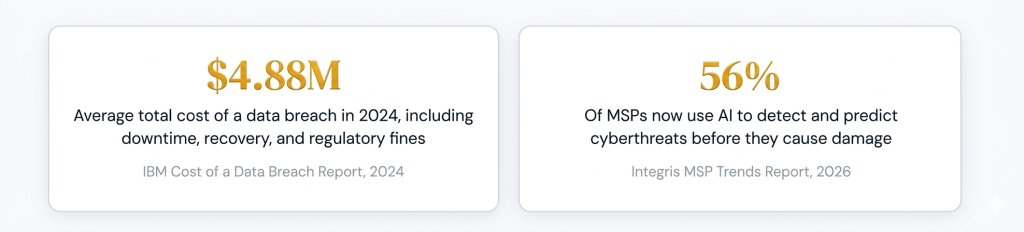
Source: Integris: MSP Trends to Watch in 2026
Compliance: PDPA, PCI DSS, ISO 27001, and more
Compliance is becoming both essential and increasingly complex. In Singapore, businesses must follow the Personal Data Protection Act (PDPA). Companies that handle card payments need to meet PCI DSS standards, while healthcare organisations face additional obligations under MAS TRM guidelines.
Keeping up with these evolving regulations is a specialist task. MSPs serving regulated industries maintain dedicated compliance expertise and help businesses with documentation, audit readiness, and the technical controls required by each framework. In-house teams without compliance experience often handle this manually and partially, creating significant risk.
Disaster recovery: hours versus days
A properly configured MSP provides automated, cloud-based backups that are regularly tested against your recovery time objectives (RTO). In the event of a ransomware attack or hardware failure, having a tested backup can mean recovery in hours instead of losing weeks of data.
For SMBs without an in-house disaster recovery plan, a single serious incident can be devastating. Studies show that one in five SMBs could not survive a breach costing as little as $10,000.
Scalability and Growth Support in MSP vs Traditional IT Support
Business growth puts pressure on IT. More employees mean more devices, accounts, licenses, potential security risks, and overall complexity. How smoothly your IT scales can determine whether growth feels manageable or chaotic.
Hiring additional in house IT staff can take months. Finding senior talent in Singapore and across Southeast Asia is highly competitive, with ongoing IT staffing shortages in the region. Even after hiring, onboarding and knowledge transfer take time.
With a managed service provider, scaling becomes simple. Need extra cloud storage for a seasonal peak? It can be done in days. Opening a second office? Your MSP can set up remote monitoring, configure networks, and onboard users across locations, all without increasing permanent headcount.
MSPs are also ideal for hybrid and remote work setups. They provide standardized IT practices and remote monitoring to ensure consistency and security, no matter where your team is working, which is increasingly important for modern businesses across Southeast Asia.
MSP vs traditional IT support: side-by-side comparison
| Category | Traditional IT Support | Managed Service Provider (MSP) |
|---|---|---|
| Support model | Reactive: fix issues after they happen | Proactive: prevent issues with continuous monitoring |
| Availability | Business hours only (9am–6pm, Mon–Fri) | 24/7/365 monitoring and support |
| Cost structure | Pay per incident or hour; unpredictable | Fixed monthly fee; predictable |
| Expertise access | Limited to one or two generalists | Full team: cybersecurity, cloud, compliance, networking |
| Cybersecurity | Basic antivirus/firewall; mostly reactive | Layered security; continuous monitoring and threat detection |
| Compliance support | Manual and partial | Up-to-date with PDPA, PCI DSS, ISO 27001, MAS TRM |
| Scalability | Requires new hires and training | Adjust service plan as you grow; no hiring delay |
| Disaster recovery | Manual or partial backups; often untested | Automated cloud backups with tested recovery plans |
| Response time | Delayed after hours; depends on staff availability | Immediate from dedicated on-call team |
| Cost impact | Higher long-term costs due to downtime and repairs | Average 20–30% IT cost reduction (Research and Markets, 2025) |
| Remote/hybrid work | Ad hoc; inconsistent | Built for distributed teams and multiple locations |
When Traditional IT Support May Still Be Suitable
While MSPs are the best fit for most growing SMBs, there are scenarios where traditional IT support or a hybrid approach can be sufficient:
- Your business has fewer than five employees and minimal reliance on digital systems, with no e-commerce, no cloud operations, and no sensitive customer data.
- Your IT setup is simple and static, with one or two computers, no servers, and no complex network.
- You have a capable senior in-house IT team and only need specialist support for specific projects.
- You are a pre-revenue startup where preserving cash is more important than IT risk for now.
- You need help with a single, well-defined project, such as a one-time migration, where a contract consultant is more cost-effective than a full MSP.
Choosing the Right Model for Your Business: MSP vs Traditional IT Support
Use this framework to guide your decision. If you check three or more boxes in either column, it is a strong signal toward that model.
| Consider an MSP if you | Traditional support may suffice if you |
|---|---|
| Have ten or more employees relying on digital systems daily | Have fewer than five to ten employees |
| Handle customer payment data or personal information | Have minimal digital infrastructure |
| Have compliance obligations such as PDPA, PCI DSS, ISO 27001 | Have no sensitive customer or payment data |
| Are planning to scale headcount or open new locations | Have a strong in-house IT team already |
| Have experienced recurring IT issues or downtime | Need help with a single defined project |
| Have no dedicated IT staff or only one generalist | Are in a pre-revenue stage with tight cash constraints |
| Have a remote or hybrid team across time zones | |
| Cannot afford downtime during peak business hours |
- Ask your current IT provider: do they proactively monitor your systems, or only respond when you call?
- Calculate your downtime exposure: if systems were down for 4 hours, what would it cost in lost revenue and idle staff?
- Review your compliance obligations: do you know which regulations apply to your business and whether you’re meeting them?
- Assess your growth trajectory: will your IT needs be materially different in 12 months?
Frequently Asked Questions About MSP vs Traditional IT Support
Q1. What is the difference between an MSP and traditional IT support?
An MSP provides proactive 24/7 IT management under a fixed monthly fee. Traditional IT support reacts to issues after they occur and charges per incident.
Q2: How much does an MSP cost per month?
Typically $100 to $250 per user per month for SMBs. Some charge per device, around $30 to $75. Prices vary by region and infrastructure.
Q3: Is an MSP worth it for a small business?
Yes, for SMBs with ten or more employees using digital systems. MSPs can reduce IT costs by 20 to 30 percent and increase productivity. Avoiding one or two major incidents often covers the cost.
Q4: What are the signs my business needs an MSP?
Recurring IT issues, no dedicated IT staff, cybersecurity concerns, plans to grow, compliance requirements, and unpredictable IT bills.
Q5: When does traditional IT support make more sense?
For businesses with fewer than five to ten employees, minimal digital dependency, no sensitive data, or a strong in-house IT team. One-off projects may also not require an MSP.
Q6: Can I switch from traditional IT to an MSP without disruption?
Yes. MSPs conduct an IT audit, document systems, and onboard everything in a structured migration, usually within two to six weeks, with no downtime.
Conclusion
When comparing MSP vs Traditional IT Support, the difference comes down to proactive versus reactive management. For most growing SMBs, an MSP provides predictable costs, 24/7 monitoring, stronger cybersecurity, and easier compliance, making IT more scalable and reliable. Traditional IT support may still work for very small teams or single projects, but as your business grows, the advantages of an MSP are clear.
Onext Digital is a technology services company helping SMBs across Southeast Asia modernise their IT infrastructure. Our managed IT team brings together specialists in cybersecurity, cloud infrastructure, and compliance advisory. Learn about our Managed IT Services.