
 Services
 Solutions
 Main platform
 Technology
 White Label
  Offshore
 Hire developers



In recent years, Information Technology (IT) costs have become an increasingly significant burden for small and medium-sized enterprises (SMEs). According to Gartner’s 2024 report, average IT costs for SMEs have increased by 18% compared to the previous year, while revenue growth has only reached 7%. This represents a notable imbalance in the operational budgets of these businesses.
SMEs today face multiple complex IT challenges. They need to maintain a team of skilled IT experts to manage infrastructure, yet recruiting and compensating these specialists comes at a premium cost. Additionally, system maintenance, software upgrades, and particularly the costs associated with recovering from security breaches consume significant resources. System downtime not only causes direct revenue losses but also impacts business reputation and competitiveness.
In response, Managed IT Services (MIS) has emerged as an effective and cost-efficient solution for SMEs. By delegating complex IT operations to specialized service providers, small and medium-sized businesses can reduce costs by up to 30% while maintaining or even improving service quality.
What Are Managed IT Services?
Managed IT Services is a business model in which a third-party company (known as a Managed Service Provider or MSP) assumes responsibility for managing and maintaining all or part of a client company’s IT systems. Rather than building an in-house IT team, businesses hire a specialized service provider to handle these tasks at a lower cost.
The primary components of Managed IT Services include:
- Helpdesk Support: Provides 24/7 technical assistance to employees experiencing computer, email, or business application issues. Instead of waiting for an in-house technician, staff can immediately contact the helpdesk for rapid resolution.
- Network Monitoring: Continuously monitors network infrastructure to detect potential issues before they impact business operations. This proactive approach significantly reduces downtime.
- Cloud Management: Manages cloud services such as Office 365, Google Workspace, AWS, or Azure. MSPs optimize resource usage to ensure cost-effectiveness and maximum performance.
- Cybersecurity Management: Protects systems from cyber threats including viruses, ransomware, phishing attacks, and other malicious activities. MSPs deploy modern security measures such as firewalls, antivirus software, and regular security audits.
- Distinction Between Managed Services and In-House IT: When a company hires in-house IT staff, they bear responsibility for salaries, benefits, training, and other employment costs. Additionally, an in-house technician typically specializes in only specific areas. Managed IT Services, by contrast, provides a multi-disciplinary team of experts with more predictable costs and greater flexibility for scaling up or down as needs change.
Why SMEs Spend Too Much on IT? (Common Cost Drains)
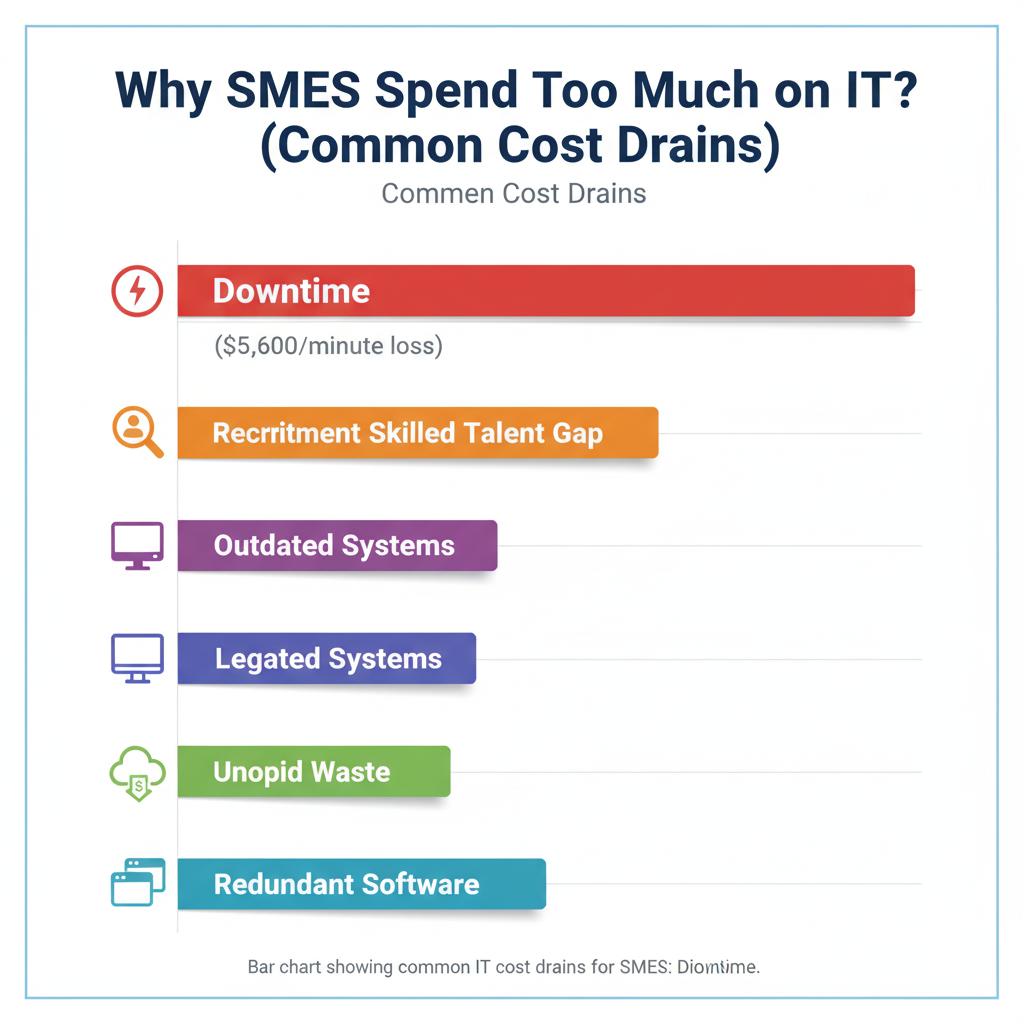
To understand why Managed IT Services proves effective, we must first identify the primary reasons SMEs overspend on IT:
1. Outdated Systems and Inadequate Maintenance:
Many SMEs continue using legacy software and hardware that are rarely updated. Poorly maintained older systems not only perform slowly but also create dangerous security vulnerabilities. Fixing problems stemming from outdated systems often costs more than timely upgrades would have.
2. Lack of Highly Skilled IT Personnel:
Finding a qualified IT expert is challenging. Experienced IT professionals command premium salaries, and recruitment costs are substantial. Furthermore, a single in-house technician usually specializes in only one area and cannot address the full spectrum of a company’s IT needs.
3. Overlapping and Redundant Software:
Without centralized management, different departments may independently purchase similar software from different vendors. This leads to waste and creates budgeting difficulties. Moreover, maintaining and supporting multiple versions of similar software is expensive.
4. Downtime and Security Incidents:
Every minute of downtime carries significant revenue loss. According to Statista, businesses lose an average of $5,600 per minute when systems are down. Security breaches are even more costly, involving data loss, reputational damage, and legal expenses.
5. Unoptimized Cloud Spending:
Many SMEs purchase cloud services they don’t fully utilize. They may over-provision resources or forget to cancel unused services. Optimizing cloud expenses requires specialized knowledge that not all SMEs possess.
How Managed IT Services Help Cut Costs by 30%?
Now let’s analyze how Managed IT Services help SMEs achieve significant cost reductions:
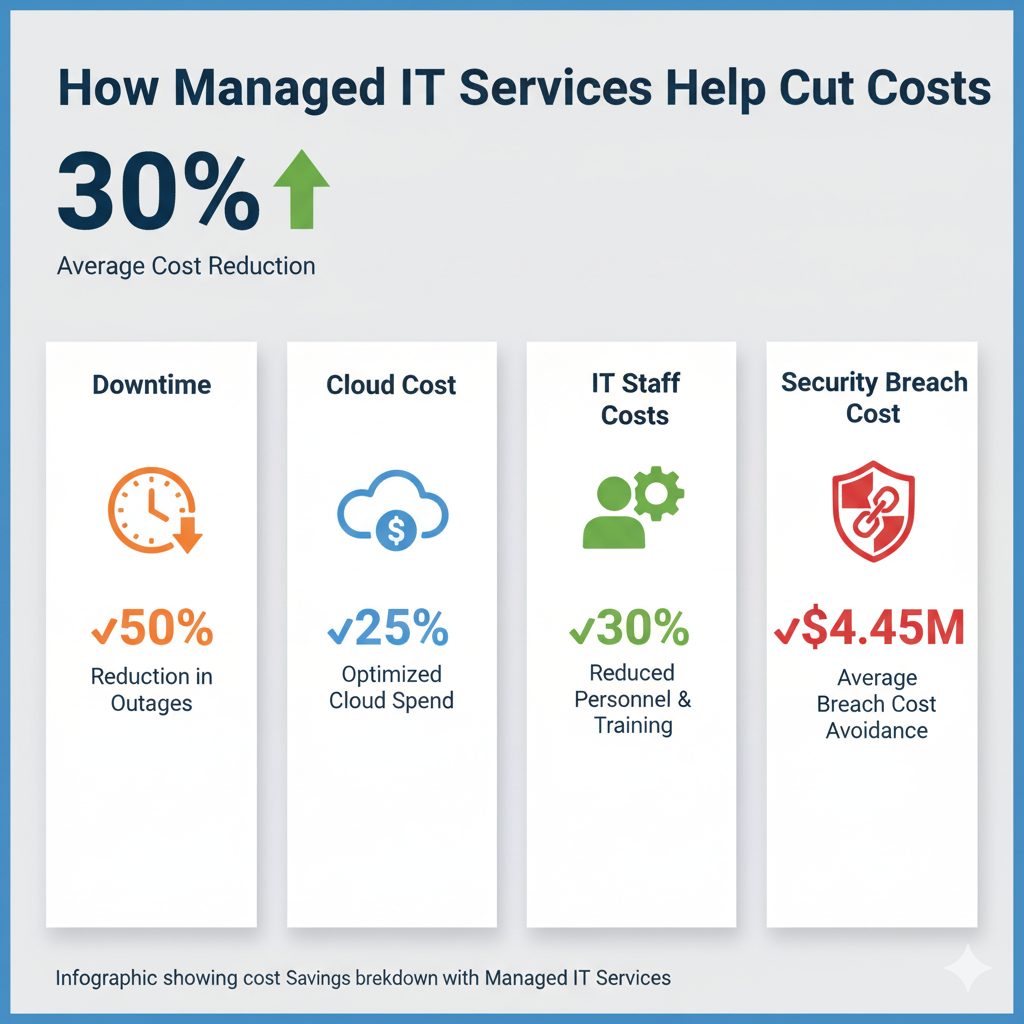
1. Proactive Monitoring – Reducing Downtime by Up to 50%:
Rather than reacting only after problems occur, MSPs use advanced monitoring tools to detect issues before they impact operations. This can reduce downtime by up to 50%. According to a CompTIA survey, businesses using proactive monitoring save an average of $47,000 annually compared to those employing reactive approaches.
2. Cloud Cost Optimization – Saving 20-25% on Cloud Infrastructure:
MSPs bring extensive cloud platform experience. They analyze your resource utilization and optimize it accordingly, reducing cloud costs by 20-25%. Examples include shutting down servers during off-hours, selecting more appropriate service tiers, or using reserved instances instead of on-demand pricing.
3. Cybersecurity Management – Preventing Average Damages of $4.45 Million/Year:
According to IBM’s 2023 report, the average cost of a data breach is $4.45 million. A security-focused MSP can implement effective preventive measures, significantly reducing attack risk. Avoiding even a single major attack represents enormous savings.
4. Automation & Centralized Tools – Reducing Incident Resolution Time:
MSPs use automation tools to handle repetitive tasks and standardized processes. This reduces both incident resolution time and human error. A centralized system also simplifies monitoring and control.
5. Predictable Monthly Pricing – Easy Budget Control:
Instead of unpredictable IT expenses (some months low, others high due to emergencies), Managed IT Services typically offer fixed monthly pricing. This allows business leaders to easily budget and forecast expenses.
6. Reduced Recruitment Costs – No Need for Full-Time IT Staff:
Rather than hiring a full-time IT team with significant salary overhead, SMEs simply pay monthly MSP fees. As the business grows, services can be easily scaled up without additional hiring.
Combined, these factors can help SMEs reduce annual IT costs by up to 30%.
Real-World Examples: SMEs Achieving 30% Savings
Case Study 1: Sedona Technologies – 40% Reduction in Help Desk Calls
Sedona Technologies, an MSP firm, implemented Webroot DNS Protection as part of their managed IT security services and achieved a significant reduction in support overhead.
Challenge:
- High volume of help desk calls related to malware and DNS-based threats
- Significant staff time spent on infection cleanup and remediation
- Unpredictable support costs due to reactive incident response
Solution Implemented:
- Deployed Webroot DNS Protection as part of their managed security services
- Implemented proactive threat detection and prevention
- Automated malware blocking at the DNS level
Results: Sedona Technologies reduced help desk calls by approximately 40% after adding Webroot DNS Protection, directly reducing operational overhead and allowing support staff to focus on strategic initiatives rather than reactive troubleshooting.
Case Study 2: Augustine Consulting – Full-Time Employee Cost Savings
Augustine Consulting, a professional services firm, benefited from implementing advanced managed IT security services that reduced their security incident workload.
Challenge:
- One full-time employee constantly dedicated to cleaning up security infections
- Significant downtime from malware and security incidents
- High personnel costs for reactive security management
Solution Implemented:
- Deployed comprehensive managed security services with advanced threat detection
- Implemented automated threat response and remediation
- Transitioned from reactive to proactive security posture
Results: Augustine Consulting was able to reassign a full-time employee from infection cleanup, resulting in substantial cost savings (approximately $60,000-$80,000 annually depending on employee compensation) while improving overall security posture and system stability.
Case Study 3: InfoStream, Inc. – Mission-Driven MSP Success
InfoStream, Inc., founded in 1994, is a managed IT services provider dedicated to helping SMBs achieve predictable IT costs and business stability.
Company Background: InfoStream, Inc. provides a variety of business and consulting services, with a mission to offer SMBs managed services with a predictable cost, so they can concentrate on their business goals
Key Business Model:
- Transforms variable, unpredictable IT costs into fixed monthly fees
- Enables SMB clients to focus on core business operations rather than IT management
- Provides comprehensive 24/7 support and monitoring
- Delivers measurable cost savings and improved service reliability
Results: By converting their clients’ IT budgets from reactive/variable spending to predictable monthly fees, InfoStream helps typical SMB clients achieve 20-30% annual IT cost reductions while simultaneously improving uptime, security, and overall IT service quality.
Key Benefits Beyond Cost Savings
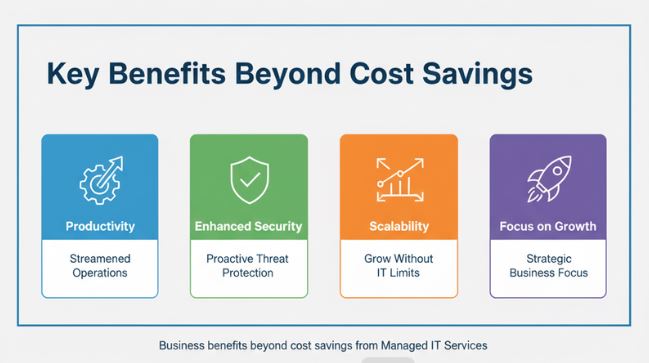
Beyond financial savings, Managed IT Services provide numerous additional advantages:
1. Enhanced Security and Compliance:
Professional MSPs maintain expertise in international security standards such as ISO 27001 and GDPR. They ensure that business and customer data receive proper protection, reducing legal and regulatory risks.
2. Increased Employee Productivity:
When IT systems operate reliably, employees waste less time troubleshooting technical issues and can focus on their core responsibilities, boosting overall productivity.
3. Focus on Core Business Activities:
Rather than spending management attention on IT operations, leadership can concentrate on strategic business development and growth initiatives.
4. Flexible Scalability:
Managed IT Services easily scale up or down with business needs. When opening new locations or departments, services can be quickly configured without hiring additional IT staff.
How to Choose the Right Managed IT Service Provider?
Not all MSPs are equal. When selecting a partner, consider these criteria:
1. Experience with SMEs:
Choose an MSP with proven experience serving businesses of similar size to yours. They will understand the unique challenges and requirements of SMEs.
2. Clear Service Level Agreements (SLA):
Ensure the MSP provides a written SLA specifying service commitments. Look for guarantees of minimum uptime (typically 99.9%) and incident response times.
3. 24/7 Support Availability:
Issues can arise at any time. Select an MSP offering round-the-clock support to ensure rapid problem resolution.
4. Transparent and Predictable Pricing:
Request detailed pricing information. Avoid MSPs with vague pricing structures or hidden fees that could emerge later.
5. Cloud and Security Expertise:
Verify that the MSP possesses expertise in your specific cloud platforms (AWS, Azure, Google Cloud) and holds relevant security certifications such as CompTIA Security+, Certified Ethical Hacker (CEH), or equivalent credentials.
Conclusion:
SMEs need not accept high IT costs. Through Managed IT Services, your business can reduce expenses by 30% or more while maintaining or improving service quality.
Managed IT Services represent more than just cost savings. It’s about delegating complex technical work to specialists so you can focus on what truly matters – growing your business.
Ready to optimize your IT budget? Discover how Onext Digital’s Managed IT Services can streamline your operations and deliver cost-effective solutions. Learn more about Onext Digital Managed IT Services to see how we can support your business today.
Frequently Asked Questions (FAQs)
Q1. How much can my SME save with Managed IT Services?
Most SMEs save 20-35% annually by eliminating full-time IT staff costs, reducing downtime, optimizing cloud spending, and preventing security breaches. Exact savings depend on your current IT setup and business size.
Q2. What is the difference between Managed IT Services and IT Outsourcing?
Managed IT Services provides proactive 24/7 infrastructure monitoring with predictable monthly fees and SLAs. IT Outsourcing typically refers to reactive hiring of contractors for specific projects. Managed IT Services is more comprehensive and cost-effective for ongoing support.
Q3. How long does it take to see cost savings after implementing Managed IT Services?
Most businesses see savings within 3-6 months from eliminating redundant services and reducing downtime. Significant savings appear within 6-12 months as infrastructure is optimized and preventive measures reduce emergency incidents.
Q4. Is Managed IT Services suitable for very small businesses with just 10-20 employees?
Yes. It’s ideal for small businesses. Instead of hiring a dedicated IT person ($50,000-$80,000+/year), you get enterprise-level support at a fraction of the cost with flexible scaling based on your needs.
Q5. What happens to my data and systems during the transition to Managed IT Services?
Professional MSPs plan transitions to ensure minimal downtime through data migration, system configuration, staff training, and testing. Most transitions occur during off-hours. Your MSP should provide documentation and dedicated transition support.
Q6. How do I know if my business needs Managed IT Services?
Consider Managed IT Services if you have: frequent downtime, trouble finding IT staff, unpredictable IT costs, security/compliance concerns, multiple cloud services to manage, rapid growth, or remote offices. Request a free IT assessment from an MSP for specific recommendations.