
 Services
 Solutions
 Main platform
 Technology
 White Label
  Offshore
 Hire developers



By 2026, IT budgeting is no longer straightforward. Between rising software prices and the need for AI integration, most companies are seeing their monthly IT bills climb due to costs they didn’t see coming.
Many businesses now face the same challenge: identical requirements, yet quotes that differ by 2–3 times. This leaves decision-makers asking a critical question: “What is a reasonable price and are we paying for things we don’t actually need?”
Quick snapshot: Managed IT services costs in 2026
- Typical price range: $100–$250 per user per month
- Key cost drivers: AI operational integration, multi-layer security, and multi-cloud management
- Optimization potential: Up to 30% cost savings through FinOps practices and regular SaaS audits
Here is a look at what we will cover:
- The 4 most common pricing models for Managed IT Services
- 5 hidden cost drivers that often cause budget overruns
- A practical roadmap to reduce IT spending without slowing down your operations
Managed IT Services Cost in 2026: A Quick Overview
In 2026, the average cost of Managed IT Services typically ranges from $100 to $250 per user per month.
This figure is not a vague industry estimate. It reflects how IT has evolved from basic technical support into a detailed operational system basic technical support to a detailed operational system that includes cloud infrastructure, cybersecurity, backups, monitoring, and an increasing number of AI-related layers.
Common pricing models in 2026:
| Pricing Model | Typical Cost Range | Best Fit For |
| Per user | $100–$250 / user / month | Office-based and hybrid organizations |
| Per device | $60–$180 / device / month | Factories, showrooms, fixed-device environments |
| Flat fee | $2,000–$10,000+ / month | Stable organizations with low staff fluctuation |
| Outcome-based | Based on SLA & uptime | Performance-driven, mission-critical operations |
Note: Lower service prices do not necessarily mean lower total costs. In many cases, a reasonably priced package that adequately covers risk delivers better long-term financial outcomes.
Why is $100–$250 the current market standard?
Three main reasons for this price range:
- AI is now embedded in IT operations
Tools such as AI copilots, workflow automation, and internal chatbots must be governed, access-controlled, and secured. This represents an entirely new operational workload that traditional IT packages were never designed to handle.
- Cloud environments are significantly more complex
Most organizations no longer rely on a single platform. Running Microsoft 365 alongside Azure, AWS, or Google Workspace requires advanced management and cost optimization capabilities far beyond legacy models.
- Security and compliance are no longer optional
New information security requirements force Managed Service Providers (MSPs) to invest heavily in monitoring, incident response, and reporting. These costs are now directly reflected in service pricing.
In the next section, we’ll break down the four most common Managed IT pricing models in 2026, helping you choose a model that aligns with how your business actually operates not just the lowest-looking quote.
The 4 Most Common Managed IT Services Pricing Models in 2026
Once you understand the cost baseline, the more important question becomes not “how much”, but “how is that price calculated?”
In 2026, most Managed IT providers structure their pricing around one of the following four models.
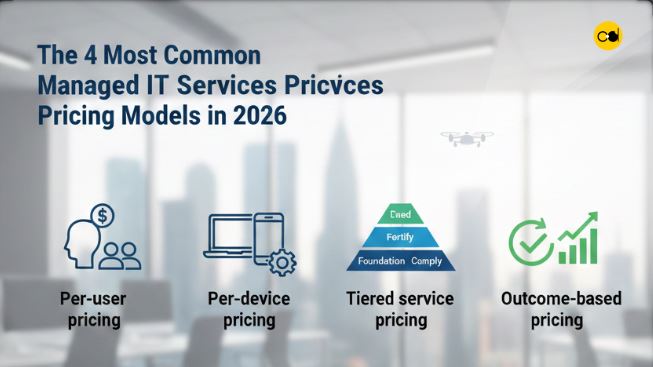
1. Per-user pricing
The most common model for office-based and hybrid work environments.
How it works: A fixed monthly fee is charged for each employee using IT services.
Pros:
- Easy to forecast and budget
- Scales well with workforce changes
- Strong coverage for user-centric services (email, endpoints, remote support)
Cons:
- Can be costly for organizations with many low-utilization users
- Does not fully reflect backend infrastructure complexity
Best for: Professional services firms, SaaS companies, office-based and hybrid or remote-first teams.
2. Per-device pricing
Common in environments with stable, shared infrastructure.
How it works: Fees are based on the number of devices workstations, POS systems, production machines, or network equipment.
Pros:
- Easy to manage when device counts are stable
- Independent of workforce fluctuations
- Well-suited to manufacturing and retail
Cons:
- Underrepresents user support complexity
- Additional costs arise when new devices or IoT systems are added
Best for: Factories, showrooms, retail chains, and shift-based operations with shared equipment.
3. Tiered service pricing
The fastest-growing model from 2025–2026.
How it works: Services are structured into progressive tiers. As you move up, the level of protection and support expands:
- Foundation: Focuses on core operations, covering essentials like helpdesk support, 24/7 monitoring, and daily backups.
- Fortify: Adds an extra layer of protection with enhanced security tools, including EDR (Endpoint Detection and Response), MFA, and proactive incident monitoring.
- Comply: The highest level, designed for full compliance. It includes everything in the lower tiers plus dedicated audits, regulatory reporting, and security policy management.
Pros:
- Clear service scope and transparency
- Easy to upgrade as the business grows
- Matches rising security and compliance demands
Cons:
- Risk of overbuying higher tiers than necessary
- Requires a clear understanding of what each tier includes
Best for: Growing businesses, compliance-driven industries, fintech, healthcare, logistics.
4. Outcome-based pricing
An emerging but still niche model in 2026.
How it works: Pricing is tied to operational outcomes such as:
- System uptime
- Incident resolution time
- SLA performance
Pros:
- Aligns costs with real performance
- Clear accountability for the MSP
- Ideal for essential operations
Cons:
- Typically more expensive
- Requires very clear KPIs and SLAs
- Not all MSPs are capable of delivering this model
Best for: 24/7 operations, large e-commerce platforms, transaction systems, critical infrastructure.
5 Hidden Costs Most Businesses Overlook
Most Managed IT quotes look reasonable at first glance. The real problem appears months later, when costs creep up without a clear explanation. The cause is rarely the base price it’s what wasn’t fully disclosed upfront.
Here are the five most common hidden cost drivers in 2026:
1. AI integration & Copilot: costs go beyond licenses
AI is being embedded into email, documents, CRM systems, and internal support but many organizations only account for license fees.
Additional costs often include:
- AI access control and permissions
- Input/output data governance
- Data leakage risk monitoring
- User training and usage policies
Without proper governance, AI can become an expensive, low-impact investment or worse, a serious security risk.
2. Rising security and compliance requirements
Security standards have evolved rapidly. In 2026, many organizations must upgrade:
- Access control policies
- Incident monitoring
- Response and reporting processes
These requirements often increase Managed IT costs by 20–30%, even if company size remains unchanged. If compliance scope isn’t clearly defined upfront, these costs almost always appear later.
3. Technical debt from legacy systems
Older systems may still “work,” but require far more effort to keep stable.
On-prem servers, legacy internal software, and fragmented integrations demand ongoing maintenance and troubleshooting. Costs accumulate gradually and often only become visible during expansion or modernization efforts.
4. Cloud complexity and “waste” spending
Multi-cloud is now the norm but true cost control is rare:
- Idle resources still being billed
- Virtual machines running 24/7 unnecessarily
- Services enabled for testing and never turned off
These costs don’t appear in Managed IT quotes, leading to unnecessary cloud overspending without FinOps oversight.
5. Provider location and Offshore/Nearshore sourcing
The same service scope can cost dramatically different amounts in the US, Europe, or Southeast Asia. However, lower prices don’t always equal better value.
Key considerations include:
- Time zone alignment and response speed
- Communication quality
- Experience with complex systems
Strategic global sourcing can deliver real savings but only with clear processes and consistent service standards.
How to Cut IT Costs by Up to 30% Without Sacrificing Performance?

Reducing IT costs doesn’t mean cutting costs blindly. Actually, the most efficient companies often spend less because they know exactly where their money goes.
Below are proven strategies from 2025–2026 that deliver significant savings without increasing risk.
1. SaaS license audits and cleanup
Most organizations buy more software than they actually use.
Common waste includes:
- Microsoft 365 or Google Workspace accounts for departed staff
- Premium licenses used only for basic features
- Overlapping SaaS tools across departments
Conducting a license audit every 6–12 months alone can reduce IT costs by 10–15% with minimal operational impact.
2. Standardizing hybrid work
On-site support is the most expensive component of Managed IT. By standardizing devices, workflows, and remote access, most issues can be resolved without dispatching technicians.
Benefits include:
- Lower after-hours support costs
- Reduced downtime
- Easier scaling without proportional IT cost increases
3. Applying FinOps to control cloud spending
Cloud isn’t expensive because of technology it’s expensive because of poor governance.
FinOps enables organizations to:
- Track costs by department
- Eliminate unused or oversized resources
- Set budgets and spending alerts
Many companies reduce cloud bills by 20–30% within 2–3 months of FinOps adoption without changing system architecture.
4. Automating operations with AIOps
Many IT incidents are repetitive: storage full, services stopped, login failures, performance alerts. These can be automated.
AIOps enables:
- Early incident detection
- Automated remediation of basic issues
- Reduced reliance on manual support
The result is lower operating costs and faster response times.
5. Strategic long-term contract negotiation
Annual contracts often miss economies of scale. For stable environments, 24–36 month agreements typically include:
- 10–15% discounts
- Stronger SLA commitments
- Priority support during major incidents
The key is negotiating based on operational data not intuition.
Cost Comparison: In-house IT vs. Managed Service Provider (MSP)
As IT budgets rise, many organizations revisit a familiar question: should we maintain an internal IT team or outsource to an MSP?
By 2026, the issue is no longer “who is cheaper,” but who delivers greater stability and risk control.
1. The true cost of in-house IT in 2026
An experienced IT engineer’s cost extends beyond salary:
- Taxes, insurance, benefits
- Continuous training (cloud, security, AI)
- Dependency risk on key individuals
- Limited after-hours coverage
For mid-sized companies, the cost of 1–2 internal engineers often matches or exceeds a full 24/7 MSP package.
2. What MSPs provide beyond cost savings
Hiring an MSP isn’t just about “fixing computers.” Organizations gain:
- Multi-disciplinary expertise (cloud, security, networking)
- Standardized incident response processes
- Continuous monitoring and rapid response
- Flexible scaling of services
Most importantly, MSPs reduce human dependency risk the biggest weakness of internal IT models.
3. High-level comparison
| Criteria | In-house IT | MSP |
| Fixed costs | High | Predictable |
| Skill coverage | Limited | Broad |
| 24/7 support | Hard to ensure | Built-in |
| Scalability | Slow | Flexible |
| Personnel risk | High | Low |
4. Opportunity cost: the overlooked factor
When internal IT teams are overloaded or under-skilled, businesses pay through:
- Prolonged downtime
- Delayed projects
- Unaddressed security risks
These costs don’t appear on payroll but directly impact revenue and reputation.
FAQs
Q1: Why are Managed IT Services more expensive in 2026?
A: Costs are rising due to AI integration, stricter data security requirements, and the growing complexity of multi-cloud environments. Businesses are now paying for deep operational expertise not just basic technical support.
Q2: How can I save 30% on IT costs without risking operations?
A: Focus on three areas: (1) SaaS license audits, (2) FinOps-driven cloud optimization, and (3) automation of repetitive tasks through AIOps.
Q3: Should I choose per-user or per-device pricing?
A: Choose per-user pricing for office or hybrid environments. Choose per-device pricing for factories, showrooms, or fixed shared-device systems.
Q4: Is outsourcing to an MSP cheaper than in-house IT?
A: In terms of total cost of ownership (TCO), MSPs are typically 20–30% more cost-effective, while also providing 24/7 multi-disciplinary expertise that small internal teams struggle to match.
Conclusion
Managed IT Services costs in 2026 aren’t just about service fees, they’re driven by uncontrolled spending. In most cases, budget leaks come from poor cloud management or paying for software licenses you simply don’t use.
The good news is that by auditing your systems and cutting out the “waste,” you can likely reduce your monthly IT bill by up to 30% without affecting your day-to-day operations.
If your current quotes feel complicated or you’re not sure where your budget is actually going, let’s talk. At Onext Digital, we don’t just hand over a generic price list. We’ll help you audit your current environment, identify the waste, and set up a transparent cost structure from day one. You should know exactly what you’re paying for.
Connect with an Onext expert to audit your IT spending and get a clear optimization plan tailored to your business.