
 Services
 Solutions
 Main platform
 Technology
 White Label
  Offshore
 Hire developers



In today’s data-driven business environment, customer relationships are no longer managed through spreadsheets or disconnected tools. Companies that want full control over their processes, data, and growth are increasingly turning to custom CRM development instead of relying solely on off-the-shelf CRM platforms.
But what exactly is custom CRM development? When does it make sense to build your own CRM? How much does it cost, and what kind of return on investment can you expect?
This guide answers all of those questions and more. Whether you are a founder, product manager, or CTO, this article will walk you through everything you need to know about designing, building, and scaling a custom CRM system tailored specifically to your business.
What Is Custom CRM Development?
Custom CRM development is the process of designing and building a customer relationship management system from scratch to match a company’s unique workflows, business rules, and long-term strategy.
Unlike SaaS CRM solutions that offer predefined features and limited customization, a custom CRM is built around your exact requirements from data models and user roles to automation logic and integrations.

Definition of Custom CRM Software
Custom CRM software is a bespoke CRM solution developed specifically for one organization. It allows businesses to:
- Define custom workflows and approval logic
- Control how customer data is stored, processed, and accessed
- Integrate deeply with internal systems such as ERP, accounting, or marketing platforms
- Scale without being constrained by SaaS pricing tiers or feature limits
In short, a custom CRM adapts to your business not the other way around.
How Custom CRM Works (High-Level Overview)
At a high level, a custom CRM system includes:
- Centralized data layer (customers, leads, deals, activities)
- Business logic layer (rules, automation, workflows)
- User interface (web, mobile, or both)
- Integration layer (APIs connecting CRM with other tools)
Because everything is designed intentionally, data flows exactly as your teams need from lead capture and sales pipelines to post-sale support and analytics.
Custom CRM vs Off-the-Shelf CRM (Salesforce, HubSpot, Zoho)
One of the most common questions businesses ask is whether they should build a custom CRM or customize an existing SaaS CRM like Salesforce, HubSpot, or Zoho.
Feature Comparison
| Criteria | Custom CRM | SaaS CRM |
| Workflow flexibility | Unlimited | Limited |
| Data ownership | Full control | Platform-dependent |
| Integrations | Fully custom | API & plugin-based |
| Scalability | Designed for your growth | Pricing & feature caps |
| Long-term cost | Predictable | Increases with users |
Cost Comparison Over 3–5 Years
SaaS CRMs may look affordable initially, but costs often increase significantly as your team grows. Monthly subscriptions, add-ons, automation limits, and premium integrations add up over time.
A custom CRM typically requires a higher upfront investment, but over 3–5 years it can be more cost-effective, especially for mid-sized and enterprise businesses.
When SaaS CRM Is Enough and When It Fails
SaaS CRM works well when:
- Your workflows are standard
- You don’t need complex automation
- Your team size is small
However, SaaS CRMs often fail when:
- Processes become too specific or complex
- Integrations are critical to operations
- Data security and compliance are strict
- Costs grow faster than business value
When Should You Invest in Custom CRM Development?
Custom CRM development is not for every business but for the right organizations, it can be a competitive advantage.
Business Signals You Need a Custom CRM
You may need a custom CRM if:
- Your team relies heavily on manual workarounds
- SaaS CRM customization no longer meets your needs
- Customer data is scattered across multiple systems
- Reporting and analytics are difficult or unreliable
Custom CRM for SMBs vs Enterprises
- SMBs benefit from custom CRMs when automation and efficiency are critical to growth.
- Enterprises require custom CRMs for scalability, compliance, and system integration.
The key is alignment between CRM functionality and long-term business strategy.
Benefits of Custom CRM Development for Growing Businesses
As your business grows, the limitations of generic CRM platforms become increasingly clear. Custom CRM development solves these challenges by delivering a solution designed specifically to support your growth. Here’s why many companies choose to build a CRM tailored to their needs rather than buying off-the-shelf.
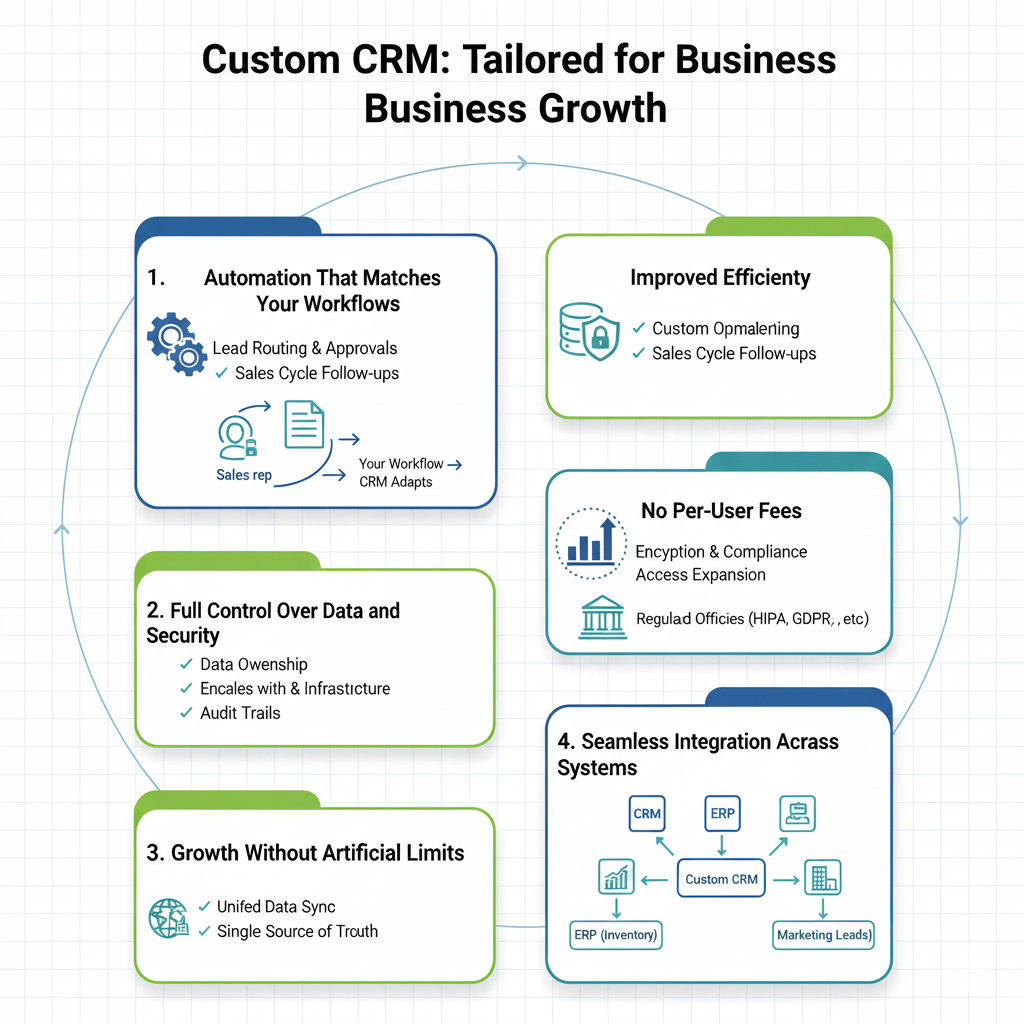
1. Automation That Matches Your Workflows
Most standard CRMs offer generic automation but your business is unique. A custom CRM automates the exact processes that drive your revenue and efficiency.
For example:
- Routing leads based on territory, product expertise, or team capacity
- Triggering deal approvals that follow your sales hierarchy and criteria
- Managing customer onboarding sequences according to your delivery process
- Scheduling follow-ups aligned with your actual sales cycle, not a generic template
The difference is significant. Instead of your team bending their workflows to fit the software, the CRM adapts to how your team works. The result: faster deal cycles, higher conversion rates, and more time spent building relationships rather than performing repetitive tasks.
2. Full Control Over Data and Security
With a SaaS CRM, your customer data lives on someone else’s platform. A custom CRM gives you complete ownership and control. You decide:
- Where the data is stored
- Which encryption and security measures protect it
- Who in your organization can access what
- How audit trails and compliance logs are maintained
For regulated industries, this level of control is critical. Healthcare organizations meet HIPAA requirements, financial institutions comply with data residency laws, and educational institutions adhere to FERPA regulations. A custom CRM enforces these rules automatically, eliminating compliance risks and cumbersome workarounds.
Even for companies outside regulated sectors, secure data management is a competitive advantage. Customer lists, pricing strategies, and deal pipelines remain confidential, giving you peace of mind and a strategic edge.
3. Growth Without Artificial Limits
SaaS CRM pricing often imposes artificial constraints. Adding users, expanding to new regions, or storing more historical data can trigger expensive upgrades.
A custom CRM grows with your business, not your vendor’s pricing model. Whether you’re onboarding new sales reps, opening offices in multiple countries, or integrating a recently acquired division, the system scales according to your infrastructure. Expansion becomes a technical decision not a financial bottleneck allowing you to grow aggressively without worrying about spiraling subscription costs.
4. Seamless Integration Across Systems
Your CRM doesn’t operate in isolation it intersects with every part of your business. ERP systems manage inventory, accounting tracks revenue, marketing automation nurtures leads, and payment gateways process transactions.
A custom CRM connects natively with all these systems. Data flows automatically, bidirectionally, without manual imports or reconciliation. For example:
- A converted lead automatically becomes a new account in your ERP
- Payment status updates in accounting reflect in the CRM
- Marketing engagement data flows back into customer profiles
This unified ecosystem gives your teams a single source of truth. Sales sees real-time inventory, finance monitors customer lifetime value, marketing tracks campaign effectiveness, and operations monitors customer health metrics. No spreadsheets, no duplicate data entry just smooth, continuous synchronization.
The result: faster decision-making, fewer errors, and teams working with clarity instead of confusion.
Custom CRM Development Architecture Explained
A strong architecture is the backbone of any scalable and secure CRM. It ensures that your system can grow with your business, handle large volumes of data, and remain reliable under pressure.
1. Monolithic vs Microservices Architecture
Choosing the right architecture depends on your business size and growth plans:
- Monolithic architecture is simpler and faster to develop. It works well for smaller teams and organizations with straightforward requirements.
- Microservices architecture breaks the system into independent, modular components. Each service can scale individually, making it ideal for large enterprises with complex workflows and high traffic demands.
The choice impacts flexibility, scalability, and long-term maintenance costs.
2. API-First & Headless CRM Approach
An API-first CRM is designed to communicate seamlessly with other systems. This approach brings several advantages:
- Easy integration with third-party tools, from ERP and accounting software to marketing automation platforms.
- Support for multiple frontends, such as web apps, mobile apps, or partner portals.
- Long-term flexibility, allowing your CRM to adapt to future business needs without major rewrites.
Essentially, an API-first, headless CRM ensures your system can evolve as your business grows.
3. Database Design & Data Modeling
The database is the heart of any CRM, storing all your customer interactions, transactions, and historical data. A well-designed CRM database must:
- Handle large volumes of customer data efficiently
- Maintain historical activity logs for reporting and compliance
- Support real-time analytics queries without slowing down the system
Proper indexing, normalization, and optimization are crucial to ensure fast performance and smooth user experience.
4. CRM Security & Compliance (GDPR, HIPAA, ISO)
Security and compliance are non-negotiable in modern CRM systems. Best practices include:
- Role-based access control, ensuring users only access the data they are authorized to see
- Data encryption both at rest and in transit
- Audit logs to track changes and support compliance audits
- Compliance-ready architecture, meeting standards such as GDPR, HIPAA, and ISO
A secure, compliant CRM protects sensitive customer information, reduces legal risk, and builds trust with clients.
Core Features Every Custom CRM Should Have
A well-designed custom CRM includes features that go beyond basic contact management, helping your teams work smarter, make informed decisions, and drive growth. Here are the key components every custom CRM should offer:
1. Contact & Lead Management
A custom CRM centralizes all your customer and lead information in one place. It provides detailed profiles, tracks interaction history, and allows segmentation based on various criteria such as industry, engagement level, or purchase behavior. This makes it easy for your team to understand each customer and tailor their approach effectively.
2. Sales Pipeline & Deal Tracking
Every business has its own sales process, and a custom CRM reflects that. You can define custom stages for your deals, assign probability scores, and forecast revenue accurately. This ensures your sales pipeline is always transparent, helping managers and teams make data-driven decisions.
3. Workflow Automation & Business Rules
Manual tasks slow down teams and increase the chance of errors. A custom CRM automates repetitive processes using trigger-based actions. From lead routing and deal approvals to follow-up reminders, the system enforces your business rules automatically, freeing your team to focus on high-value activities.
4. Reporting, Analytics & Dashboards
A custom CRM provides real-time insights aligned with your key performance indicators (KPIs). Dashboards visualize sales trends, pipeline health, customer engagement, and more. This enables managers to quickly identify opportunities or bottlenecks and take immediate action.
5. AI & Predictive Insights (Optional but Powerful)
Advanced CRMs can include AI-powered features such as lead scoring, churn prediction, and sales recommendations. These predictive insights help your team prioritize high-value leads, anticipate customer behavior, and improve overall performance.
Custom CRM Development Process: Step by Step
Building a custom CRM requires a structured approach to ensure it meets your business needs, scales effectively, and delivers real value. Here’s a step-by-step breakdown of the development process:
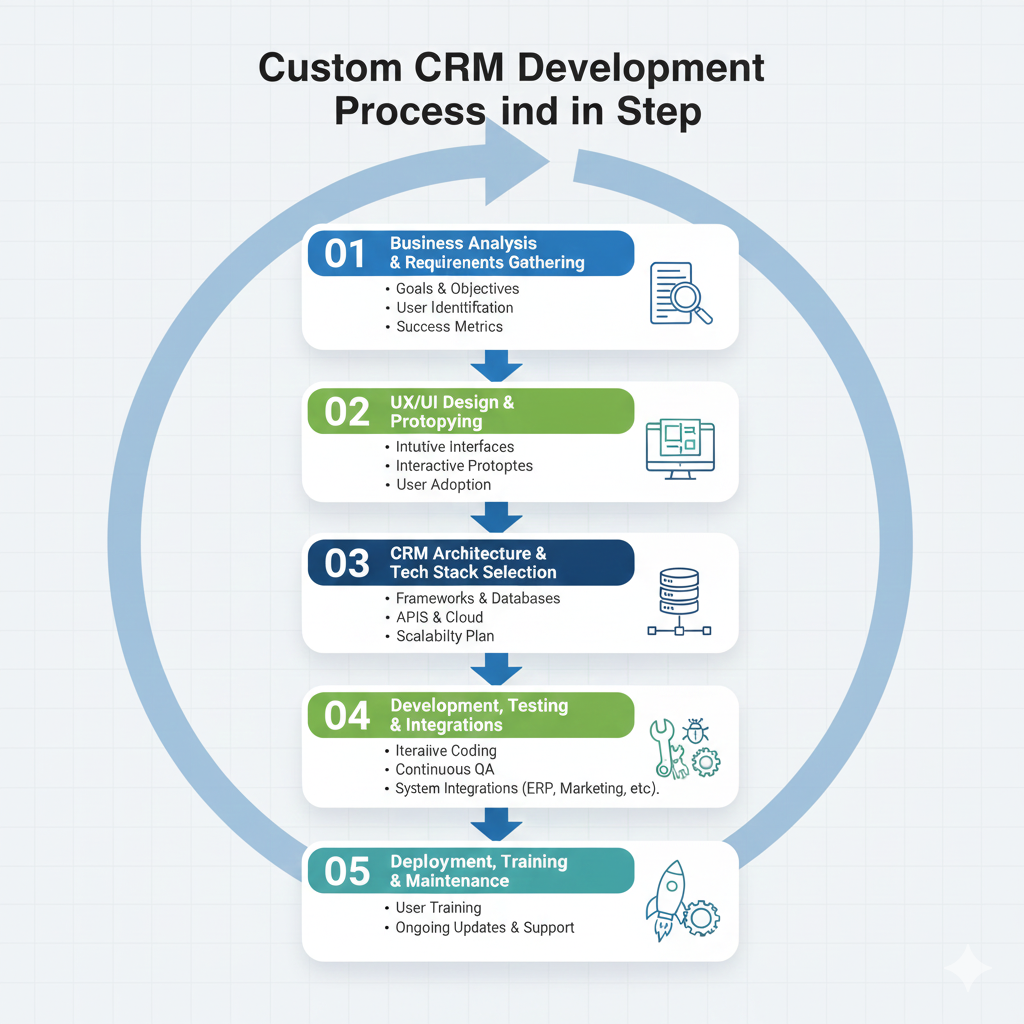
Step 1 – Business Analysis & Requirements Gathering
The first step is understanding your business inside out. Identify your goals, define who will use the system, and set measurable success metrics. This phase ensures that the CRM you build addresses real pain points and aligns with your long-term strategy.
Step 2 – UX/UI Design & Prototyping
A CRM is only effective if your team actually uses it. During this phase, designers create intuitive interfaces and interactive prototypes that reflect your workflows. The focus is on user adoption making it easy for sales, marketing, and operations teams to navigate and perform tasks efficiently.
Step 3 – CRM Architecture & Tech Stack Selection
Choosing the right architecture and technology stack is critical for performance, scalability, and maintainability. This includes selecting frameworks, databases, APIs, and cloud infrastructure that will support your CRM today and grow with your business in the future.
Step 4 – Development, Testing & Integrations
Development happens iteratively, with continuous testing at every stage. Integration with other systems ERP, accounting software, marketing platforms, and more is implemented to ensure seamless data flow and eliminate silos. This step ensures the system is both functional and reliable.
Step 5 – Deployment, Training & Maintenance
Once the CRM is ready, it is deployed to your organization. Training ensures that users understand how to leverage the system effectively. Ongoing maintenance and updates keep the CRM aligned with evolving business needs and technology improvements.
How Much Does Custom CRM Development Cost?
Investing in a custom CRM is a strategic decision. Understanding the cost structure and potential ROI helps businesses plan effectively and make informed choices.
1. Cost Breakdown by Development Phase
The total cost of a custom CRM depends on several factors. Here’s a typical breakdown:
- Discovery & Planning: Defining business goals, requirements, and success metrics.
- Design: UX/UI design and prototyping to ensure high user adoption.
- Development: Building the CRM, integrating with existing systems, and implementing automation.
- Maintenance & Support: Ongoing updates, bug fixes, and technical support to keep the system running smoothly.
Each phase contributes to creating a CRM that is not only functional but scalable, secure, and aligned with your workflows.
2. Estimated Cost by Business Size
Costs vary depending on the complexity and scale of your business:
- Small and Medium Businesses (SMB): $20,000 – $60,000
- Mid-sized Companies: $60,000 – $150,000
- Enterprises: $150,000+
Larger organizations often require advanced integrations, higher security standards, and more customization, which increases development costs.
3. Cost vs. ROI
Although a custom CRM requires an upfront investment, the return on investment can be significant. Most businesses see measurable ROI within 12–24 months through:
- Increased operational efficiency
- Reduced manual work and errors
- Improved customer retention and satisfaction
- Faster decision-making and revenue growth
A well-built custom CRM often pays for itself by enabling your team to work smarter, not harder.
Common Challenges in Custom CRM Development (and How to Overcome Them)
Developing a custom CRM is a powerful way to streamline business processes, but it comes with its own set of challenges. Being aware of these hurdles and knowing how to address them can save time, money, and frustration.
1. Scope Creep & Unclear Requirements
One of the most frequent issues in custom CRM projects is scope creep, where new features are continuously added or initial requirements are poorly defined. This often leads to delays, budget overruns, and a system that fails to meet business needs.
How to Overcome It:
- Conduct thorough business analysis to capture all essential requirements.
- Document priorities and must-have features clearly.
- Use phased or iterative development, delivering the CRM in manageable stages to maintain focus and control.
2. Low User Adoption
Even the most feature-rich CRM fails if your team does not adopt it. Complicated interfaces, lack of training, or resistance to change can prevent users from embracing the system.
How to Overcome It:
- Apply UX-first design principles to create intuitive, user-friendly interfaces.
- Offer comprehensive training and onboarding sessions for all users.
- Gather feedback regularly and iterate on the system to better match users’ needs and workflows.
3. Scalability & Performance Issues
A CRM that works well initially may struggle as your business grows. Poor architecture or unoptimized databases can lead to slow performance, errors, and system downtime.
How to Overcome It:
- Plan your architecture from the start, considering future growth and potential traffic spikes.
- Design a scalable database structure and optimize queries for efficiency.
- Continuously monitor system performance and update infrastructure proactively to support expansion.
Common Risks in Custom CRM Implementation (and How to Mitigate Them)
While building a custom CRM can provide significant advantages, it also comes with several implementation risks that businesses must be aware of. Understanding these risks upfront allows organizations to plan effectively and minimize disruptions.
1. Budget Overruns
Custom CRM projects often involve complex requirements that evolve over time. Without careful scope management, costs can exceed initial estimates. Unexpected integrations, additional features, or changes in requirements may quickly inflate budgets.
Mitigation: Conduct thorough requirements gathering, prioritize must-have features, and adopt phased development with clear cost checkpoints.
2. Integration Delays
Connecting a CRM with ERP, marketing automation, accounting, or other internal systems can be technically challenging. Data inconsistencies or legacy system limitations often cause delays.
Mitigation: Map out integrations early, use standardized APIs, and schedule buffer time for testing and troubleshooting.
3. Rapid Technological Changes
Frameworks, libraries, and cloud infrastructure evolve rapidly. A CRM built without flexibility may face compatibility issues or require costly rewrites in the future.
Mitigation: Choose a modular, API-first, and headless architecture to ensure long-term adaptability and ease of updates.
4. Vendor or Developer Dependency
Relying heavily on a single vendor or development team can create risks in maintenance, feature expansion, or system knowledge transfer.
Mitigation: Document all processes and architecture decisions, maintain internal technical knowledge, and consider multiple vendor options for critical support.
5. Data Security and Compliance Risks
Improperly designed systems may fail to meet GDPR, HIPAA, or ISO standards, leading to legal liabilities and reputational damage.
Mitigation: Implement role-based access control, encryption, audit logs, and regular compliance reviews to ensure your CRM meets regulatory requirements.
6. Low User Adoption
Even a technically perfect CRM can fail if teams do not use it effectively due to poor usability or lack of training.
Mitigation: Apply UX-first design principles, conduct training sessions, and gather feedback to iteratively improve the system.
How to Choose the Right Custom CRM Development Partner?
Selecting the right development partner is critical to the success of your custom CRM project. The right team not only delivers a functional system but also ensures scalability, security, and long-term value. Here’s what to look for:
1. Proven CRM and Integration Experience
Look for partners with a track record of successful CRM projects, especially ones that involve complex integrations with ERP, marketing automation, accounting, or other business systems. Experience in similar industries is a plus, as it ensures they understand your business workflows and challenges.
2. Strong System Architecture Knowledge
A reliable partner must have deep expertise in system architecture, database design, and scalability planning. The right architecture ensures your CRM performs well under load, can grow with your business, and integrates seamlessly with other tools.
3. Transparent Development Process
Transparency is key. Your partner should clearly communicate timelines, milestones, development methodology, and progress updates. Iterative development, regular demos, and open collaboration reduce misunderstandings and keep the project on track.
4. Post-Launch Support and Scalability Planning
A CRM is never truly finished at launch. Ensure your partner offers ongoing maintenance, updates, and support. They should also plan for future scalability, helping your system adapt as your business grows without costly overhauls or downtime.
Final Thoughts
Custom CRM development is more than just a software project it’s a strategic investment for businesses that prioritize flexibility, scalability, and full control over their data. While it demands careful planning, thoughtful design, and precise execution, the long-term benefits far outweigh the initial costs, enabling faster growth, higher efficiency, and better customer relationships.
If your current CRM is holding your business back, a custom-built solution tailored to your workflows and goals can unlock the next stage of success. Partnering with an experienced development team, like ONEXT DIGITAL, ensures your CRM is designed for seamless integration, robust performance, and future scalability helping your organization stay ahead in today’s competitive market.
Frequently Asked Questions About Custom CRM Development
1. How long does it take to build a custom CRM?
The typical timeline is 3 to 6 months, depending on the complexity of your workflows, integrations, and feature set. Larger, enterprise-level CRMs may take longer to design, develop, and deploy.
2. Is a custom CRM better than Salesforce or other off-the-shelf platforms?
It depends on your business needs. While Salesforce and similar CRMs are powerful, a custom CRM is tailored specifically to your workflows, automation needs, and growth strategy, offering flexibility and control that off-the-shelf solutions can’t always provide.
3. Can a custom CRM scale to millions of users?
Yes. With the right architecture, database design, and cloud infrastructure, a custom CRM can scale efficiently to support large user bases, high transaction volumes, and multiple business units.
4. How do I choose the right CRM development partner?
Look for a partner with:
- Proven technical expertise in CRM development
- Experience in your industry or similar workflows
- A transparent development process and iterative approach
- Long-term support and scalability planning
Choosing the right partner ensures your CRM is not only functional today but also adaptable for future growth.