
 Services
 Solutions
 Main platform
 Technology
 White Label
  Offshore
 Hire developers



In today’s fast-paced digital world, managing increasing user demands, complex workflows, and disconnected systems can easily overwhelm any organization. Web portal development offers the solution by bringing people, processes, and data together within a single, seamless digital environment.
Whether your focus is on customers, employees, or business partners, a well-designed web portal provides secure and convenient access to the right tools and information. It enables self-service, improves efficiency, and enhances overall satisfaction while lowering operational costs.
With global spending on digital transformation expected to reach nearly 3.9 trillion dollars by 2027, investing in a robust web portal is no longer optional but essential for businesses that aim to stay competitive.
This guide will take you through the key steps, types, features, and best practices of web portal development to help you plan, build, and optimize a solution that truly transforms your business.
What is a Web Portal?
A web portal is a secure and centralized digital platform that gives users personalized access to specific services, tools, or information through a single interface. Unlike a traditional website that displays the same content to all visitors, a web portal delivers dynamic and user-focused experiences. The content and features are tailored to each individual based on their role, access level, and activity.
Modern web portal development aims to build connected systems that enhance collaboration, streamline workflows, and create seamless digital experiences. By bringing together data and processes from different platforms, portals allow customers, employees, vendors, and partners to access exactly what they need quickly and efficiently.
Common Types of Web Portals
- Customer Portals provide account management, order tracking, and personalized recommendations.
- Patient Portals allow users to view medical records, check test results, and book appointments securely.
- Employee Intranet Portals offer centralized access to internal communications, HR tools, and company updates.
- Partner or Vendor Portals support collaboration, order processing, and document sharing between organizations.
Each of these web portal solutions serves a unique purpose but shares the same goal of improving accessibility, engagement, and productivity through personalized digital interactions.
Web Portal vs Website
Although both websites and web portals exist on the web, they are designed for different purposes. A website mainly provides public information to attract and inform visitors, while a web portal focuses on secure and personalized user interactions. It allows authorized users to log in and access customized data or services.
| Feature | Website | Web Portal |
|---|---|---|
| Primary Purpose | Share public information or promote a brand | Provide secure and personalized access to tools or data |
| User Access | Open to all visitors | Restricted to registered or authorized users |
| Content Delivery | Static and the same for everyone | Dynamic and based on user roles |
| Interaction | Mostly one-way viewing | Two-way actions such as submitting or updating data |
| Use Cases | Blogs, landing pages, company websites | Employee dashboards, learning portals, healthcare systems |
In essence, a website acts as the public face of a business, while a web portal serves as its private digital workspace. It connects people, information, and processes within one unified platform, helping organizations operate more efficiently and deliver better experiences.
What is Web Portal Development?
Web portal development is the process of planning, designing, and building a customized digital platform that connects users to essential business systems and services through a secure and intuitive interface. It combines front-end design, backend programming, and seamless integration with tools such as CRMs, databases, and third-party applications to create a unified experience.
Unlike standard website development, portal development focuses on dynamic user interaction, personalized data access, advanced security, and smooth system connectivity. A well-built portal is not just a website but an interactive environment where users can manage information, complete transactions, and collaborate efficiently.
Depending on your business goals, web portal development may include:
- Building self-service platforms for customers, employees, or partners
- Integrating third-party tools such as payment systems, ERPs, or analytics platforms
- Setting up role-based permissions and secure authentication
- Designing scalable architecture that adapts to future growth
When implemented effectively, web portal development creates a centralized digital hub that reduces manual work, increases data accuracy, and ensures a consistent user experience across all devices. It becomes a core part of an organization’s digital ecosystem, supporting long-term efficiency and growth.
The Most Common Types of Web Portals and How They Power Modern Businesses
Web portals come in many forms, each designed to serve a specific purpose depending on audience and business objectives. Whether your goal is to improve collaboration, enhance customer service, or streamline internal operations, understanding the different types of portals will help you choose the right solution for your organization.
Below are the most common web portal types used across industries, along with examples of how businesses leverage them to deliver better digital experiences.

1. Customer Portals
A customer portal is a secure online space where users can access and manage their personal information, orders, and support requests without contacting your team directly. These portals often integrate with CRMs, payment systems, and inventory tools to ensure smooth transactions and a consistent user experience.
Example: Subscription-based platforms such as Netflix or Spotify use customer portals to let users manage billing, update preferences, and view personalized recommendations. This self-service approach increases customer satisfaction while reducing operational workload.
2. Client Portals
A client portal is designed for businesses that work with other companies (B2B). It provides a dedicated environment for sharing documents, tracking project progress, and maintaining transparent communication with clients.
Example: A digital marketing agency may use a client portal to share campaign reports, project timelines, and performance data. Clients can log in anytime to view updates without needing to contact the account manager, improving communication efficiency.
3. Employee Intranet Portals
An employee intranet portal serves as a centralized digital workspace where team members can access company resources, internal news, HR tools, and training materials. It also supports collaboration through features such as discussion forums, document sharing, and employee recognition systems.
Example: Microsoft SharePoint is one of the most widely used intranet portal solutions. It enables teams to manage content, collaborate on documents, and stay aligned on company updates when integrated with Microsoft 365 tools.
4. Horizontal Portals
Horizontal portals provide access to a wide range of information across various industries, including news, entertainment, technology, and business. They act as broad digital platforms that cater to users with diverse interests rather than a specific niche.
Example: Google and Microsoft’s MSN are popular horizontal portals that combine search, news, email, and other online services into a single platform, offering a unified and accessible experience for users.
5. Vertical Portals
Vertical portals are designed for a specific market or niche audience. They deliver specialized content and services relevant to a particular industry or interest group. The focused nature of these portals increases engagement and builds authority in their domain.
Example: HealthIT.gov is a government-supported vertical portal that provides healthcare professionals with information on electronic health records, medical technology, and healthcare policy updates.
6. Vendor or Partner Portals
Vendor and partner portals help organizations collaborate more effectively with suppliers, distributors, and external partners. They enable secure sharing of documents, order tracking, shipment updates, and real-time communication.
Example: In industries such as manufacturing or logistics, partner portals streamline supply chain operations, improve coordination, and ensure timely deliveries by keeping all stakeholders connected.
7. Government Portals
Government portals offer citizens a centralized digital space to access public information and services. These portals allow users to pay taxes, renew licenses, submit applications, and stay informed about official updates.
Example: USA.gov is a comprehensive government portal that brings together essential public services, from tax filing to healthcare information, making interactions between citizens and government agencies more transparent and efficient.
8. Educational Portals
Educational portals are interactive platforms that connect students, teachers, and administrators in one digital environment. They simplify access to learning materials, grades, and schedules while fostering communication and collaboration.
Example: Moodle is a well-known open-source learning management system that supports online education. It allows students to view assignments, submit coursework, and participate in discussions, while teachers can track progress and manage class activities efficiently.
Why Understanding Web Portal Types Matters
Choosing the right web portal solution can significantly impact user satisfaction and business performance. Each portal type serves a distinct purpose whether it is improving customer engagement, enhancing collaboration, or streamlining workflows. By identifying the portal that aligns with your organization’s goals, you can create a more connected, productive, and user-friendly digital environment.
Key Features That Define a Successful Web Portal
Building a powerful web portal requires more than just great design and solid functionality. A truly successful portal must be secure, scalable, user-friendly, and data-driven ensuring smooth interaction between businesses and their users.
Below are the essential features that every modern web portal should include to deliver optimal performance and long-term value.
| Feature | Description and Importance |
|---|---|
| Secure User Authentication | Protects your portal from unauthorized access with multi-factor authentication (MFA), single sign-on (SSO), and role-based access control (RBAC). End-to-end encryption ensures sensitive data remains secure during transmission and storage. |
| Intuitive Navigation and User Interface | A simple, well-organized interface improves engagement and reduces friction. Consistent menus, logical layouts, and clear visuals help users easily complete their tasks. |
| Responsive Design Across Devices | Ensures that users enjoy a seamless experience whether they access the portal from desktops, tablets, or mobile devices. A responsive design enhances accessibility and contributes to better SEO rankings. |
| Fast and Reliable Performance | Optimizes page load times through techniques like caching, image compression, and efficient coding. A fast, responsive portal increases user satisfaction and retention. |
| Smart Search Functionality | As portals grow in content, advanced search with filters, predictive suggestions, and keyword recognition becomes vital to help users quickly find the information they need. |
| Scalable Architecture for Growth | A modular, API-friendly structure allows the portal to evolve with your business needs. Cloud hosting solutions like AWS or Azure ensure performance stability and easy scalability. |
| Built-in Analytics and Reporting | Integrated analytics tools monitor user interactions and performance metrics. Insights from data enable continuous optimization of features and user experience. |
| Backup and Disaster Recovery | Regular automated backups and a solid disaster recovery plan protect against data loss and minimize downtime during unexpected issues. |
6 Essential Steps to Build a Successful Web Portal
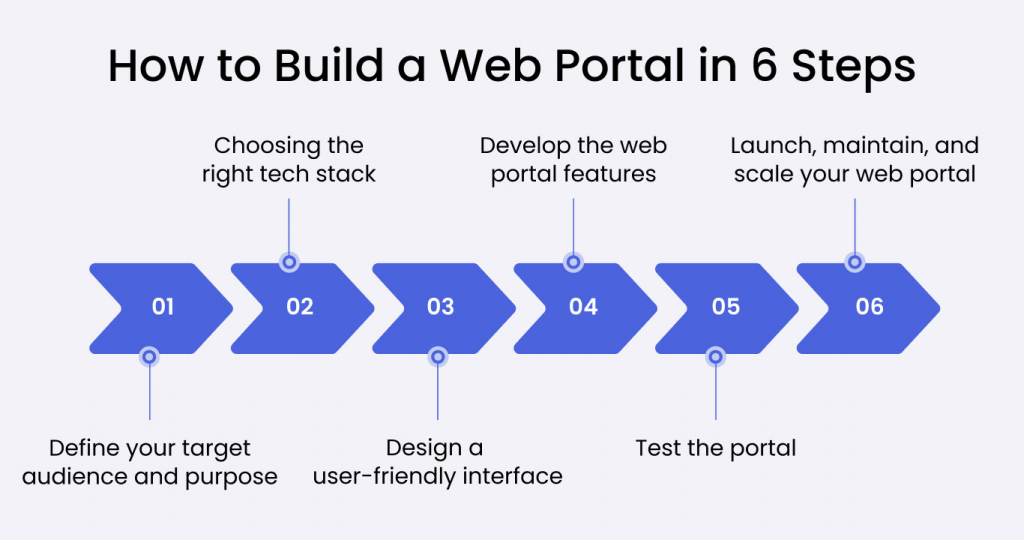
Developing a modern web portal is not only about writing code or creating an interface. It is a process of building a connected digital ecosystem where users, data, and business workflows operate seamlessly. A well-planned development approach ensures that the portal is functional, scalable, secure, and truly aligned with user and business goals.
Below is a complete breakdown of each stage in building an effective web portal.
1. Define Your Goals and Audience
Every successful web portal starts with a clear purpose. Identify who your users are and what specific needs the portal should fulfill.
Ask yourself:
- Who are the primary users such as customers, employees, or partners?
- What challenges will the portal solve for them?
- Which features can deliver the most value and convenience?
Understanding your audience helps align every feature with real use cases. For example, a customer portal might focus on self-service and payment management, while an employee portal centers on internal collaboration and document sharing.
2. Choose the Right Technology Stack
The technology stack forms the foundation of your portal. It affects how well the system performs, how secure it is, and how easily it can evolve in the future. Selecting the right combination of technologies ensures smooth integration and reliable performance.
| Portal Type | Frontend | Backend | Database / Infrastructure |
|---|---|---|---|
| E-commerce Portal | React, Next.js | Node.js, Django | MongoDB, AWS |
| Customer Portal | Vue.js, Angular | Laravel, Firebase | Google Cloud, MySQL |
| Employee Intranet | Blazor | ASP.NET, Spring Boot | Azure, PostgreSQL |
Essential integrations to consider include:
- CRM systems such as Salesforce or HubSpot
- ERP platforms such as SAP or Oracle
- Payment solutions such as Stripe or PayPal
- Analytics tools such as Google Analytics or Mixpanel
Choosing technologies that align with your objectives helps reduce development time while ensuring the portal remains adaptable for future upgrades.
3. Design a User Centered Interface
The design stage focuses on creating an experience that is intuitive, visually appealing, and accessible to every user. A strong user interface and user experience design can determine whether people continue using your portal or abandon it after the first visit.
Core design principles:
- Clear dashboard layout with defined actions
- Mobile responsive design for all devices
- Consistent visual identity and easy navigation
- Accessibility features for all users
Good design is not just about visuals. It builds trust, reduces user frustration, and supports long term engagement.
4. Develop Core Features and Functionality
Once the design is complete, the development phase turns ideas into working modules. Focus first on the essential functions that directly support user needs.
Important features include:
- Secure login with multi factor authentication and single sign on
- Advanced search and filtering
- Personalized dashboards for each user group
- Integrated content management system
- Real time notifications and messaging
- Data analytics and reporting tools
Start small, launch a functional version, and refine features based on real user feedback. This agile approach minimizes risk and improves overall quality.
5. Test and Optimize the Portal
Before launching, testing ensures every component works as intended across devices, browsers, and user roles.
| Test Type | Purpose | Example |
|---|---|---|
| Functionality Testing | Verify that all features perform correctly | Test login, checkout, or data submission |
| Usability Testing | Assess navigation and user friendliness | Observe how users complete basic tasks |
| Performance Testing | Evaluate speed and system stability under load | Simulate heavy traffic or concurrent users |
| Security Testing | Detect vulnerabilities and compliance issues | Check encryption, authentication, and access control |
| Compatibility Testing | Ensure accessibility on all platforms | Chrome, Safari, Android, iOS |
| User Acceptance Testing | Gather final user feedback before release | Identify usability gaps before going live |
Thorough testing improves reliability, security, and user confidence before the portal reaches production.
6. Launch, Monitor, and Scale
Launching the portal is only the beginning. Continuous monitoring and maintenance are vital for long term success.
Post launch essentials:
- Track usage behavior with Google Analytics or Hotjar
- Monitor and fix errors using tools such as Sentry or Bugsnag
- Collect user feedback to identify improvement opportunities
- Update regularly to patch vulnerabilities and enhance features
Tips for scaling effectively:
- Use cloud services such as AWS or Azure to manage traffic automatically
- Build modular architecture to add new components easily
- Apply load balancing to prevent downtime during high traffic
A web portal should grow along with your business. Continuous optimization ensures that it remains secure, high performing, and aligned with evolving user expectations.
9 Key Benefits of Web Portal Development for Businesses
Developing a custom web portal is not just about building a digital interface. It is about transforming how your business connects with customers, employees, and partners. A well-designed portal streamlines workflows, centralizes information, and enhances overall digital performance.
Below are nine major benefits of web portal development that can elevate your organization’s efficiency and competitiveness.
1. Centralized Access to Services and Resources
A web portal serves as a single entry point for all essential tools and services. Instead of managing multiple systems or platforms, users can access everything they need in one secure place. This simplifies navigation, reduces confusion, and ensures consistency across departments.
Example: Customers or employees can log in once to view invoices, support requests, order histories, and personal details.
2. Enhanced Customer Experience and Self-Service
A customer-oriented portal enables users to perform key actions such as tracking orders, updating information, or submitting tickets without waiting for assistance. This saves time for both users and support teams while increasing satisfaction and trust.
Result: Faster responses, fewer support requests, and stronger customer loyalty.
3. Strong Data Security and Compliance
Security is a critical factor in enterprise portal development. Modern web portals use advanced authentication and encryption methods to safeguard sensitive data. Common security layers include:
- Multi Factor Authentication (MFA)
- Role Based Access Control (RBAC)
- End to end encryption
These measures protect private information and help companies comply with major regulations such as GDPR, HIPAA, and PCI DSS.
4. Scalability and Adaptability
A professional web portal grows with your business. Whether your user base increases from hundreds to thousands, scalable architecture ensures stable performance. Using modular design and cloud hosting services like AWS or Azure, businesses can easily add new features, users, or departments without rebuilding the entire system.
5. Personalized User Experience with Artificial Intelligence
Artificial intelligence allows portals to deliver personalized content and experiences. Based on user behavior and preferences, the portal can recommend relevant products, display custom dashboards, or adjust workflows automatically.
Instead of being a static tool, your web portal becomes a smart assistant that anticipates user needs and improves engagement.
6. Built In Analytics for Better Decisions
Integrated analytics provide visibility into how users interact with your portal. You can track feature usage, identify drop-off points, and measure content effectiveness.
These insights allow businesses to:
- Optimize features for better engagement
- Identify and address service gaps
- Align portal updates with real user behavior
Data-driven insights make every update more strategic and effective.
7. Seamless Experience Across All Channels
Today’s users expect smooth transitions between mobile, desktop, email, and chat. A well-designed portal ensures that users can continue their tasks without losing progress or context.
This omnichannel experience is essential for remote teams, hybrid workforces, and customers who frequently switch between devices.
8. Reduced Operational and Support Costs
By enabling users to self-serve, web portals minimize repetitive tasks such as password resets, data updates, or report requests. This reduces workload for support teams and lowers operational costs.
Outcome: Greater efficiency, lower expenses, and more time for strategic initiatives.
9. Foundation for Continuous Innovation
A modern business web portal lays the groundwork for future innovation. It provides the flexibility to integrate emerging technologies such as chatbots, IoT devices, and automation systems.
Your portal becomes a long-term digital foundation that supports new opportunities and adapts to evolving business needs.
How Much Does It Cost to Develop a Web Portal
The cost of developing a web portal varies widely depending on several factors such as project complexity, required features, technology stack, and the experience level of the development team. On average, the web portal development cost can start from 15,000 USD and go beyond 100,000 USD for complex enterprise-grade solutions.
However, when partnering with experienced development companies in Vietnam, businesses can often save from 30 to 50 percent compared to Western markets while still ensuring high quality and scalability.
1. Project Complexity and Scope
The overall cost is primarily influenced by the size and complexity of your project. A basic customer or employee portal that includes login, profile management, and a simple dashboard may range from 15,000 to 25,000 USD. Meanwhile, a comprehensive enterprise web portal with modules for e-commerce, CRM, or data management can cost 50,000 to 100,000 USD or more.
For example, developing an e-commerce portal that allows product management, real-time order tracking, and integrated payment systems will require a higher investment due to its technical complexity and integration requirements.
2. Technology Stack Selection
The choice of technology significantly impacts both the cost and performance of your web portal. Open-source technologies such as React, Vue.js, or Node.js are popular for being cost-effective, flexible, and easy to maintain. On the other hand, enterprise solutions built with Java Spring, .NET, or Oracle-based platforms may require specialized developers, which increases development time and cost.
Vietnamese technology companies often combine modern frameworks with agile methodologies to deliver scalable, high-performance portals at competitive prices.
3. Ongoing Maintenance and Support
Once your portal goes live, regular maintenance is essential to ensure stability, performance, and security. Businesses should plan to allocate 15 to 25 percent of the total development cost annually for system updates, bug fixes, and new feature enhancements.
Maintenance activities typically include:
- Applying security patches and performance updates
- Monitoring uptime and system health
- Upgrading infrastructure to handle more users
- Adding new modules or integrations as your business grows
4. Third-Party Integrations
Integrating external systems into your portal increases functionality but also adds to the overall cost. Common integrations include:
- CRM systems: Salesforce, HubSpot, or Zoho
- Payment gateways: Stripe, PayPal, or MoMo (for the Vietnamese market)
- ERP solutions: SAP, Odoo, or NetSuite
Each integration requires additional configuration, testing, and sometimes licensing fees, which should be considered in your initial budget.
5. Custom Features and Advanced Functionalities
Custom web portal development often involves advanced features tailored to specific business needs. Adding functionalities such as:
- Real-time data collaboration tools
- Personalized user dashboards powered by AI
- Predictive analytics and business intelligence
- Role-based access and data visualization
These features enhance usability and user engagement but also increase the time and cost of development.
6. Cost Advantage When Outsourcing to Vietnam
For companies in North America, Europe, or Australia, outsourcing web portal development to Vietnam offers a significant cost advantage. Skilled Vietnamese developers typically charge 15 to 25 USD per hour, while developers in Western markets may charge 60 to 120 USD per hour for similar expertise. Despite lower rates, top software companies in Vietnam maintain high standards in code quality, communication, and delivery.
This difference makes Vietnam one of the most attractive destinations for businesses seeking cost-efficient custom web portal development without compromising quality or long-term scalability.
Conclusion
Investing in custom web portal development is more than just a technology decision it’s a strategic move to drive business growth. Whether you’re a CEO aiming to optimize operations, a CTO expanding your digital infrastructure, or a startup bringing an MVP to life, a well-built portal can streamline workflows, reduce costs, and enhance user satisfaction.
ONEXT DIGITAL offers end-to-end web portal development services tailored to your goals. Our team transforms your vision into secure, scalable, and high-performing solutions that empower your business to grow and stay ahead in the digital era.
Frequently Asked Questions About Web Portal Development
1. What makes a web portal essential for my business?
A web portal serves as a centralized hub where users can access key services, data, and tools in one place. It improves collaboration, streamlines processes, enhances customer engagement, and supports scalability making it a valuable long-term investment for any organization.
2. How do I ensure the security of my web portal?
Security begins with robust authentication and access management. Use multi-factor authentication (MFA), role-based access control (RBAC), data encryption, and regular vulnerability testing to safeguard your portal against threats and ensure user trust.
3. Can my web portal scale as my business grows?
Yes. With a scalable architecture and cloud-based infrastructure, your portal can seamlessly adapt to increased traffic, new features, and evolving business requirements without the need for a full redevelopment.
4. What technologies are used in modern web portal development?
Modern web portals often use frameworks like React, Angular, or Vue for the frontend, and Node.js, Django, or Laravel for the backend. These technologies ensure high performance, flexibility, and smooth integration with third-party systems or APIs.
5. How long does it take to develop a custom web portal?
Development time varies based on complexity and feature scope. A simple customer or employee portal might take 2–3 months, while a fully integrated enterprise or eCommerce portal can take 6–9 months or more.