
 Services
 Solutions
 Main platform
 Technology
 White Label
  Offshore
 Hire developers



ClickFunnels ecommerce combines an online store with the platform’s sales funnel tools, so you can sell products, manage orders, and build a more focused buying journey in one place. It makes the most sense if you sell one or a few core products. If you’re managing hundreds of SKUs, though, you’ll probably find Shopify or WooCommerce easier to work with.
ClickFunnels is still often associated with landing pages, online courses, and sales funnels. But ClickFunnels 2.0 goes beyond that. It includes a Store feature where you can list products, manage inventory, take payments, and run a basic ecommerce operation without building a separate store.
So the question isn’t really whether ClickFunnels can sell products. It can. The bigger question is whether it makes sense for your type of business. In this guide, we’ll look at what ClickFunnels ecommerce actually offers, how to set it up, what it costs, how it compares with Shopify and WooCommerce, and when another platform may be the better choice.
What Is ClickFunnels Ecommerce?
ClickFunnels ecommerce brings an online store and sales funnels together in one platform. There are two main ways to sell with it:
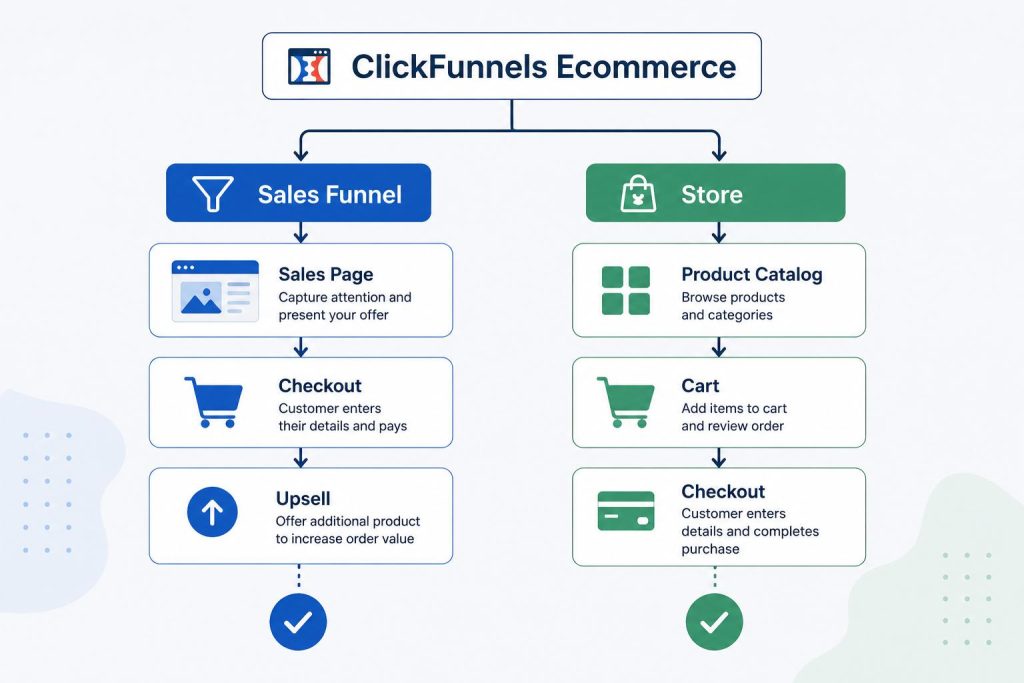
- Traditional sales funnels: This is the more focused approach. A customer lands on a sales page, goes through the order form, may see an upsell, and then reaches the thank-you page. There’s little browsing involved. The whole experience is built around one specific offer.
- The Store: ClickFunnels 2.0 also gives you a more familiar ecommerce setup. Customers can browse different products, look through categories, and add items to a cart before checking out.
The advantage is that you can use both depending on what you’re selling. Your Store can handle customers who want to browse, while a dedicated funnel can guide people toward a specific product, promotion, or offer.
This works particularly well when you have a small product range, are launching a new product, or sell subscriptions and higher-priced products that need a little more explanation before someone buys. For a store with hundreds of products and a more complex catalog, though, Shopify or WooCommerce will generally give you more room to grow.
Is ClickFunnels Right For Selling Ecommerce Products?
ClickFunnels can work well for ecommerce, but it depends on what you sell and how customers make the decision to buy. It’s a better fit for a focused product range than a store with hundreds of products to manage. If you’re running a large catalog, Shopify or WooCommerce will usually be the easier option.
1. You have one main product.
If most of your business revolves around one flagship product, ClickFunnels lets you build the whole buying experience around it. Instead of sending customers through a long list of products, you can focus the page, offer, checkout, and follow-up on getting that one product sold.
2. You’re launching or testing products.
ClickFunnels is useful when you want to get an offer in front of customers quickly. Its templates give you a starting point for building a sales page, checkout, upsell, and other parts of the funnel without having to build a full ecommerce store first.
3. You sell products that need more explanation.
A higher-priced product often takes more than a product image and a short description to sell. You may need testimonials, video, FAQs, an order bump, or an upsell before the customer feels ready to buy. ClickFunnels is well suited to this kind of guided buying experience.
If your store has a large catalog, complicated inventory, or relies heavily on customers browsing between products, ClickFunnels may not be the best fit. Shopify or WooCommerce will generally give you more flexibility in those situations.
Key Ecommerce Features In ClickFunnels
1. Store Builder & Product Management
ClickFunnels covers the basics you’d expect from an ecommerce platform. You can add products, group them into categories, create variants such as size or color, and assign SKUs. Inventory can also be tracked as orders come in.
You can use it for physical products, digital products, and subscriptions, all from the same platform. For a smaller store, that may be enough to avoid having to connect several separate tools just to get the basics working.
2. One-Click Upsells & Order Bumps
This is one of the areas where ClickFunnels has a clear advantage. Upsells and order bumps are part of the funnel itself, so you don’t have to install another app just to add an extra offer at checkout.
For example, someone buying a one-month supply of a supplement could be offered a three-month option or a related product before finishing the order. If they accept it, they can add the offer without going through checkout all over again.
It won’t automatically increase sales, of course. The offer still needs to make sense. But when the upsell is relevant, it can be a simple way to increase average order value (AOV).
3. Two-Step Checkout & SMART Checkout
With a two-step checkout, customers enter their basic details first and payment information second. That means you can capture an email address before the order is complete, which can be useful for following up with people who leave checkout.
SMART Checkout is aimed more at returning customers. It can remember customer details and make repeat purchases quicker by reducing how much information they need to enter again.
4. Payments, Tax, and Subscriptions
ClickFunnels works with payment providers such as Stripe and PayPal, and it supports recurring payments for subscriptions and memberships.
Payments AI can help automate tax calculations, but this depends on where your business operates. Its automated tax features are currently focused on the US, so sellers in other markets may need to use their payment provider or another tax solution instead.
Email marketing and automation are also built into ClickFunnels, although the features and sending limits depend on the plan.
How To Set Up An Ecommerce Funnel In ClickFunnels (6 Steps)
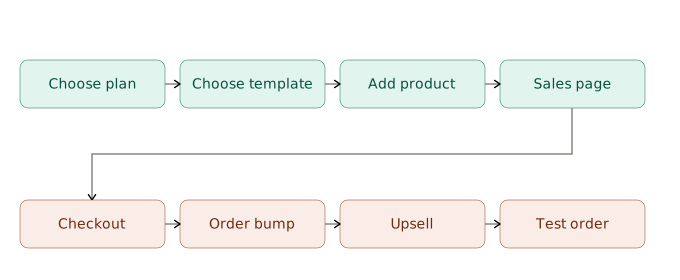
Step 1: Choose your plan.
Start with a plan that matches the size of your store and the features you actually need. If you’re testing a small product range, there’s no reason to pay for features you won’t use yet.
Step 2: Pick a template.
ClickFunnels has ecommerce and funnel templates you can use as a starting point. Choose one that’s close to the type of product and buying journey you have in mind, then adjust the pages to fit your brand.
Step 3: Add your products.
Enter the basics such as the product name, description, images, price, variants, and SKU. If your products are subject to tax, check the relevant settings before you start taking orders. It’s much easier to get this right before launch than fix it later.
Step 4: Build the sales page.
Keep the page focused on one main offer and one clear next step. You can include supporting information such as reviews, product details, FAQs, and guarantees, but don’t make customers work out what they’re supposed to do next.
Step 5: Add your order bump and upsell.
Use the order bump for a small, relevant add-on that makes sense alongside the main purchase. You can then use an upsell after checkout to offer a higher-value product, bundle, or upgrade. The key is relevance. Adding offers just for the sake of having them can make the buying experience feel pushy.
Step 6: Place a test order.
Before sending traffic to the funnel, go through the entire process yourself. Check the product, checkout, payment, order bump, upsell, confirmation page, and any follow-up emails. A test order is a simple step, but it can catch problems that are easy to miss when you’re only looking at the pages in the editor.
ClickFunnels vs Shopify vs WooCommerce: Which One Should You Use?
There’s no single ecommerce platform that’s right for everyone. It really comes down to what you sell, how customers buy from you, and how much control you want over the store.
ClickFunnels makes the most sense when you care about guiding customers through a specific buying journey.
Shopify is the stronger choice if you’re building a traditional online store with a growing product range.
WooCommerce gives you more freedom to customize things, especially if your business already runs on WordPress.
| Criteria | ClickFunnels | Shopify | WooCommerce |
| Best at | Sales funnels and conversion-focused selling | Running and growing an online store | Customization and flexibility |
| Product range | Better for smaller product ranges | Handles large catalogs well | Can handle large catalogs with the right setup |
| Upsells & order bumps | Built in | Usually needs an app | Usually needs a plugin or extension |
| App/plugin ecosystem | Smaller | Large | Large |
| Cost | Higher monthly subscription | Several plans available | Free software, but hosting and other costs apply |
| Ease of use | Easy for non-technical users | Generally easy to manage | More setup and maintenance involved |
| Mobile management | More limited | Dedicated mobile app | Depends on your setup |
| Best fit | Focused offers, launches, subscriptions, and funnel-led sales | Growing ecommerce brands and larger catalogs | Businesses that want more control over their store |
If you only sell a few products and spend a lot of time testing offers, upsells, and different buying journeys, ClickFunnels can be a good fit. For a traditional store with lots of products and customers who want to browse, Shopify will usually be easier to manage as the business grows. WooCommerce is worth considering when you want more control and don’t mind taking on some of the technical work yourself.
What Does ClickFunnels Ecommerce Actually Cost?
ClickFunnels is usually more expensive upfront than basic ecommerce platforms, so the monthly subscription is worth looking at alongside the features you actually need. Pricing and plan limits can change, but the platform has typically offered plans around $97/month for Startup and $297/month for Pro.
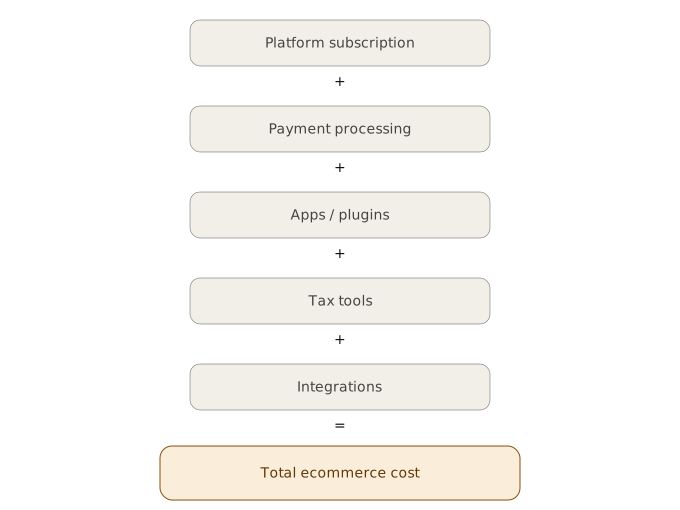
The difference between plans isn’t just the price. Things such as email limits, testing features, and other account limits can vary, so it’s worth checking the current plan details before signing up.
There can also be costs outside the ClickFunnels subscription. Payment processing fees still apply when you use providers such as Stripe or PayPal, and some businesses may need additional tools for integrations, tax handling, or other requirements that aren’t covered by the platform.
It’s also worth looking beyond the monthly subscription when comparing ClickFunnels with Shopify or WooCommerce. A cheaper platform can become more expensive once you start adding paid apps or plugins for upsells, order bumps, email marketing, and other features. The better comparison is the total cost of running the setup you actually need, not just the advertised starting price.
When You Should NOT Use ClickFunnels For Ecommerce
ClickFunnels can be a good fit for a focused ecommerce business, but there are situations where another platform will make your life much easier.
- You have a large product catalog. If you’re dealing with hundreds or thousands of SKUs, product organization, inventory, filtering, and day-to-day store management can become harder to handle. Shopify or WooCommerce will generally be better suited to this kind of setup.
- You rely on complex business systems. If your store needs to connect closely with an ERP, advanced inventory system, custom fulfillment process, or other specialized software, check the available integrations carefully before committing to ClickFunnels.
- You need to keep monthly costs as low as possible. ClickFunnels comes with a relatively high subscription cost. If you’re just starting out and need a basic store, WooCommerce can be a more cost-effective option, although you’ll still have hosting, maintenance, and other costs to consider.
- You need advanced tax automation outside the US. ClickFunnels’ automated tax capabilities vary by market. If you operate in a country where those features aren’t available, you may need to use your payment provider or another tax solution instead.
These aren’t necessarily reasons to rule out ClickFunnels altogether. They’re simply situations where it’s worth comparing the alternatives before you commit. Switching platforms later can take time, especially once you’ve built up products, customer data, orders, and integrations.
If you already use ClickFunnels but need to connect it with your CRM, ERP, payment systems, or other business tools, the platform may still work for you. In those cases, the issue is often less about replacing ClickFunnels and more about making it work with the rest of your tech stack. ONEXT DIGITAL can help businesses build and connect custom integrations around ClickFunnels when standard integrations aren’t enough.
Example: A Product Funnel That Fits ClickFunnels
Take a supplement brand that sells a monthly subscription. Instead of building a big store with dozens of products, it could start with one main product and build the sales journey around it.
A customer might first land on a sales page that explains the product and answers the usual questions. From there, they move to checkout, where they might see an offer to upgrade from a one month supply to a three month option. After the purchase, they could be shown a related product as an upsell.
There’s nothing particularly complicated about this setup. The idea is to keep the customer focused on one main offer while giving them a couple of relevant ways to buy more. That’s where ClickFunnels tends to work well.
Note: This is an illustrative example of a common ecommerce setup, not a verified case study or campaign result.
Conclusion
ClickFunnels can be a solid ecommerce option, but it depends on the kind of store you’re running. If you sell one or a few main products and want more control over the buying experience, its funnels, upsells, and order bumps can be useful. It can also work well for product launches, subscriptions, and some high ticket offers.
If you’re building a large store with hundreds of products, complex inventory, or lots of browsing, Shopify or WooCommerce will probably be a better fit.
In the end, don’t choose based on which platform is getting the most attention. Look at what you actually need to sell, how much you want to spend, and where you expect the business to be in the next few years. That will tell you more than any feature comparison.
Read more: ClickFunnels for Digital Agencies: How to Build a High-Converting Client Acquisition Funnel
FAQs
Is ClickFunnels good for ecommerce?
Yes, ClickFunnels can work well for ecommerce, especially if you sell a small range of products, run product launches, or rely heavily on sales funnels, upsells, and order bumps. It is less suitable for large stores with hundreds or thousands of products and more complex inventory needs.
Is ClickFunnels better than Shopify for ecommerce?
It depends on how your customers shop. ClickFunnels is a better fit when you want to guide customers through a specific buying journey. Shopify is generally better for larger stores where customers need to browse, search, filter, and manage a wider product catalog.
Can ClickFunnels be used as a full ecommerce store?
Yes. ClickFunnels 2.0 includes a Store where you can list products, manage categories and variants, track inventory, and process orders. You can also use sales funnels alongside the Store for specific products, promotions, or offers.
Can ClickFunnels manage inventory?
Yes, ClickFunnels includes basic inventory management features. It can work well for smaller product ranges, but businesses with hundreds or thousands of SKUs, complex inventory rules, or advanced fulfillment requirements may find Shopify or WooCommerce easier to manage.
How much does ClickFunnels ecommerce cost?
The cost depends on the ClickFunnels plan you choose and any additional tools or services you need. You should also factor in payment processing fees, integrations, and other ecommerce costs rather than looking only at the monthly subscription price. Check the current ClickFunnels pricing before signing up, as plans and limits can change.
Do I need coding skills to build an ecommerce store with ClickFunnels?
No. You can build the main store, product pages, checkout, and sales funnels without coding. Technical development may be needed if you want custom functionality or integrations with systems such as a CRM, ERP, or custom fulfillment platform.