
 Services
 Solutions
 Main platform
 Technology
 White Label
  Offshore
 Hire developers



Agency owners are often good at building growth systems for clients. They know how to improve campaigns and conversion rates, but their own pipeline may still rely on referrals, sporadic outreach, or a basic contact form.
That creates an awkward gap: the agency can build predictable growth for clients without having the same predictability in its own sales pipeline.
ClickFunnels can help close that gap. It gives agencies a simple way to build focused landing pages, forms, offers, and lead capture flows around specific campaigns or services.
But a form submission is not a sale. Leads still need to be qualified, followed up with, and moved through the sales process. As the agency grows, those activities also need to connect with the CRM, ERP, and marketing tools already running behind the scenes.
So the goal is not simply to build a better funnel. It is to make that funnel work with the rest of the business.
This guide looks at how digital agencies can use ClickFunnels to build a more reliable acquisition process and connect it to the systems that turn leads into customers and revenue.
1. What Is ClickFunnels and Why Does It Matter for Digital Agencies?
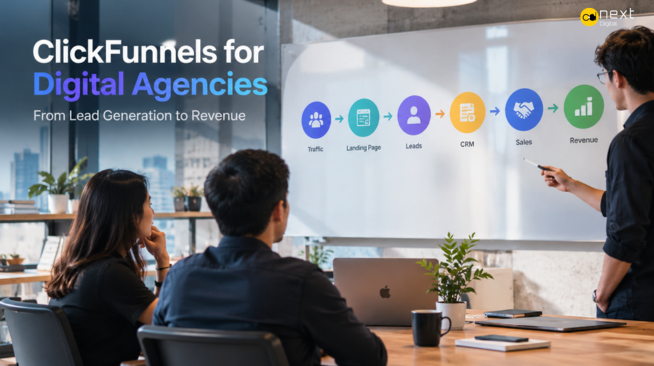
ClickFunnels is a funnel building platform that helps businesses guide prospects toward a specific action, such as booking a consultation, requesting a quote, or making a purchase. It combines landing pages, forms, offers, and follow up flows into a focused conversion journey.
For digital agencies, this can be useful when a campaign or service needs a more direct path than the main website provides. Instead of sending someone interested in Magento development to a general services page, for example, an agency can direct them to a dedicated landing page focused on Magento, with relevant messaging, qualification questions, and a clear next step.
Why Agencies Have Different Funnel Requirements
Selling agency services is different from selling a low cost consumer product. A potential client may be considering a project worth tens or hundreds of thousands of dollars, with several people involved in the decision. The sales process can also take weeks or months.
That makes lead qualification more important than simply increasing form submissions.
An agency might ask about:
- Budget: Does the project fit the agency’s typical engagement size?
- Business needs: What problem is the prospect trying to solve?
- Technology: What platforms or systems are already in place?
- Timeline: Are they researching options or ready to start?
These questions help separate casual enquiries from genuine opportunities.
The funnel should also reflect the agency’s sales cycle. A prospect might download a guide, request an assessment, book a consultation, and only then ask for a proposal.
The goal is not to generate the most leads. It is to generate qualified opportunities that sales can realistically convert.
ClickFunnels vs. a Traditional Agency Website
A website and a funnel serve different purposes, and agencies often need both.
| Traditional Website | ClickFunnels Funnel |
|---|---|
| Builds overall credibility | Focuses on one conversion goal |
| Covers multiple services | Targets a specific offer or audience |
| Encourages exploration | Guides the prospect toward action |
| Supports brand discovery | Uses focused campaign messaging |
| Provides broader information | Moves prospects toward the next step |
For example, an agency offering software development, CRM consulting, and ecommerce services needs its website to explain all three. But a campaign targeting companies looking for CRM implementation could send traffic to a dedicated funnel offering a free assessment, collecting qualification data, and inviting suitable prospects to book a consultation.
The website answers “Why should I trust this agency?”
The funnel answers “What should I do next?”
Once a prospect submits a form, however, the funnel is only one part of the process. The agency still needs to qualify the lead, manage the opportunity, and track what happens next. That is where CRM, marketing automation, and eventually ERP integration become important.
2. How Digital Agencies Can Use ClickFunnels to Generate More Qualified Leads
For an agency, the goal is not to collect as many leads as possible. It is to attract the right ones.
A hundred poor fit inquiries can take more sales time than ten genuine opportunities. ClickFunnels is more useful when agencies build funnels around specific services, ask the right questions, and give prospects a clear next step.
Build Service Specific Landing Pages
A generic agency page often tries to promote every service at once. That usually makes the message less relevant and gives visitors too many choices.
Instead, build pages around a specific service and customer problem.
For example:
- Web development: Businesses with outdated, slow, or hard to maintain websites.
- SEO: Companies struggling with organic traffic, rankings, or qualified leads.
- CRM implementation: Businesses dealing with scattered customer data or manual sales processes.
- Software development: Companies that need custom applications, system upgrades, or integrations.
- Digital transformation: Organizations working with disconnected systems or inefficient processes.
Each page should quickly answer:
- Who is this for?
- What problem does it solve?
- What should I do next?
Someone looking for CRM implementation should not have to work through a page full of unrelated web design and app development services. The closer the message matches their intent, the easier it is to get a meaningful response.
Create Lead Magnets That Attract B2B Buyers
Not every B2B buyer is ready to request a proposal. With higher value services, prospects often need time to research and get internal agreement.
A useful lead magnet gives them a reason to engage earlier.
Instead of another generic ebook, an agency could offer:
- Website audit: Find technical, UX, performance, or conversion issues.
- ROI calculator: Estimate the potential return from a technology or marketing investment.
- Technology assessment: Review current platforms, integrations, and technical gaps.
- CRM readiness checklist: Identify whether existing sales processes are ready for automation.
- Digital transformation assessment: Highlight workflow and system integration problems.
The offer should also help attract people with a real need.
For example, Custom Software Project Assessment is likely to attract a more relevant audience than a generic “Guide to Software Development.”
The goal is not just to collect email addresses. It is to start conversations with prospects the agency can realistically help.
Use Qualification Forms to Filter Leads
The form is another chance to qualify the opportunity.
Keep it short, but ask enough to help sales understand whether the prospect is worth pursuing. Depending on the service, useful fields include:
- Budget: What investment range is available?
- Current tech stack: What CMS, CRM, ERP, ecommerce platform, or internal systems are being used?
- Business challenge: What are they trying to solve?
- Timeline: Are they researching or ready to start?
- Company size: How large is the organization?
- Service required: What solution are they looking for?
This information can later be used for lead scoring and segmentation.
A prospect with a clear project, suitable budget, and near term timeline is usually more valuable than someone simply browsing options.
The principle is simple: quality beats quantity.
A smaller funnel that consistently produces qualified opportunities can be much more valuable than one that simply drives up the number of form submissions.
3. What Should a ClickFunnels Funnel for a Digital Agency Look Like?
A good agency funnel should feel like one connected journey, not a bunch of pages sitting next to each other.
The basic flow is: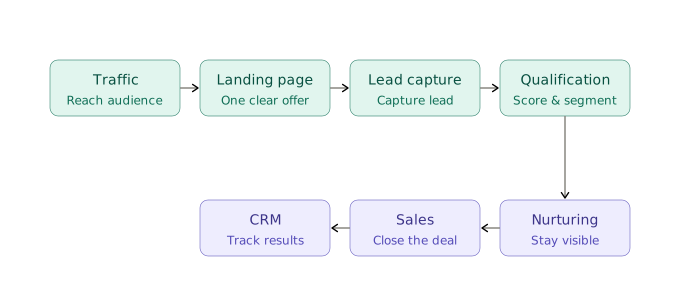
Each stage has a different purpose.
Step 1: Attract the Right Audience
A funnel cannot fix the wrong traffic. Before worrying about conversion rates, make sure you are reaching people who actually fit your ideal customer profile.
Common channels include:
- SEO: Create content and landing pages around high intent searches related to your services.
- Paid advertising: Send targeted campaigns to dedicated landing pages instead of the homepage.
- LinkedIn: Reach founders, CTOs, marketing leaders, and other B2B decision makers.
- Content marketing: Use case studies, guides, research, and useful industry content to build trust.
The message should stay consistent from one step to the next.
If an ad offers a free CRM assessment, the landing page should immediately reinforce that offer. The visitor should not have to wonder whether they landed on the right page.
Step 2: Turn Visitors Into Leads
Once the right person reaches the page, make the next step clear.
A typical agency landing page might include:
- A clear value proposition
- One main call to action
- Relevant service messaging
- Case studies or results
- Client testimonials
- Industry or technical expertise
- Trust and security signals
- A simple lead form
Avoid giving visitors several competing options.
If the goal is to book CRM consultations, “Book a CRM Assessment” is much clearer than offering “Learn More,” “Contact Us,” and “Explore Services” at the same time.
Everything on the page should support the same action.
Step 3: Qualify and Segment Leads
Not every form submission deserves a sales call.
Use the information collected to understand the prospect and where they are in the buying process. Useful segments might include:
- Service interest
- Company size
- Budget
- Project timeline
- Industry
- Technology stack
- Buying intent
Lead scoring can then help decide what happens next.
Someone with a defined software project, budget, and start date may be ready for sales. Someone downloading an introductory guide probably needs more information first.
This saves the sales team from treating every lead the same way.
Step 4: Nurture Leads
B2B buyers rarely choose an agency after one interaction. They may need to compare providers, secure budget, or get other decision makers involved.
This is where automated nurturing can help.
Depending on what the prospect is interested in, the funnel might send:
- Email sequences
- Case studies
- Service guides
- Industry insights
- Webinars
- ROI content
- Consultation reminders
Keep the content relevant. Someone who downloaded a CRM assessment should receive CRM related content, not another generic agency newsletter.
The goal is simply to stay useful and visible until the prospect is ready to talk.
Step 5: Move Qualified Leads to Sales
Once a lead meets the qualification criteria, their information should move into the CRM.
A typical workflow could look like:
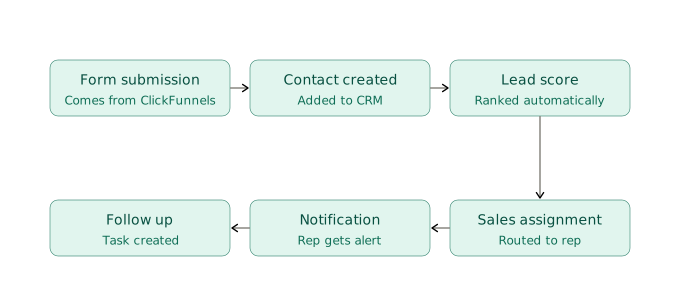
From there, the CRM gives sales a clearer picture of the opportunity: where the lead came from, what service they requested, what they submitted, and how they interacted with the funnel.
This is where a lead generation funnel starts becoming a revenue system.
ClickFunnels handles much of the front end experience, but the real value comes when that data connects with CRM, marketing automation, ERP, and other business systems.
For an agency trying to scale, that connection may be more valuable than squeezing another percentage point out of the landing page conversion rate.
4. ClickFunnels Alone Is Not a Complete Agency Growth System
ClickFunnels is good at one part of the acquisition process: turning traffic into leads.
But a lead is not revenue.
Once someone submits a form, the agency still needs to qualify the opportunity, follow up, manage proposals, deliver the project, send invoices, and keep track of the customer relationship. Most of this happens outside ClickFunnels.
That becomes harder to manage as the agency grows. A process that works for 20 leads a month can quickly become messy when hundreds of prospects are coming in from different campaigns and services.
The answer is not to replace ClickFunnels. It is to connect it with the systems that handle what happens after conversion.
Where ClickFunnels Ends
ClickFunnels mainly handles the front end of the customer journey: landing pages, forms, offers, and other elements designed to get prospects to take action.
The rest of the business may involve:
- Creating and maintaining customer records
- Assigning leads to salespeople
- Managing sales opportunities
- Handling proposals and contracts
- Coordinating project delivery
- Tracking resources and costs
- Managing invoices and payments
- Maintaining customer relationships
- Reporting on financial and operational performance
These tasks usually sit across CRM, ERP, project management, accounting, and other business systems.
It helps to think of ClickFunnels as the front door, rather than the whole building.
It brings the prospect in. The systems behind it determine what happens next.
The Hidden Problem: What Happens After Someone Submits the Form?
This is where many agency funnels start to break down.
Marketing may generate hundreds of submissions, only for someone to export the data to a spreadsheet, forward the details to sales, and manually keep track of follow ups.
The process ends up looking like: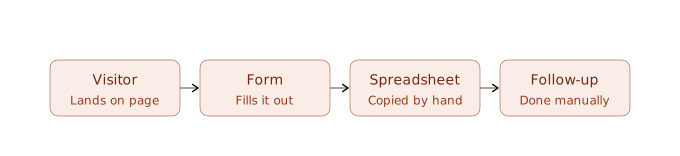
That might be manageable at low volume, but it creates problems as the pipeline grows:
- Leads are missed or contacted too late.
- Sales receives incomplete information.
- Marketing struggles to track what happens to its leads.
- Customer data gets duplicated.
- Managers have little visibility into which campaigns actually generate revenue.
A more connected setup looks like:
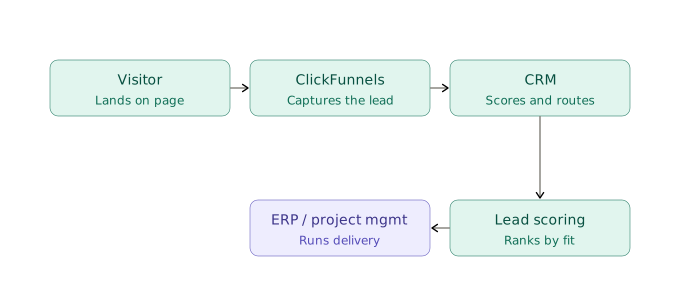
The funnel captures the lead. The CRM creates the customer record and tracks the opportunity. Lead scoring helps sales decide which prospects need attention first. Once a deal closes, project and financial systems can take over.
At that point, improving the funnel is no longer just a marketing task. It becomes a technology integration challenge.
For a growing agency, the goal is not to replace every tool with a new one. It is to make the existing systems work together, so information can move between marketing, sales, delivery, and finance without constant manual work.
5. Integrating ClickFunnels With Your CRM
For most agencies, the CRM is the next system to connect after a prospect submits a ClickFunnels form.
The idea is simple: get the lead into the sales system with the information the team actually needs.
Without an integration, someone may have to copy form details into the CRM manually. That works for a handful of leads, but quickly becomes a chore as volume grows.
Why CRM Integration Matters
A CRM gives sales and marketing one place to manage contacts and opportunities.
When ClickFunnels connects with the CRM, agencies can:
- Create contacts automatically
- Record where leads came from
- Track the service they are interested in
- Assign leads to the right salesperson
- Score leads based on qualification data
- Create follow up tasks
- Track customer interactions
- See which campaigns generate real opportunities
It also gives marketing a better view of what happens after conversion. Sales can see where a prospect came from and what they were interested in before the first conversation.
That becomes particularly useful when an agency is running several campaigns or selling different services.
What Data Should Flow From ClickFunnels to Your CRM?
The exact fields depend on the business, but a typical integration might pass:
| ClickFunnels Data | CRM Use |
|---|---|
| Name and email | Create contact |
| Company name | Create or link account |
| Phone number | Sales outreach |
| Service requested | Categorize opportunity |
| Lead source | Campaign attribution |
| Campaign or landing page | Marketing analysis |
| Budget range | Lead qualification |
| Project timeline | Sales prioritization |
| Form responses | Sales context |
| Conversion date | Funnel reporting |
You do not need to send every available field into the CRM.
The goal is to give sales enough context to act without making the prospect repeat information they have already provided.
Automate Nurturing, Lead Scoring and Routing
Not every prospect is ready to speak with sales after submitting a form. Some are still researching, while others already have a defined project and are comparing providers.
Connecting ClickFunnels with the CRM allows agencies to automate what happens next based on each prospect’s behaviour and qualification data.
Lead nurturing keeps prospects engaged until they are ready to take the next step. A simple sequence might include a confirmation email, relevant educational content, a case study, and a consultation invitation. The content should match the prospect’s interest rather than sending everyone the same generic newsletter.
Lead scoring helps sales prioritise opportunities. Scores can consider factors such as company size, budget, project timeline, service interest, and engagement. A prospect requesting a technical assessment with a suitable budget and near term start date may deserve immediate sales attention, while someone downloading an introductory guide may be better suited to a longer nurture sequence.
Lead routing determines who receives the lead and what happens next.
For example:
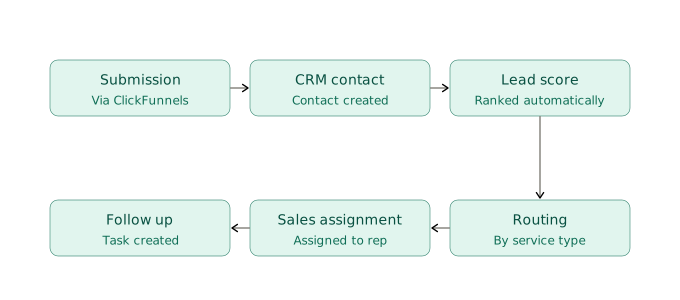
These workflows reduce manual handoffs and help sales focus on leads that are more likely to become opportunities.
Automation does not need to handle every part of the sales process. The goal is to make routine decisions consistent, while giving sales teams the context they need to take over when human interaction matters.
6. Connecting ClickFunnels With ERP and Back Office Systems
CRM integration covers much of the sales process. But once an agency grows, customer and deal information also needs to move into operations and finance.
That is where ERP and back office integration become important.
Why ERP Integration Matters as Your Agency Grows
Winning a deal is not the end of the process. The agency still needs to set up the project, allocate resources, manage budgets, prepare contracts, send invoices, and track delivery.
Without integration, the same information may be entered several times:
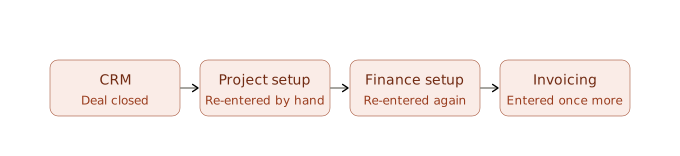
A connected setup can remove much of this repetition. When a deal closes, relevant customer and commercial data can move into the ERP or project management system automatically.
This helps connect:
- Finance and invoicing
- Project delivery
- Resource planning
- Customer records
- Cost tracking
- Reporting
The goal is not to automate everything. It is to keep information accurate as it moves between teams.
From Lead Generation to Revenue Operations
At this point, the funnel should be viewed as part of a larger business process:
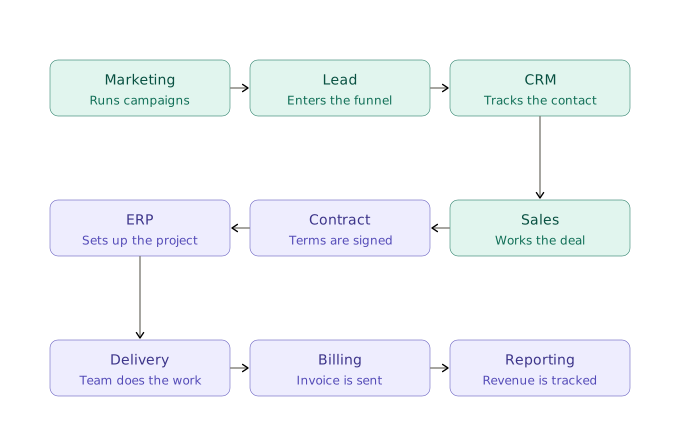
Each system handles a different part of the journey.
ClickFunnels captures the lead. The CRM manages the sales opportunity. ERP and operational systems handle delivery and commercial processes, while finance manages billing and payments.
This gives management a clearer picture of what happens after the initial conversion.
Instead of asking only, “How many leads did this funnel generate?” they can ask:
- Which campaigns produced qualified opportunities?
- Which services generate the most valuable customers?
- How long does it take to turn a lead into revenue?
- Where are opportunities being lost?
- What does customer acquisition actually cost?
That is the move from basic funnel reporting to revenue operations.
Avoiding Data Silos
Disconnected systems create problems that often go unnoticed at first.
The same customer may exist in ClickFunnels, the CRM, project management software, and accounting under slightly different records. Teams then spend time updating information manually and reconciling differences.
Over time, this can lead to:
- Duplicate records
- Repeated data entry
- Inconsistent information
- Slow handoffs
- Reporting gaps
- More administrative work
- Higher risk of errors
Replacing every system is not always the answer. In many cases, it makes more sense to connect the tools already in use around a clear data and process structure.
The goal is simple: move information smoothly from the first conversion through sales, delivery, and billing, without making people enter the same data over and over.
ClickFunnels can improve the point where a prospect converts. The integration behind it determines what happens next.
7. ClickFunnels Funnel Strategies for Different Types of Digital Agencies
There is no single funnel that works for every agency. The right approach depends on what you sell, who you are selling to, and how much information a prospect needs before they are ready to talk to sales.
Web Design and Development Agencies
Funnel: Free website audit → Consultation
A website audit is an easy first step for businesses that know their site is not performing as well as it should. It can highlight issues with performance, mobile usability, user experience, or conversions.
From there, qualified prospects can be invited to a consultation to discuss what needs to be fixed and whether a redesign or development project makes sense.
SEO and Marketing Agencies
Funnel: SEO assessment → Strategy call
An SEO assessment can give prospects a clearer picture of what is holding back their organic growth, from technical issues to weak content or poor search visibility.
The next step should not just be a list of SEO problems. It should connect those findings to business goals, such as attracting more qualified traffic, improving visibility, or finding new growth opportunities.
Software Development Agencies
Funnel: Technical discovery → Proposal
A custom software project usually involves more than a few basic contact details. Before a sales call, the agency may need to understand the business requirements, existing systems, integration needs, timeline, and budget.
A technical discovery funnel can collect this information upfront, giving the sales and delivery teams a better starting point for the conversation. If the project is a good fit, the discovery can then lead to a defined scope and proposal.
CRM and Digital Transformation Agencies
Funnel: Business process assessment → Solution roadmap
For CRM and digital transformation projects, the problem is often bigger than choosing a piece of software. The business may be dealing with manual processes, disconnected systems, duplicated data, or poor reporting.
A business process assessment can uncover these issues and give the prospect a clearer view of what needs to change. From there, the agency can develop a practical roadmap covering CRM, ERP, automation, or system integration based on the actual business needs.
8. Common ClickFunnels Mistakes Digital Agencies Should Avoid
A funnel can look great and still bring in poor results if the strategy behind it is wrong. For digital agencies, a few mistakes tend to show up again and again.
Using One Generic Funnel for All Traffic
Different prospects come with different needs. Someone looking for Magento development should not see the same message as a business searching for CRM implementation or SEO services.
Where it makes commercial sense, build separate funnels around specific services, industries, campaigns, or customer problems. A more relevant message usually makes it easier for the right prospects to take the next step.
Asking for Too Much Data Too Early
Qualification is important, but a long form can put people off before they have enough reason to engage.
Ask for the information you actually need to judge basic fit, such as the service required, company size, budget range, or project timeline. More detailed technical or commercial questions can come later, once the prospect is further along.
Failing to Connect the Funnel With the CRM
Getting a lead into ClickFunnels is only the beginning.
If someone still needs to export the data, copy it into the CRM, or message the sales team manually, the funnel is creating more work instead of removing it.
Connect ClickFunnels with the CRM so relevant lead information can move into the right sales workflow automatically.
Measuring Vanity Metrics Instead of Revenue
A strong conversion rate does not necessarily mean a successful funnel. You can generate plenty of leads and still end up with very little business.
Look beyond page views, form submissions, and conversion rates. Track what happens after the lead enters the funnel:
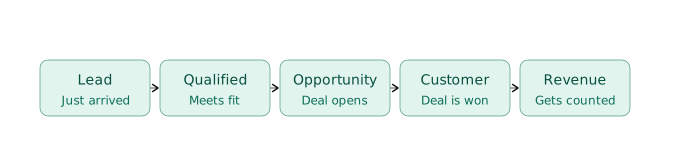
The more useful question is not “How many leads did the funnel generate?” but “How much qualified pipeline and revenue did it create?”
That is the difference between optimising a funnel for activity and optimising it for business results.
9. When Should a Digital Agency Consider Custom ClickFunnels Integrations?
Standard ClickFunnels integrations can work well for a simple lead generation setup. But as an agency grows, managing data across multiple platforms can become harder and more time consuming.
Custom integration may be worth considering when:
- Your team is still copying lead data manually between ClickFunnels, the CRM, spreadsheets, or other systems.
- Sales is receiving leads through email, spreadsheets, or messaging apps instead of a consistent workflow.
- Customer information is duplicated or inconsistent across CRM, ERP, project management, or accounting systems.
- Marketing cannot easily track which leads become opportunities and customers, making campaign ROI difficult to measure.
- Standard integrations cannot handle your business rules, such as custom lead scoring, routing, approval steps, or service specific workflows.
- Growing lead volume is creating operational bottlenecks, with sales, delivery, and finance spending too much time moving or checking data.
These are more than technology issues. They are signs that the agency’s sales and revenue process may have outgrown its current setup.
Adding another tool may not solve the problem. A better approach is to look at how information should move from the first conversion through sales, delivery, and billing, then connect the systems around that process.
10. Building a Connected Funnel With ONEXT DIGITAL
ClickFunnels handles the front end. Everything after that, CRM, ERP, project management, billing, is usually where things break down, because it’s spread across tools that don’t talk to each other.
ONEXT DIGITAL builds that missing connection. We start by looking at where your team is currently re-entering data or losing track of leads, then set up the integration so information moves automatically from ClickFunnels into your CRM, and from there into ERP or project management once a deal closes. Your team keeps using the tools they already have, we just remove the manual work between them.
If leads are still getting lost in spreadsheets or handed off manually, that’s usually a sign the setup hasn’t caught up with how much the agency has grown.
FAQs
Can ClickFunnels replace a CRM for a digital agency?
No. ClickFunnels is mainly designed to help agencies create landing pages, capture leads, and guide prospects toward a specific action. A CRM is used to manage contacts, sales opportunities, follow ups, and customer relationships. Connecting ClickFunnels with a CRM allows each system to handle the part of the process it is designed for.
What happens after a lead submits a ClickFunnels form?
The lead should be captured, qualified, and routed to the appropriate sales or nurturing workflow. Relevant information such as the prospect’s contact details, service interest, budget, timeline, and form responses can be sent to the CRM. Qualified leads can then be assigned to sales, while less ready prospects can enter a nurturing sequence.
How does ClickFunnels integrate with a CRM?
ClickFunnels can send lead information to a connected CRM when a prospect submits a form or completes a conversion action. Depending on the setup, the integration can create or update contacts, record lead sources, assign sales owners, trigger follow ups, and support lead scoring. More complex workflows may require APIs or custom integration.
Can ClickFunnels integrate with an ERP?
Yes. ClickFunnels can be part of a broader integration architecture that connects marketing, CRM, ERP, project management, and financial systems. A common approach is to send leads from ClickFunnels to the CRM first, then pass relevant customer and deal information to operational or ERP systems after a deal closes. The exact workflow depends on the agency’s existing systems and business processes.
How can digital agencies use ClickFunnels to generate better quality leads?
Agencies can build funnels around specific services, customer problems, or target industries rather than sending every prospect to a generic website. Focused offers, relevant landing page messaging, and qualification questions about factors such as budget, timeline, company size, and project requirements can help filter out poor fit enquiries and identify stronger opportunities.
When does a digital agency need a custom ClickFunnels integration?
Custom integration becomes useful when manual data entry, disconnected systems, duplicate customer records, or inconsistent lead routing start slowing down the sales process. It can also be necessary when standard integrations cannot support specific business rules or workflows. In these cases, connecting ClickFunnels with the agency’s CRM, ERP, project management, or other systems can reduce manual work and improve data flow.