
 Services
 Solutions
 Main platform
 Technology
 White Label
  Offshore
 Hire developers



B2C ecommerce solutions are no longer just about building an online store. For retail businesses today, they play a key role in how you sell, manage operations, and deliver a smooth buying experience from the moment a customer lands on your site to the final checkout.
Customers are more demanding than ever. They expect fast-loading pages, a mobile-friendly interface, secure payments, clear product information, and a checkout process that feels quick and simple. If your ecommerce system is slow, hard to manage, or unable to grow with your business, it will impact both your sales and customer experience.
That’s why choosing the right B2C ecommerce solution matters. A well-fitted solution helps you improve conversion rates, manage products and orders more efficiently, and connect seamlessly with systems like CRM, ERP, POS, and marketing tools.
In this guide, you’ll get a clear understanding of what B2C ecommerce solutions are, what features actually matter, which platforms are worth considering, and when a custom approach makes more sense for your business.
Looking to build a scalable ecommerce system? ONEXT DIGITAL can help you design and develop a solution that fits your business goals.
What Are B2C Ecommerce Solutions?
A B2C ecommerce solution is everything you need to sell products directly to customers online. It’s not just the website people see. It also includes the systems behind it that handle products, payments, orders, customers, and daily operations.
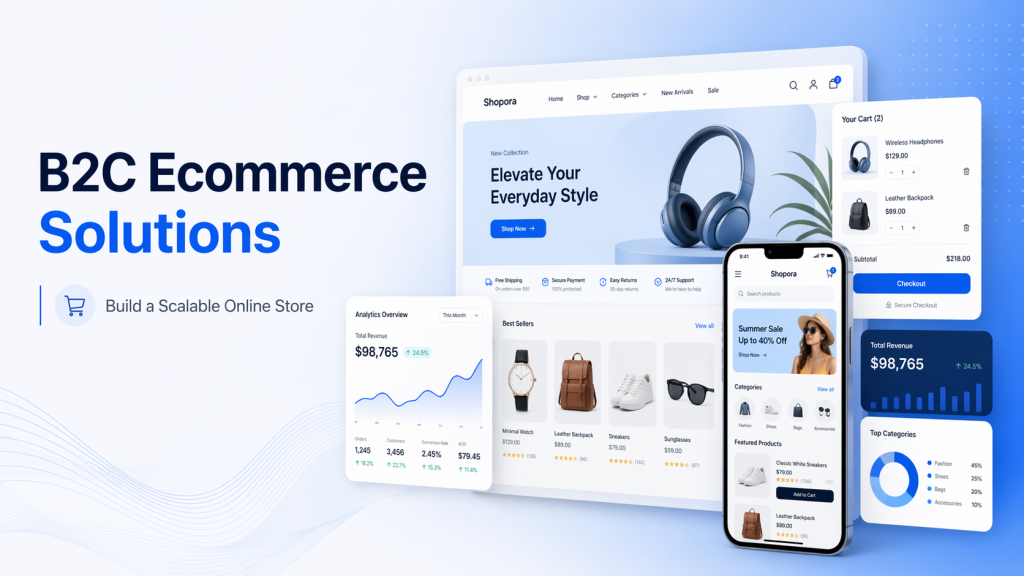
A simple way to think about it: your online store is just the front. The real “solution” is the combination of tools and technologies that keep everything running smoothly behind the scenes.
A typical B2C ecommerce setup usually includes:
- A storefront (your website or mobile interface)
- A product management system
- Payment gateways (credit cards, digital wallets, local methods)
- Order and inventory management
- Shipping and fulfillment integrations
- Customer accounts and data tracking
- Marketing and analytics tools
All of these parts need to work together. If one piece breaks or slows down, it affects the whole buying experience.
1. So what makes something a “solution” instead of just a website?
A website alone lets customers browse. A B2C ecommerce solution helps you:
- Sell faster with a smoother checkout
- Manage products and orders without manual work
- Track customer behavior and improve marketing
- Handle growth without breaking your system
- Connect with other tools your business already uses
2. Different ways businesses approach B2C ecommerce solutions
There isn’t a single way to build an ecommerce system. Depending on your needs, you might choose:
- All-in-one platforms (like Shopify or BigCommerce): quick to launch, easier to manage
- Open-source solutions (like WooCommerce or Magento): more flexible, more control
- Custom ecommerce development: built from scratch to match your exact business logic
- Headless commerce: separates frontend and backend for better performance and flexibility
- Marketplace integrations: selling through platforms like Amazon while syncing your own store
Each approach comes with trade-offs. Some are faster to start with. Others give you more control as your business grows.
3. When do you actually need a full B2C ecommerce solution?
If you’re only testing a few products, a simple store might be enough. But once your business starts to grow, you’ll likely need more than that.
You’ll need a proper solution when:
- Your product catalog is getting larger
- You’re selling across multiple channels
- You need better reporting and customer data
- Your checkout flow needs optimization
- You’re planning to scale traffic and orders
- You want to integrate with ERP, CRM, or other systems
At that point, the question is no longer “how to build a website” — it becomes “how to build a system that supports your business long-term.”
Why B2C Ecommerce Solutions Matter for Modern Businesses?
If you are selling online today, having a website is not enough. The real question is whether your current setup is actually helping you grow, or quietly holding you back.
Many businesses start with a simple store. It works at the beginning, but as traffic increases and operations become more complex, problems start to show up. Pages take longer to load, checkout feels confusing, and even small updates become time consuming.
These are not just technical issues. They directly affect your revenue.
1. What usually goes wrong?
When your ecommerce system is not strong enough, you will notice patterns like:
- Customers add products to cart but never complete the purchase
- Mobile users leave quickly because the experience feels slow or awkward
- Your team spends too much time managing products or fixing small issues
- Marketing campaigns bring traffic, but sales do not increase as expected
- Data is scattered, making it hard to understand what is really working
At first, these may seem like separate problems. In reality, they all come from the same root cause: the system is not built to support growth.
2. What a good solution actually changes?
A well-built B2C ecommerce solution does not just make your site look better. It makes everything easier and more efficient behind the scenes.
You should start to see:
- Pages load faster, especially on mobile
- Checkout becomes simpler, so more customers complete their orders
- Managing products, orders, and promotions takes less effort
- Your store connects smoothly with tools like CRM, payment systems, and shipping providers
- You can track customer behavior clearly and make better decisions
- The system can handle more traffic without slowing down
Each of these improvements has a direct impact. Faster speed helps reduce bounce rate. A smoother checkout increases conversion. Better data helps you spend marketing budget more effectively.
3. Why this matters more now?
Customer expectations are higher than before. People are used to buying from large ecommerce brands where everything works instantly. They expect the same experience everywhere.
If your site feels slow or complicated, they will not wait. They will leave and buy somewhere else.
At the same time, running an ecommerce business is more complex now. You may be selling across multiple channels, dealing with different payment methods, or managing international orders. Without a solid system, it becomes difficult to keep everything under control.
Key Features of Effective B2C Ecommerce Solutions
A good B2C ecommerce solution should do more than help you list products online. It should make the buying process easier for customers and make daily work simpler for your team.
Here are the features that matter most.
1. Mobile friendly storefront
Most customers will visit your store from a phone. So the mobile experience cannot feel like a smaller version of the desktop site.
Product pages should be easy to read. Buttons should be clear. Images should load fast. Checkout should be simple to complete with one hand.
If mobile feels slow or messy, customers will leave before they even compare prices.
2. Fast page speed
Speed is one of the first things customers notice, even if they do not think about it directly.
A slow store can hurt both sales and SEO. Product pages, collection pages, search results, and checkout all need to load quickly.
This depends on many things, including clean code, optimized images, good hosting, limited third party scripts, and a theme or frontend built with performance in mind.
3. Simple checkout
Checkout is where many stores lose sales.
A strong B2C ecommerce solution should make checkout clear and short. Customers should know what they are paying, how shipping works, and what payment options are available.
Useful checkout features include:
- Guest checkout
- Multiple payment methods
- Clear shipping fees
- Discount code support
- Address autocomplete
- Trust signals near payment
The goal is simple: remove anything that makes the customer hesitate.
4. Product management
Your team should be able to add, edit, organize, and update products without stress.
This becomes even more important when your store has many product types, variants, collections, bundles, or seasonal campaigns.
A good product management setup helps you control:
- Product titles and descriptions
- Images and videos
- Pricing
- Variants
- Stock status
- Categories and collections
- SEO fields
When this part is clean, your team saves time and your customers get better product information.
5. Secure payment options
Customers need to feel safe when they pay.
Your store should support trusted payment methods such as credit cards, digital wallets, local payment options, and payment providers that are common in your target market.
Security also matters behind the scenes. The solution should follow proper standards for payment handling, data protection, and fraud prevention.
6. Inventory and order management
As orders grow, manual tracking becomes risky.
A proper ecommerce solution should help you manage stock levels, order status, returns, and fulfillment without too much manual work.
This is especially important if you sell across several channels, such as your own website, marketplaces, retail stores, or social commerce platforms.
7. Search and filtering
Customers should be able to find products quickly.
Good search and filtering can make a big difference, especially for stores with large catalogs.
Useful filters may include:
- Price
- Size
- Color
- Brand
- Category
- Availability
- Rating
- Material
If customers cannot find what they want, they usually do not keep looking for long.
8. SEO friendly structure
Your ecommerce store should be built in a way that search engines can understand.
This includes clean URLs, optimized title tags, meta descriptions, structured data, internal links, fast loading pages, and indexable product and category pages.
SEO should not be treated as something added after launch. It needs to be considered from the beginning, especially for product architecture and category structure.
9. Analytics and reporting
You need to know what is happening inside your store.
A good solution should help you track traffic, conversion rate, cart abandonment, best selling products, customer behavior, and revenue by channel.
Without clear data, it is hard to know whether the problem is traffic, product pages, pricing, checkout, or marketing quality.
10. Integration with business tools
Most growing ecommerce businesses do not run on one tool only.
Your store may need to connect with:
- CRM
- ERP
- POS
- Email marketing tools
- Accounting software
- Shipping providers
- Warehouse systems
- Customer support tools
Good integrations reduce manual work and help your team avoid mistakes.
11. Scalability
Your ecommerce system should not break when your business grows.
More products, more traffic, more orders, more markets, and more campaigns all put pressure on the system.
A scalable B2C ecommerce solution gives your business room to grow without needing to rebuild everything too soon.
Types of B2C Ecommerce Solutions
Not every business needs the same ecommerce setup. A small brand testing its first products will not need the same system as a retail company selling across multiple countries.
Below are the main types of B2C ecommerce solutions businesses usually consider.
1. SaaS ecommerce platforms
SaaS platforms are ready made ecommerce systems that let you build and manage an online store without handling the full technical setup yourself.
Popular examples include Shopify, BigCommerce, and Salesforce Commerce Cloud.
This option works well if you want to launch quickly, keep management simple, and avoid dealing too much with hosting or backend maintenance.
However, SaaS platforms can become limited when your business needs highly custom features, complex integrations, or full control over the shopping experience.
2. Open source ecommerce solutions
Open source platforms give you more control over how your store is built and managed.
Common examples include WooCommerce, Magento, and OpenCart.
This option is often a good fit for businesses that need more flexibility, custom workflows, or deeper control over website structure and data.
The tradeoff is that open source solutions usually require more technical support. You may need developers to handle hosting, updates, security, performance, and custom features.
3. Custom ecommerce development
A custom ecommerce solution is built around your exact business needs.
Instead of adjusting your process to match a platform, the system is designed to fit how your business actually works.
This can be useful if you have:
- Complex product rules
- Unique pricing logic
- Custom checkout flow
- Special shipping requirements
- ERP or CRM integration
- Multi market operations
- A large product catalog
- Internal business processes that standard platforms cannot handle well
Custom development usually takes more time and investment, but it gives you more control and long term flexibility.
4. Headless commerce
Headless commerce separates the frontend from the backend.
In simple terms, the part customers see is separate from the system that manages products, orders, and checkout.
This approach can help businesses create faster, more flexible shopping experiences. It is often used when brands want full control over design, performance, and content across different channels.
Headless commerce can be a strong choice for growing brands, but it also needs a clear technical plan. Without the right team, it can become more complex than expected.
5. Marketplace based ecommerce
Some businesses sell mainly through marketplaces such as Amazon, eBay, Etsy, or regional platforms.
This can be a good way to reach customers quickly, especially when you do not yet have a strong brand or existing traffic.
The downside is that you have less control. Marketplace rules, fees, competition, and limited customer data can make it harder to build long term brand value.
Many businesses use marketplaces as one sales channel, while still building their own ecommerce website as the main brand hub.
6. Omnichannel ecommerce solutions
Omnichannel ecommerce connects your online store with other sales channels, such as physical stores, marketplaces, social media, mobile apps, and POS systems.
The goal is to create a consistent customer experience across all touchpoints.
For example, a customer may discover a product on Instagram, check details on your website, buy online, and return it in store. A good omnichannel setup helps all of these steps work together.
This type of solution is especially useful for retail brands that sell both online and offline.
Which type should you choose?
The right choice depends on your business stage, budget, technical needs, and growth plan.
- If you need speed, a SaaS platform may be enough.
- If you need flexibility, open source may be a better fit.
- If your business model is complex, custom development may be the smarter long term choice.
- If performance and content experience are top priorities, headless commerce may be worth considering.
The best B2C ecommerce solution is not always the most popular one. It is the one that fits how your business sells, operates, and plans to grow.
Best B2C Ecommerce Platforms and Technologies to Consider
Choosing a B2C ecommerce platform is one of the biggest decisions in the project. It affects how fast you can launch, how much control you have, how easy the store is to manage, and how well the system can grow later.
There is no single best platform for every business. The right choice depends on your products, budget, team, and long term plan.
| Platform or technology | Best for | Main strengths | Things to consider |
| Shopify | Small to growing B2C brands | Easy to launch, simple admin, strong app ecosystem | Custom logic can be limited without apps or custom development |
| Shopify Plus | Larger retail brands | More control, better automation, stronger checkout options | Higher monthly cost |
| WooCommerce | WordPress based businesses | Flexible, SEO friendly, large plugin ecosystem | Needs proper hosting, maintenance, and security setup |
| Magento or Adobe Commerce | Complex product catalogs and enterprise stores | Powerful catalog management, flexible structure, strong B2C and B2B support | Development and maintenance can be more expensive |
| BigCommerce | Growing brands that need built in ecommerce features | Good native features, flexible APIs, less reliance on apps | Design and customization may still need expert support |
| Salesforce Commerce Cloud | Enterprise retail businesses | Strong personalization, CRM connection, enterprise scale | Best suited for larger budgets and teams |
| Headless commerce with React, Vue, or Next.js | Brands that need high performance and custom frontend | Faster experience, flexible design, better content control | Requires stronger technical planning and development support |
1. Shopify
Shopify is a popular choice for B2C brands that want to launch quickly and manage the store without too much technical work.
It works well for fashion, beauty, lifestyle, food, accessories, home products, and many direct to consumer brands.
Shopify is especially useful when your team wants a clean admin panel, reliable hosting, and access to many apps for marketing, reviews, subscriptions, loyalty, and analytics.
The main thing to watch is customization. If your store needs very specific checkout logic, complex product rules, or deep backend workflows, you may need Shopify Plus or custom development.
2. WooCommerce
WooCommerce is a strong option if your business already uses WordPress or needs more control over content and SEO.
It gives you flexibility with product pages, landing pages, blogs, and custom content structure. That makes it useful for brands that rely heavily on organic traffic and content marketing.
However, WooCommerce needs proper setup. Hosting, speed, plugin quality, security, and updates all matter. If too many plugins are added without control, the store can become slow or hard to maintain.
3. Magento or Adobe Commerce
Magento, now part of Adobe Commerce, is often used for larger stores with complex catalogs, many product types, or advanced pricing rules.
It is powerful, but it is not the simplest option. Businesses usually choose Magento when they need flexibility at a deeper level and have the budget to support proper development and maintenance.
For small stores, it may be more than needed. For complex ecommerce operations, it can be a strong long term choice.
4. BigCommerce
BigCommerce sits somewhere between ease of use and flexibility.
It comes with many ecommerce features already built in, which can reduce the need for too many third party apps. It also provides useful API options for businesses that want to connect with other systems.
It can work well for growing brands that need more native features but do not want the heavy technical demands of a fully custom setup.
5. Salesforce Commerce Cloud
Salesforce Commerce Cloud is mainly used by enterprise retail businesses.
Its strength is in personalization, customer data, marketing connection, and large scale ecommerce operations. It is a serious option for companies that already use Salesforce or need advanced customer journeys.
For smaller businesses, the cost and setup may be too heavy.
6. Headless ecommerce technologies
Headless ecommerce is not a single platform. It is an approach that uses a separate frontend, often built with technologies like React, Vue, or Next.js, connected to an ecommerce backend through APIs.
This can be a good choice when your brand needs a faster website, more creative control, or a shopping experience that standard themes cannot provide.
But headless is not always necessary. It works best when there is a clear reason for it, such as performance, custom UX, multi channel content, or complex frontend requirements.
How to make the right choice?
Do not choose a platform only because it is popular.
Start with practical questions:
- How many products do you sell now?
- How many do you expect to sell in one or two years?
- Do you need custom checkout or pricing logic?
- Will you sell in multiple countries?
- What systems need to connect with your store?
- How much control does your team need?
- What is your budget for development and maintenance?
A good B2C ecommerce platform should match your current needs, but it should also leave enough room for growth.
How to Choose the Right B2C Ecommerce Solution?
Choosing the right B2C ecommerce solution starts with one simple question: what does your business actually need to sell better?
A platform may look good on paper, but that does not always mean it is right for your store. The best choice should fit your products, your team, your budget, and the way you plan to grow.
1. Start with your business size
A small store with a few products may only need a simple Shopify or WooCommerce setup.
But if you have thousands of products, multiple warehouses, different customer groups, or international markets, you will need something more structured.
Before choosing a platform, look at:
- Number of products
- Number of product variants
- Monthly traffic
- Average order volume
- Number of markets or languages
- Internal team size
- Future growth plan
This helps you avoid choosing a system that feels fine today but becomes a problem later.
2. Understand your product complexity
Not all products are simple.
Some stores sell basic physical products. Others need bundles, subscriptions, custom options, size charts, product personalization, wholesale pricing, or advanced inventory rules.
The more complex your products are, the more carefully you need to choose your ecommerce setup.
For example, a fashion brand may need strong filtering by size, color, material, and availability. A furniture brand may need delivery zone logic. A beauty brand may need bundles, subscriptions, and product recommendations.
Your platform should support how your products are actually sold.
3. Think about your team
A good ecommerce solution should make daily work easier, not harder.
If your marketing team needs to update landing pages often, choose a setup that gives them enough control. If your operations team manages hundreds of orders per day, make sure the backend is clear and efficient.
Ask questions like:
- Can the team update products without asking developers every time?
- Can marketing create campaigns and landing pages easily?
- Can orders, refunds, and returns be handled smoothly?
- Is the admin panel easy enough for daily use?
- Will the team need training?
A powerful system is not useful if your team struggles to use it.
4. Check your integration needs
Most ecommerce businesses need more than a storefront.
Your store may need to connect with payment gateways, shipping providers, CRM, ERP, POS, email marketing, accounting software, warehouse tools, or customer support platforms.
This is where many projects become complicated.
Before development starts, list every tool your business uses and decide how each one should connect with your store.
You should know:
- What data needs to move between systems
- How often the data should sync
- Which system is the source of truth
- What happens when an order is changed or cancelled
- Who will manage errors or failed syncs
Good integration planning can save a lot of time later.
5. Consider SEO from the beginning
SEO should not be something you fix after launch.
Your ecommerce solution should support clean URLs, editable metadata, structured product data, fast loading pages, internal linking, indexable category pages, and proper redirects.
This is especially important if you are migrating from an old website.
A poor migration can cause ranking drops, broken URLs, lost traffic, and lower sales. So make sure SEO is part of the planning stage, not a last minute task.
6. Look at total cost, not just setup cost
Some platforms look affordable at the beginning but become expensive as you add apps, custom features, paid themes, integrations, and maintenance.
When comparing options, look at the full picture:
- Platform fee
- Hosting
- Theme or design cost
- Development cost
- App or plugin fees
- Payment fees
- Maintenance
- Security updates
- Future custom work
The cheapest option is not always the most cost effective one.
7. Plan for growth
Your ecommerce solution should not only solve today’s problems. It should also support where your business is going.
Think about what may happen in the next 12 to 24 months.
- Will you add more products?
- Will you enter new markets?
- Will you need multiple languages or currencies?
- Will you run larger campaigns?
- Will you connect with more systems?
- Will you need a mobile app later?
If the answer is yes, choose a solution that can grow with you.
8. Final checklist before making a decision
Before choosing a B2C ecommerce solution, make sure you are clear on:
- Your business goals
- Your product structure
- Your budget
- Your team’s ability to manage the system
- Your required integrations
- Your SEO requirements
- Your expected traffic and order volume
- Your long term growth plan
The right solution is not always the biggest or most expensive one. It is the one that fits your business model and gives you enough room to grow.
B2C Ecommerce Solution Development Process
Building a B2C ecommerce solution should follow a clear process. This helps avoid missed requirements, weak user experience, and technical issues after launch.
1. Discovery
Start by understanding the business, products, customers, and goals. This stage usually covers:
- Product types
- Target customers
- Sales channels
- Payment needs
- Shipping rules
- Required integrations
2. UX and UI Design
The design should make shopping simple. Focus on clear navigation, strong product pages, mobile experience, and easy checkout. A good design helps customers find products faster and complete orders with less friction.
3. Platform Selection
Choose the platform based on real business needs. Shopify may work well for fast launch. WooCommerce can be good for content focused brands. Magento or custom development may be better for complex stores.
4. Development and Integration
This is where the store is built and connected with key systems. Common integrations include payment gateways, shipping providers, CRM, ERP, POS, email marketing, and analytics tools.
5. SEO and Performance Setup
SEO should be handled before launch, not after. This includes clean URLs, metadata, structured data, redirects, image optimization, and page speed improvements.
6. Testing
Test the full shopping journey before going live. Check product pages, cart, checkout, payment, order emails, mobile layout, forms, tracking, and integrations.
7. Launch and Support
After launch, keep monitoring the store. Fix issues quickly, review customer behavior, improve conversion, and update the system as the business grows.
A strong development process helps your ecommerce store launch smoothly and stay ready for long term growth.
Real Example: Jewellery Ecommerce Website Built with Magento
A practical example of a B2C ecommerce solution is the Magento website ONEXT DIGITAL developed for APPLES & FIGS Jewellery, a UK based jewelry store.
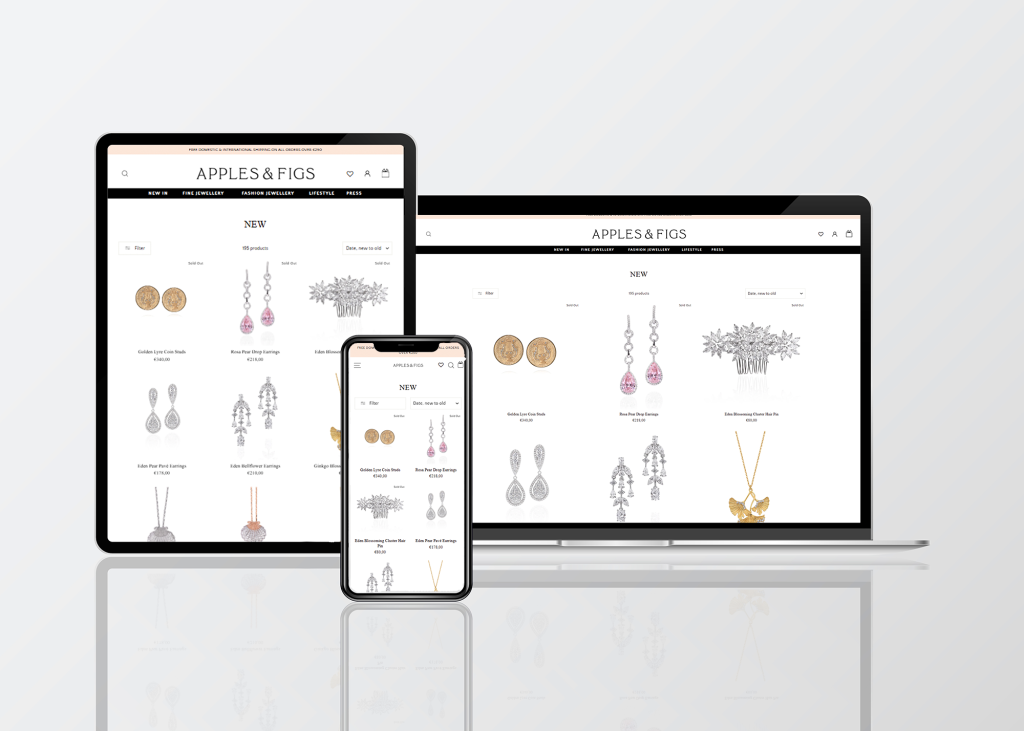
The brand needed a strong ecommerce website to expand its online presence and support a wide range of jewelry products. For this type of business, a basic online store would not be enough. The website needed to handle multiple stores, secure payment methods, and a large product catalog while keeping the shopping experience smooth for customers.
ONEXT DIGITAL helped build a Magento based ecommerce solution that supported the brand’s online growth. Magento was a suitable choice because it offers flexibility for complex catalogs, store management, payment setup, and future expansion.
This project shows why choosing the right B2C ecommerce solution matters. For a growing retail brand, the platform is not only about displaying products. It also needs to support operations, customer trust, and long term scalability.
After launch, ONEXT DIGITAL continued to support smooth website operations through ongoing development and technical support.
Common Mistakes When Choosing B2C Ecommerce Solutions
Choosing the wrong B2C ecommerce solution can cost more than expected. It may slow down your store, make daily work harder, or limit future growth.
1. Choosing only by price
A cheaper option may look attractive at first, but it can become expensive later through extra apps, fixes, and custom work.
2. Ignoring mobile experience
Many customers shop on mobile. If the store is hard to use on a phone, you will lose sales.
3. Making checkout too complicated
Long forms, unclear fees, or limited payment methods can make customers abandon their carts.
4. Adding too many plugins or apps
Too many add-ons can slow down the website and create conflicts. Use only what is truly needed.
5. Forgetting SEO during development
SEO should be planned before launch. Clean URLs, redirects, metadata, and page speed all matter.
6. Not planning integrations
Payment, shipping, CRM, ERP, and marketing tools should be considered early. Poor integration planning often leads to manual work later.
7. Not thinking about growth
Your store may work today, but will it still work when traffic, products, and orders increase?
A good B2C ecommerce solution should support your current needs and give your business room to grow.
How Much Do B2C Ecommerce Solutions Cost?
The cost of a B2C ecommerce solution can vary a lot. It depends on how complex your store is and how much customization you need.
Instead of focusing on one number, it’s better to understand the typical ranges and what affects them.
1. Basic store
Suitable for small businesses or startups.
- Simple design
- Limited number of products
- Standard features
Estimated cost: a few hundred to a few thousand dollars
Often built with Shopify or basic WooCommerce setup
2. Growing business
For brands that already have steady traffic and sales.
- Custom design
- Better performance
- More integrations
- Marketing tools
Estimated cost: a few thousand to tens of thousands of dollars
May include Shopify, WooCommerce, or BigCommerce with customization
3. Custom ecommerce solution
For businesses with more complex needs.
- Custom features
- Advanced product logic
- Integration with ERP, CRM, or other systems
- Optimized performance
Estimated cost: tens of thousands of dollars and above
Usually involves custom development or headless setup
4. Enterprise level
For large scale ecommerce operations.
- Multi market and multi language
- High traffic and large catalogs
- Advanced personalization
- Deep system integration
Estimated cost: can go much higher depending on requirements
Often uses platforms like Adobe Commerce or Salesforce Commerce Cloud
What affects the cost?
Several factors can increase or reduce the total cost:
- Number of products and variants
- Design complexity
- Custom features
- Third party integrations
- Platform fees
- Hosting and infrastructure
- Ongoing maintenance and support
Conclusion
B2C ecommerce solutions are not just about getting a store online. They shape how you sell, how your team works, and how easily your business can grow.
A simple setup may be enough at the beginning. But as your store scales, the system behind it needs to keep up. Speed, checkout experience, integrations, and flexibility all start to matter more.
The key is to choose a solution that fits your current needs while leaving room for future growth. That could be a SaaS platform, an open source setup, or a custom ecommerce solution, depending on how your business operates.
If your current store feels slow, hard to manage, or limited, it may be time to rethink your approach.
Looking to build or upgrade your B2C ecommerce system? ONEXT DIGITAL can help you plan, develop, and optimize a solution that supports your business long term.
FAQs
What is a B2C ecommerce solution?
It is a system that helps businesses sell products directly to customers online. It includes the website, payment setup, order management, and all the tools needed to run an online store.
What is the best B2C ecommerce platform?
There is no single best option. Shopify works well for fast setup. WooCommerce is flexible and good for content driven sites. Magento or custom solutions fit more complex businesses. The right choice depends on your needs.
How much does a B2C ecommerce website cost?
Costs can range from a few hundred dollars for a simple store to tens of thousands for a custom solution. It depends on design, features, integrations, and scale.
Is Shopify good for B2C ecommerce?
Yes. Shopify is a strong choice for many B2C brands. It is easy to use, quick to launch, and has a large ecosystem of apps. For more complex needs, Shopify Plus or custom work may be required.
Should I choose a platform or a custom solution?
If your needs are simple, a platform is usually enough. If your business has complex workflows, integrations, or unique requirements, a custom solution may be better in the long run.
Can B2C ecommerce solutions connect with other systems?
Yes. Most solutions can integrate with tools like CRM, ERP, payment gateways, shipping providers, and marketing platforms. The level of integration depends on the platform and setup.