
 Services
 Solutions
 Main platform
 Technology
 White Label
  Offshore
 Hire developers



If your B2B business still relies on spreadsheets, emails, and manual order processing, a Shopify B2B Ecommerce Agency can help transform your operations. From automating pricing logic to integrating with ERP and CRM systems, the right agency turns fragmented workflows into a seamless, scalable system. Migrating to Shopify Plus isn’t just launching a new storefront it’s about creating a unified platform that manages pricing, inventory, and order workflows automatically.
For instance, how does your platform know that Customer A gets a 30% discount while Customer B receives 15%? Or that a web order immediately syncs with your warehouse and accounting systems? That’s where a skilled Shopify B2B agency becomes essential. A strong agency approaches the project like a system architecture challenge, digitizing your workflow from login to shipment.
A typical Shopify B2B implementation follows structured stages, ensuring your digital ecosystem is scalable and efficient.
Discovery & Strategic Architecture by Shopify B2B Ecommerce Agencies
The success of a B2B project is determined before a single line of code is written. During the Discovery phase, a Shopify B2B agency acts as a business consultant to align your existing offline operations with a scalable digital architecture.
1. Current System Audit & Bottleneck Analysis
The agency begins by auditing your manual sales workflows to identify “friction points.”
- Offline Workflow Mapping: Examining how orders are currently handled, whether through manual email entry, phone calls, or in-person sales representatives.
- Legacy Data Assessment: Evaluating the health of your existing data (SKUs, customer lists, and historical pricing) to determine what can be migrated and what needs cleaning before moving to Shopify Plus.
2. Architectural Strategy: Blended vs. Dedicated Storefront
A critical decision in the Shopify ecosystem is determining the store structure. The agency evaluates your business model to recommend one of two paths:
- Blended Store (B2B + DTC): A single storefront that serves both retail and wholesale customers. This is ideal for brands that want to manage one inventory pool and one theme, using Shopify’s native B2B features to “gate” wholesale pricing behind a login.
- Dedicated B2B Store: An independent expansion store exclusively for wholesale. This is preferred for enterprises with vastly different product catalogs, branding, or currency requirements for their B2B arm compared to their retail side.
3. B2B User Journey Mapping
Unlike B2C, where the “buyer” and “consumer” are the same person, B2B involves multiple personas with different motivations. The agency maps these journeys to ensure the UI serves everyone:
- The Purchasing Manager: Focuses on efficiency, bulk reordering, and tracking order history. Their journey requires speed and data accuracy.
- The CEO/Business Owner: Focuses on high-level credit limits, contract terms, and authorized user permissions. Their journey requires transparency and administrative control.
- The Sales Representative: Needs the ability to “impersonate” customers to assist with orders or create draft orders on their behalf.
4. Defining the Technical Blueprint
The output of Phase 1 is a comprehensive Functional Requirement Document (FRD). This document outlines every integration point, custom logic requirement, and third-party app needed to bridge the gap between your current offline state and your future digital storefront.
Technical Integration – How Shopify B2B Ecommerce Agencies Connect ERP & CRM
In B2B ecommerce, the storefront is only one part of a larger operational system. In most B2B implementations, Shopify Plus becomes the central hub that connects your storefront with ERP, CRM, and warehouse systems, ensuring that order data, inventory levels, and financial records stay synchronized across systems.
1. ERP & CRM Integration
This is the most critical milestone for eliminating manual data entry. Agencies integrate Shopify with established ERP systems such as NetSuite, SAP, Microsoft Dynamics 365, or Odoo.
- Inventory Synchronization: Real-time syncing of stock levels from multiple locations (Multi-location inventory) to the storefront, preventing overselling on high-volume wholesale orders.
- Order & Financial Data: Orders flow directly from Shopify to the ERP for invoice generation, while the system reflects real-time Credit Limits and outstanding balances back to the customer’s web account.
2. Custom Price Lists & Catalogs
Unlike retail ecommerce, B2B buyers often operate under negotiated contracts, meaning pricing, catalogs, and even product visibility must be customized for each customer account.
- Customer-Specific Pricing: The system automatically recognizes the logged-in user to display unique discount tiers or net pricing as per their commercial agreement.
- Restricted Catalogs: Agencies configure visibility permissions to show specific product lines to certain customer groups or geographic regions, protecting distribution channel integrity.
3. Workflow Automation (Shopify Flow)
In many B2B setups, automation tools like Shopify Flow are used to eliminate repetitive manual tasks such as tagging new accounts or flagging risky orders:
- Account Categorization: Automated tagging and grouping of customers upon successful business registration.
- Risk Management: Automated flagging or pausing of orders from accounts with Overdue Invoices based on feedback loops from the ERP.
For example, in the Equipment & Sports Shopify Case Study, Onext Digital integrated Shopify Plus with the client’s ERP system to automatically synchronize inventory levels across multiple warehouses. They also implemented customer-specific pricing and automated order workflows, enabling bulk B2B orders to process without manual intervention.
4. B2B Payment & Credit Terms
Tailoring the checkout process to match professional purchasing behaviors:
- Flexible Payment Terms: Configuring deferred payment options (Net 30/60/90) based on the buyer’s creditworthiness.
- B2B Checkout Customization: Integration of VAT/Tax ID collection and support for partial payments (deposits) rather than requiring 100% credit card settlement at checkout.
5. Technical Customization via API & Apps
For complex logic not supported by native features, agencies utilize the Shopify Admin API to develop Private Apps:
- Logistics Optimization: Calculating freight costs based on pallet weight or volume (CBM) for bulky shipments.
- Approval Workflows: Building multi-level order approval systems for the buyer’s side, allowing them to manage internal procurement budgets.
Designing for the Professional Buyer (UX/UI)
In B2B ecommerce, usability is more important than visual design. Buyers care about placing large or repeat orders quickly. A Shopify B2B agency focuses on reducing friction in the purchasing process, making it easy for professional buyers who manage hundreds of SKUs to complete repetitive tasks with minimal clicks.
1. High-Velocity Ordering Tools
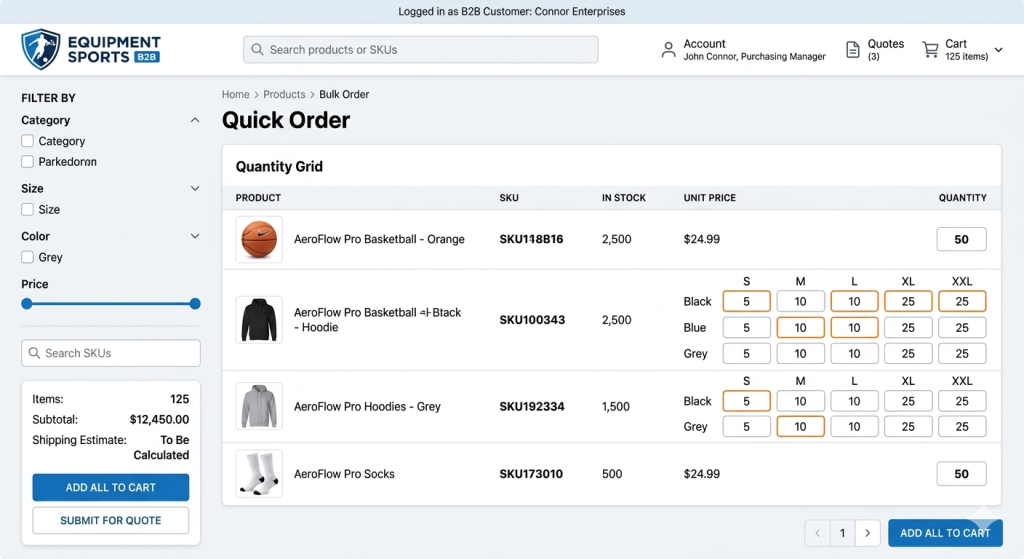
Professional buyers do not browse like retail consumers. Agencies implement tools designed for speed and bulk replenishment:
- Quick Order Forms: A dedicated interface where buyers can enter SKU numbers or product names and quantities to add multiple items to the cart simultaneously.
- CSV Uploads: Allowing procurement managers to upload a spreadsheet to populate a cart instantly for large-scale monthly restocks.
- One-Click Reordering: Providing a “Buy it Again” feature within the customer portal based on previous order history.
2. B2B-Optimized Product Discovery
Standard search and navigation often fail when dealing with thousands of technical parts or wholesale variations.
- Advanced Filtering (Faceted Search): Implementing deep filtering options (e.g., by material, industrial grade, or compatibility) to help buyers locate specific technical specifications.
- Bulk Variant Displays: Replacing standard dropdown menus with grid-style views, allowing buyers to see all sizes, colors, or configurations at once and enter quantities for each on a single screen.
3. Self-Service Account Management
One of the main goals of a B2B portal is to shift routine tasks away from sales reps and allow customers to manage orders, invoices, and accounts themselves.
- Company Profiles & Permissions: Setting up a hierarchy where a “Master Admin” on the buyer’s side can invite sub-users (e.g., junior buyers) and set individual spending limits.
- Order & Invoice History: A centralized dashboard where buyers can download PDF invoices, track shipments, and view their current account balance without contacting a representative.
4. Mobile Utility for Field Buyers
B2B buyers are often on warehouse floors or at job sites. Agencies ensure the UI is optimized for mobile utility:
- Barcode Scanning: Utilizing the mobile camera to scan physical product barcodes and add them directly to a digital cart.
- Touch-Optimized Data Entry: Ensuring quantity selectors and forms are easy to navigate on tablets and mobile devices in industrial environments.
5. Request for Quote (RFQ) Workflows
For highly customized orders or variable pricing, agencies build “Add to Quote” functionality:
- Quote-to-Order Conversion: Allowing buyers to submit a cart for review. Once the sales team approves or edits the quote, the buyer receives a notification to complete the checkout at the agreed-upon price.
Testing, Deployment, and Quality Assurance (QA)
Before launch, a reliable Shopify B2B agency will run extensive testing to make sure the storefront, ERP, and warehouse systems work together without errors. Unlike B2C, where a bug might lose a single sale, a B2B system failure can disrupt an entire supply chain.
1. End-to-End Integration Testing
The agency conducts rigorous testing of the data “handshake” between Shopify and the backend systems.
- Data Accuracy: Verifying that a bulk order placed on the storefront triggers the correct inventory deduction in the ERP and generates an accurate invoice.
- Price Logic Validation: Stress-testing the system with multiple customer profiles to ensure that Tier 1, Tier 2, and contract-specific pricing display correctly without overlap.
2. User Acceptance Testing (UAT)
Before the official launch, the agency conducts a User Acceptance Testing (UAT) phase where real stakeholders, including sales representatives and key wholesale clients, test the platform.
- Workflow Efficiency: Confirming that the bulk-order tools and account management portals are intuitive for the end-user.
- Edge Case Handling: Testing scenarios such as partial shipments, back-orders, and returns to ensure the system handles exceptions according to business rules.
3. Performance & Load Testing
B2B sites often handle massive carts (hundreds of line items) and high-concurrency traffic during seasonal restock periods.
- Checkout Speed: Optimizing the checkout script to handle large-scale calculations for taxes, shipping, and discounts without latency.
- Mobile Responsiveness: Ensuring all technical features, such as CSV uploads and barcode scanning, function across various warehouse-grade tablets and smartphones.
4. Launch & Post-Launch Support
The “Go-Live” is a coordinated event between the agency, the client’s IT team, and the ERP provider.
- DNS & Domain Migration: Ensuring a zero-downtime transition if migrating from a legacy platform.
- Internal Training: The agency provides documentation and training sessions for the client’s sales and support teams, enabling them to use “Impersonation” features to help customers place orders or resolve account issues.
5. Continuous Optimization
Post-launch, a B2B agency monitors the system to refine the user experience based on real-world data.
- Conversion Rate Optimization (CRO): Analyzing where buyers drop off in the wholesale funnel and adjusting the UI to improve flow.
- Feature Expansion: Scaling the platform by adding new automated workflows (via Shopify Flow) as the business expands into new markets or product categories.
How to Choose the Right Shopify B2B Agency?
Selecting an agency for a B2B project requires a different set of criteria than a standard retail build. Because B2B ecommerce is deeply rooted in operational logic, your partner must possess both technical depth and a firm grasp of wholesale business processes.
1. Proven Integration Expertise
The most common failure point in B2B projects is the connection between the storefront and the backend.
- The Criteria: Look for an agency with a portfolio of successful ERP, CRM, and IMS integrations (e.g., NetSuite, SAP, Sage).
- The Question: Ask how they handle real-time inventory syncing and custom pricing logic between Shopify and external databases.
2. Specialized B2B Portfolio
A visually stunning B2C portfolio does not always translate to B2B success.
- The Criteria: Review case studies specifically focused on Shopify Plus B2B features. Look for implementations involving complex company hierarchies, bulk ordering tools, and custom checkout workflows.
- The Question: Can they demonstrate a project where they solved a specific B2B friction point, such as high-volume SKU management or multi-level approval workflows?
3. Proficiency in Shopify Plus Features
Shopify Plus offers a suite of native B2B tools that can save months of development time if used correctly.
- The Criteria: Your agency should be an expert in Native shopify B2B Features (Company Profiles, Catalogs, and B2B Checkout). They should know when to use native functionality and when a Custom Private App is required to bridge a gap.
- The Question: How do they decide between using a third-party app versus building a custom solution for complex shipping or tax requirements?
4. Post-Launch Support & Scalability
B2B systems are mission-critical; downtime can stop your customers’ operations entirely.
- The Criteria: Ensure the agency offers a Service Level Agreement (SLA) for post-launch maintenance, security updates, and technical troubleshooting.
- The Question: What is their support structure for handling critical integration errors after the site goes live?
5. Strategic Consulting Capability
The best agencies don’t just take orders; they advise on the best way to digitize your sales.
- The Criteria: A top-tier partner will challenge your existing manual processes and suggest Automation (Shopify Flow) to increase efficiency.
- The Question: Based on our current manual wholesale process, what specific automations would they recommend to reduce our overhead?
For many wholesalers, building a Shopify B2B platform means turning fragmented processes, spreadsheets, manual orders, and disconnected systems into a streamlined digital workflow.
By following a structured roadmap from discovery and technical integration to high-efficiency UX design, an experienced agency transforms your wholesale business into a scalable, self-service engine. The right partner does more than just build a store; they create a system that grows with your enterprise.
Conclusion:
Building a Shopify B2B platform is more than launching an online store. It requires aligning pricing logic, ERP and CRM integrations, operational workflows, and a buyer-focused user experience into a single, scalable system.
Partnering with an experienced Shopify B2B Ecommerce Agency like Onext Digital ensures your business can replace fragmented manual processes with a streamlined, self-service platform. From custom pricing and bulk ordering tools to automated workflows and mobile-optimized UX, Onext Digital empowers wholesalers to improve order accuracy, save time, and scale operations efficiently.
Ready to optimize your B2B ecommerce experience? Contact Onext Digital today to discuss how we can build a solution tailored to your business needs.