
 Services
 Solutions
 Main platform
 Technology
 White Label
  Offshore
 Hire developers



In today’s fast-paced digital world, software is no longer just the responsibility of developers it affects every team in a company, from marketing to product to customer support. But understanding how software is built, tested, and delivered can feel overwhelming if you’re not a technical expert.
That’s where the DevOps lifecycle comes in. Think of it as a roadmap that guides how software moves from an idea to a fully functioning product, while ensuring quality, speed, and collaboration along the way. In this guide, we’ll break down the DevOps lifecycle in simple terms for non-technical teams, showing you how understanding this process can make your work smoother, improve collaboration with developers, and ultimately help your company deliver better products faster.
By the end of this article, you’ll not only know what each stage of the DevOps lifecycle involves but also how your team can play an active role in the process without ever writing a single line of code.
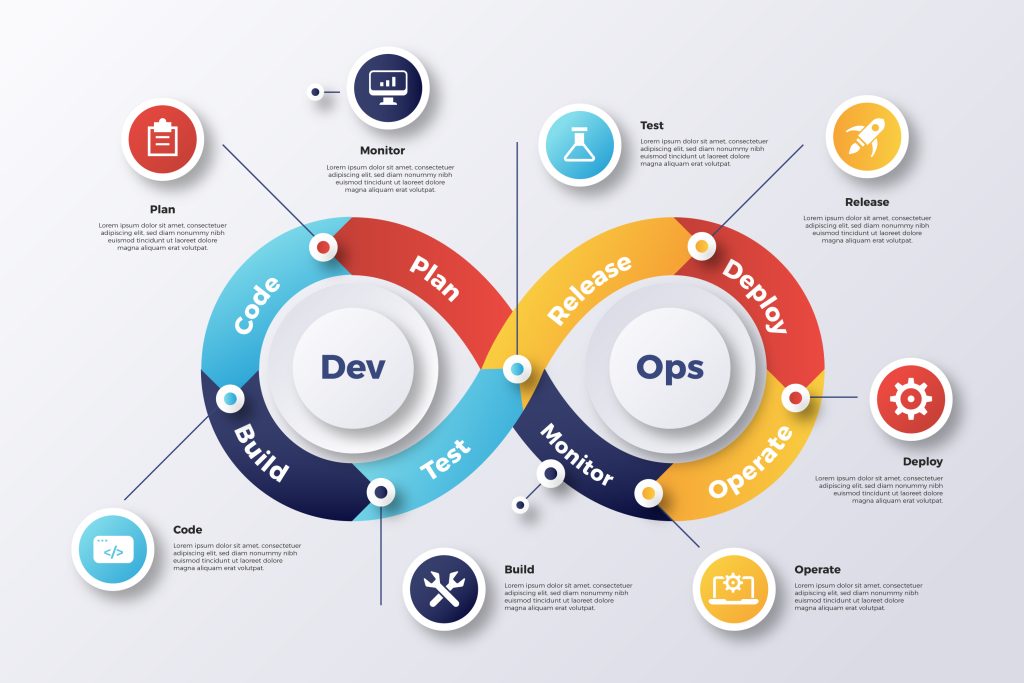
What Is the DevOps Lifecycle?
At its core, the DevOps lifecycle is simply the journey that software takes from an initial idea to a fully functioning product that customers can use and back again as improvements are made. Unlike traditional software development methods, where each stage happens in isolation, DevOps emphasizes continuous collaboration, automation, and feedback.
You can think of it like baking a cake: you don’t just throw ingredients together once and hope it works. You plan the recipe, mix carefully, bake, taste, adjust, and then share it. And every time you bake, you refine your approach to make it even better. In the same way, DevOps ensures that software is developed, tested, deployed, and monitored in a continuous, cyclical process.
For non-technical teams, the important takeaway is this: understanding the DevOps lifecycle doesn’t mean learning to code or manage servers. Instead, it’s about seeing the bigger picture how different teams contribute at each stage, how decisions affect timelines, and how feedback loops keep improving the product.
In the next section, we’ll explore why non-technical teams should care about DevOps, and how being aware of this lifecycle can make your work more effective and aligned with the rest of the company.
Why Non-Technical Teams Should Care
You might be wondering: “I don’t write code or manage servers why should I care about the DevOps lifecycle?” The truth is, even if you’re not on the technical side, understanding this process can make a huge difference in how smoothly your team operates and how successful the product becomes.
Here’s why:
1. Faster Time to Market
DevOps emphasizes continuous development and deployment. When non-technical teams understand the process, you can better coordinate marketing campaigns, product launches, and customer communications, ensuring that everyone is ready when the software is released.
2. Better Collaboration
Knowledge of the DevOps lifecycle bridges the gap between developers and other teams. You’ll know what’s happening at each stage, which reduces confusion, prevents misaligned expectations, and fosters a teamwork-oriented culture.
3. Improved Customer Experience
A smoother DevOps process means fewer bugs, faster updates, and more reliable features. By understanding the lifecycle, non-technical teams can collect feedback, prioritize user needs, and communicate issues effectively, helping deliver a product that truly satisfies customers.
4. Informed Decision-Making
Awareness of DevOps stages allows non-technical teams to make smarter decisions about timelines, resource allocation, and project priorities. You’ll be able to anticipate delays, suggest improvements, and align your goals with the development team.
In short, even if you never touch a line of code, understanding the DevOps lifecycle gives you a clear view of the software journey, helping you contribute meaningfully and make your role more impactful.
Next, we’ll dive into the 7 stages of the DevOps lifecycle, breaking down each step in simple terms so you can see exactly where your team fits in.
The 7 Stages of the DevOps Lifecycle
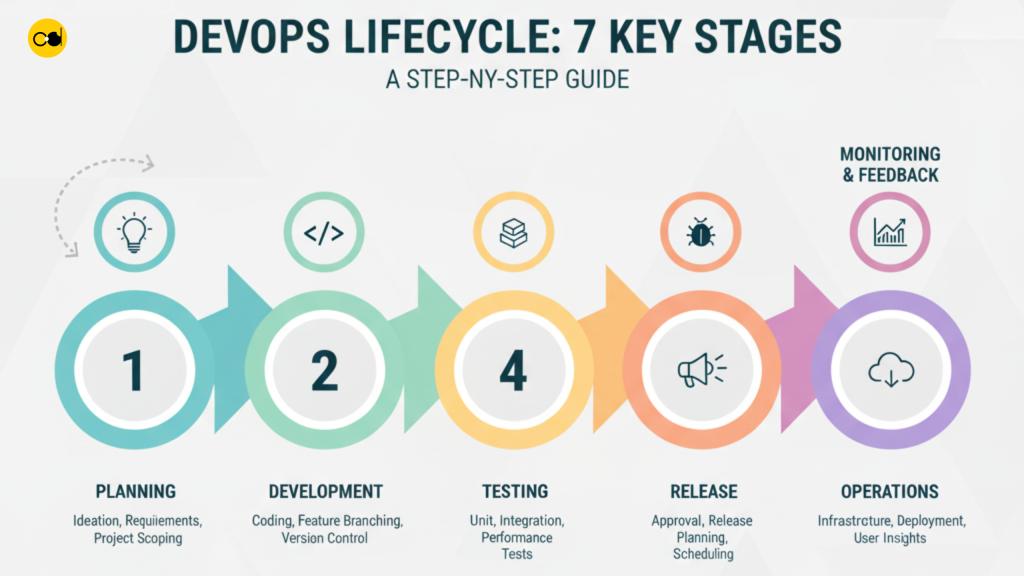
The DevOps lifecycle is a continuous loop it never truly ends. Software is always evolving, improving, and adapting to user needs. Understanding these stages helps non-technical teams see where and how they can contribute to the success of a project.
1. Planning
Planning sets the foundation for the entire project. At this stage, the team identifies what problems to solve, defines the features to build, and establishes project goals and priorities.
Role of non-technical teams:
- Provide insights about customer behavior, market trends, and business priorities.
- Help prioritize features based on marketing, sales, or strategic objectives.
- Ensure the project scope aligns with organizational goals.
Non-technical input at this stage helps reduce misunderstandings and ensures the software will address real user needs.
2. Development / Coding
During development, developers write the actual code and create the core functionality of the software. This phase focuses on transforming requirements into working solutions.
Role of non-technical teams:
- Stay informed on development progress to coordinate with other business activities.
- Clarify and validate feature requirements, ensuring alignment with business and customer expectations.
- Act as a bridge between end-users and developers, translating business needs into actionable guidance.
By supporting developers in this way, non-technical teams help prevent misaligned features and unnecessary rework.
3. Build / Integration
In this stage, all components of the software are combined, compiled, and prepared for testing. Integration ensures that different modules work together seamlessly.
Role of non-technical teams:
- Review prototypes, early versions, or mockups.
- Provide feedback on design, usability, and user experience.
- Highlight potential workflow issues from a business perspective.
This collaborative review helps the technical team identify and address issues early, reducing errors in later stages.
4. Testing
Testing ensures that the software functions as intended, meets quality standards, and is free from critical bugs before release. This includes automated tests, manual testing, and user acceptance testing (UAT).
Role of non-technical teams:
- Participate in UAT to verify that features meet business requirements and user expectations.
- Provide insights from a user’s perspective, highlighting confusing flows or missing functionality.
- Help identify priority areas for fixing issues before launch.
Non-technical involvement ensures that software delivers value from a user and business perspective.
5. Release / Deployment
Release involves deploying the software to a live environment where end-users can access it. This stage focuses on delivering new features, fixes, or updates safely and efficiently.
Role of non-technical teams:
- Prepare guides, training materials, or support documentation for internal and external users.
- Plan customer communication, marketing campaigns, or announcements for new features.
- Coordinate with operations and support teams to ensure readiness for the release.
Their contributions help users adopt the software smoothly and reduce friction during rollout.
6. Operations
Once live, the software must be monitored and maintained to ensure stability, performance, and availability. Operations include infrastructure management, incident response, and performance optimization.
Role of non-technical teams:
- Track key metrics such as user adoption, support tickets, or system performance indicators.
- Collect and report feedback from customers or internal users.
- Assist in identifying trends that may require adjustments or improvements.
By staying engaged, non-technical teams help detect issues early and support proactive improvements.
7. Monitoring & Feedback / Continuous Improvement
Monitoring and feedback close the loop of the lifecycle. Insights from users, system performance, and analytics inform updates, bug fixes, and future development priorities.
Role of non-technical teams:
- Gather, analyze, and prioritize feedback from customers, stakeholders, and internal teams.
- Suggest improvements or new features based on business strategy and user needs.
- Collaborate with technical teams to plan the next iteration of development.
This continuous improvement ensures that the software evolves with user needs and market demands, maintaining relevance and quality.
Key Principles of DevOps for Non-Technical Teams

Understanding the DevOps lifecycle is important, but knowing the principles behind it helps non-technical teams truly see how they fit into the process. Let’s break them down in simple, actionable terms:
1. Collaboration is Everything
DevOps is built on teamwork. It breaks down the walls between developers, operations, and other teams so everyone works toward the same goal.
Why it matters for non-tech teams:
- You’ll know who to talk to when issues arise.
- Your insights, like customer feedback or business priorities, become part of the software decisions.
Example: A marketing team member notices that customers frequently request a wishlist feature. Sharing this early helps developers plan it into the next release rather than retrofitting it later.
2. Continuous Improvement
DevOps treats software as an evolving product. Instead of “launch and forget,” teams continuously improve features, fix bugs, and optimize performance.
Non-technical contribution:
- Collect feedback from users.
- Suggest small improvements based on real-world use.
Example: Customer support reports that a checkout button is confusing. Developers fix it quickly, improving the experience for all users.
3. Automation Awareness
Automation speeds up testing, deployment, and monitoring. It ensures repetitive tasks are done correctly and frees up developers to focus on meaningful work.
Non-tech takeaway:
- You don’t need to automate yourself, but knowing automation exists helps you understand why releases can be faster and more reliable.
- It also explains why some updates happen automatically without manual intervention.
Example: A new feature is automatically tested and deployed overnight. Your team can plan a launch announcement without waiting for manual confirmation.
4. Transparency & Communication
Clear, frequent communication keeps everyone informed about progress, challenges, and next steps. This prevents surprises and aligns expectations across teams.
Non-technical team role:
- Attend regular updates, sprint reviews, or product demos.
- Ask questions if something is unclear.
Example: During a sprint demo, the product team sees a new feature working live and can immediately provide feedback before it goes to customers.
5. Feedback Loops
DevOps thrives on feedback from both users and internal teams. It’s a cycle of learning and improving.
Non-tech role:
- Share customer feedback, usage insights, or market trends.
- Help prioritize which improvements matter most.
Example: Marketing notices a sudden drop in sign-ups after a new UI change. Reporting this helps developers adjust quickly.
The Benefits of Understanding the DevOps Lifecycle
Understanding the DevOps lifecycle brings tangible advantages for both technical and non-technical teams. By adopting DevOps practices, organizations can deliver software faster, more reliably, and at higher quality, while improving collaboration and customer satisfaction. Here’s a detailed breakdown of the core benefits:
1. Faster Delivery
Automation, combined with CI/CD pipelines, accelerates the delivery of new features, updates, and bug fixes. Instead of waiting weeks or months for a release, teams can deploy frequent, smaller updates, ensuring the product evolves quickly.
Example: A company implementing automated testing and deployment can release a new payment feature within days instead of waiting for a quarterly release cycle.
2. Improved Quality
Continuous testing and monitoring catch bugs early in the development process. By detecting and fixing issues before they reach production, software becomes more stable, reliable, and high-quality.
Example: A marketing platform uses automated regression tests to ensure that new features don’t break existing functionalities, resulting in fewer customer complaints.
3. Enhanced Collaboration
DevOps breaks down silos between development, operations, and other teams. Shared responsibility and clear communication lead to smoother workflows, fewer misunderstandings, and faster problem-solving.
Example: During a product launch, developers, QA, and customer support teams coordinate in real time to address issues, ensuring a seamless release.
4. Increased Efficiency and Cost Savings
Automation reduces repetitive manual tasks, allowing teams to focus on innovation and strategic initiatives. This leads to better resource utilization, lower operational costs, and faster turnaround times.
Example: Automating environment setup for testing frees engineers from manual configuration, saving hours of work each week.
5. Greater Stability and Reliability
Consistent processes and frequent, smaller releases help maintain system stability. Automation ensures that issues are detected and resolved quickly, and that applications can handle variable workloads reliably.
Example: An e-commerce platform using automated deployment can scale during peak sales events without crashing.
6. Better Security
Integrating security into every stage of the DevOps lifecycle DevSecOps practices helps identify and fix vulnerabilities early. This proactive approach strengthens application security.
Example: Security scans integrated into CI/CD pipelines prevent deployment of code with known vulnerabilities, reducing risks for end-users.
7. Increased Customer Satisfaction
Frequent releases and rapid responses to feedback allow products to continuously adapt to user needs and expectations. Customers experience faster updates, fewer bugs, and more relevant features.
Example: A SaaS tool updates its dashboard weekly based on user feedback, improving usability and satisfaction over time.
8. Improved Scalability
Automation and practices like infrastructure as code (IaC) allow organizations to scale applications and infrastructure quickly and efficiently as demand grows.
Example: A cloud service automatically provisions additional servers during high traffic periods, maintaining performance without manual intervention.
Common Challenges and How Non-Technical Teams Can Help
Even in a well-structured DevOps environment, projects can face hurdles that slow progress, create misunderstandings, or affect product quality. Non-technical teams can play a critical role in addressing these challenges by fostering communication, providing business context, and managing expectations. By contributing strategically, non-technical team members help ensure technical goals align with broader business objectives, reduce delays, and improve overall workflow.

Here are the most common challenges and how non-technical teams can help overcome them:
1. Communication Gap
Challenge: Developers often use technical jargon that can be confusing for non-technical teams, which may lead to misunderstandings about requirements or priorities.
How Non-Technical Teams Can Help:
- Act as a translator between technical language and business needs.
- Focus on desired outcomes rather than the technical details.
- Ensure everyone understands what success looks like.
2. Misaligned Goals
Challenge: Technical work may not always directly support business objectives, leading to wasted effort or misprioritized features.
How Non-Technical Teams Can Help:
- Ensure that every technical goal supports broader business strategies.
- Provide clarity on which features or fixes have the highest strategic impact.
3. Unrealistic Expectations
Challenge: Non-technical teams may assume features can be delivered faster than realistically possible, causing frustration and tension.
How Non-Technical Teams Can Help:
- Set realistic timelines and resource expectations.
- Communicate business priorities and constraints
- Help balance urgency with feasibility.
4. Dependency on Technical Experts
Challenge: Teams may over-rely on developers or technical leads, creating bottlenecks and slowing decision-making.
How Non-Technical Teams Can Help:
- Use technical leads as resources for decisions, not as the only drivers of progress.
- Focus on strategic alignment, letting technical teams concentrate on development.
5. Lack of Business Context
Challenge: Developers may not fully understand customer needs, market realities, or regulatory requirements, leading to solutions that miss the mark.
How Non-Technical Teams Can Help:
- Provide the “why” behind each project.
- Share customer insights, market trends, and compliance requirements.
- Help the team understand the impact of their work on business outcomes.
6. Inefficient Processes
Challenge: Manual or repetitive tasks can consume time that could be spent on higher-value work.
How Non-Technical Teams Can Help:
- Identify and automate routine, non-technical tasks, such as data entry, reporting, or documentation.
- Free up technical team members to focus on complex, high-impact work.
7. Project Delays
Challenge: Scope creep, unclear requirements, or poor coordination between departments can cause delays.
How Non-Technical Teams Can Help:
- Provide clear requirements and priorities.
- Help manage scope creep by tracking changes and approvals.
- Ensure smooth collaboration between teams, reducing bottlenecks.
Tools Non-Technical Teams Should Know
Even if you’re not writing code, knowing the right tools helps non-technical teams collaborate effectively, stay informed, and contribute meaningfully throughout the DevOps lifecycle.
1. Project Management Tools : Jira, Trello, Asana
Purpose: Track tasks, development progress, bugs, and feature requests.
How Non-Technical Teams Use Them:
- Monitor which features are in development, testing, or ready for release.
- Submit requirements or feedback in a structured way.
- Stay aware of deadlines and dependencies.
2. Communication Tools: Slack, Microsoft Teams, Zoom
Purpose: Facilitate real-time communication and team collaboration.
How Non-Technical Teams Use Them:
- Ask questions or clarify requirements quickly.
- Share updates or insights with developers.
- Collaborate across departments on projects and feedback.
3. Feedback & Analytics Tools: Hotjar, Google Analytics, SurveyMonkey
Purpose: Collect user behavior, feedback, and satisfaction metrics.
How Non-Technical Teams Use Them:
- Provide actionable insights to development teams.
- Track feature adoption and user engagement.
- Identify issues before they become widespread problems.
4. Documentation Tools: Confluence, Notion, Google Docs
Purpose: Centralize project documentation, requirements, guides, and release notes.
How Non-Technical Teams Use Them:
- Keep all stakeholders aligned with the latest project updates.
- Document user feedback and business requirements.
- Share reference materials across departments.
5. Monitoring Dashboards: Grafana, Datadog (High-Level Overview)
Purpose: Track system performance, uptime, and usage metrics.
How Non-Technical Teams Use Them:
- Understand high-level metrics without technical details.
- Provide context or prioritize issues based on user impact.
6. Automation Tools: Zapier, Integromat (Make)
Purpose: Automate repetitive tasks across apps and systems.
How Non-Technical Teams Use Them:
- Streamline workflows like report generation, notifications, or data syncing.
- Reduce manual work and focus on strategic initiatives.
Conclusion
Understanding the DevOps lifecycle is valuable for every team, not just developers. Non-technical teams can play an important role by sharing insights, providing feedback, and helping ensure that software projects stay aligned with business goals.
By getting familiar with the stages of the lifecycle, applying key principles, and using the right tools, teams can make software delivery faster, smoother, and more reliable, while also improving collaboration and product quality.
For organizations navigating complex software projects, having the right guidance or support can make a significant difference. Working with experienced teams, like those at ONEXT DIGITAL, can help bridge the gap between technical and non-technical stakeholders, ensuring projects run efficiently and deliver results that meet both business and user needs.
Even without writing code, understanding DevOps empowers non-technical teams to become active contributors to successful, scalable, and innovative software solutions.
FAQs: Common Questions Non-Technical Teams Ask About the DevOps Lifecycle
1. Do non-technical teams really need to understand the DevOps lifecycle?
Yes. Even without writing code, non-technical teams influence planning, prioritization, communication, and release timelines. Understanding the lifecycle helps them collaborate better with technical teams, avoid misunderstandings, and improve project outcomes.
2. How is DevOps different from traditional software development?
Traditional development separates teams into silos (development builds → operations deploys). DevOps breaks these silos by encouraging continuous collaboration, automation, and faster feedback loops resulting in quicker releases and more stable systems.
3. Is DevOps only for large technology companies?
Not at all. Small businesses, startups, and non-tech companies also benefit from DevOps. The approach helps teams release updates faster, reduce manual work, and improve product quality regardless of company size or industry.
4. How long does it take to implement DevOps in an organization?
There’s no one-size-fits-all answer. Some teams see improvements within weeks, while full adoption can take several months. The timeline depends on organizational culture, existing infrastructure, and the willingness of teams to embrace automation and collaboration.
5. What tools are typically used in the DevOps lifecycle?
Common tools include:
- CI/CD: GitHub Actions, GitLab CI, Jenkins
- Infrastructure Automation: Terraform, Ansible
- Monitoring: Prometheus, Grafana, Datadog
- Collaboration: Jira, Slack
The specific toolset varies based on business goals and team preferences.
6. How do non-technical teams contribute to improving DevOps outcomes?
They improve communication, clarify requirements, manage expectations, provide user feedback, prioritize business goals, coordinate releases, and help standardize workflows. Their involvement ensures that technical efforts align with real business needs.