Businessman holding tablet and showing a growing virtual hologram of statistics, graph and chart with arrow up on dark background. Stock market. Business growth, planing and strategy concept.
With competitive pricing and excellent services, we are a trusted offshore web development partner offering high-quality solutions at competitive rates, based in Vietnam
What Is Staging in Software Development: Beginner-Friendly Guide
Back
When developing a website or application, even a small mistake can cause big problems for users and stakeholders. This is where a staging environment comes into play. But what exactly is staging in software development, and why is it so important?
A staging environment is essentially a copy of your live site where you can test new features, updates, and changes without affecting your users. It acts as the final checkpoint before deploying to production, allowing developers, testers, and even clients to identify and fix potential issues.
In this guide, we’ll explore what is staging in software development, its key benefits, the differences between staging and testing environments, and best practices to ensure your deployment is smooth and error-free. Whether you’re a beginner or managing a larger project, understanding staging can save time, reduce errors, and improve user experience.
What is Staging Environment?
A staging environment is a dedicated testing setup that replicates your live website or application as closely as possible. It’s like a “practice stage” where developers, testers, and even clients can try out new updates without affecting real users.
In the world of software development, staging is the final step before deploying changes to production. It allows teams to test new features, bug fixes, and other updates in a safe space that mirrors the live environment. By doing so, you can ensure that everything works correctly and avoid introducing errors that could disrupt users or business operations.
Here’s what makes a staging environment important:
Mirrors the live site: Everything, from the user interface to backend functionality, behaves like the production environment.
Safe testing space: Developers can experiment freely and identify issues without impacting real users.
Supports User Acceptance Testing (UAT): Clients or selected users can review updates and provide feedback before launch.
Final quality check: Teams can catch performance, usability, and security issues early.
Preparation for deployment: Staging ensures that updates are ready to go live with minimal risk.
In short, understanding what is staging in software development is crucial for anyone looking to deliver a stable, reliable, and user-friendly website or application. It reduces errors, saves time, and improves confidence in every deployment.
Benefits of a Staging Environment
In software development, rushing updates straight to a live website or application can lead to unexpected errors, frustrated users, and costly downtime. This is where a staging environment becomes indispensable. By creating a near-perfect replica of the live site, staging allows developers and teams to test changes thoroughly before they reach real users. Here’s why investing in a staging environment adds immense value to your development process:
1. Reduce the Risk of Errors
Testing updates in a staging environment ensures that bugs or broken features are identified and resolved before they affect your users. This preemptive approach minimizes downtime, prevents disruptions, and safeguards your website’s reputation.
2. Enhance User Experience
A smooth, reliable experience is essential for retaining users. Staging allows you to validate every update, ensuring that your audience interacts with a polished, error-free product. The result? Happier users and higher engagement.
3. Boost Deployment Confidence
Knowing that updates have been tested in an environment that mirrors the live site gives your team and stakeholders confidence in every deployment. It reduces anxiety, prevents rushed fixes, and helps ensure that your launch goes as planned.
4. Test Performance and Scalability
Staging provides a safe space to measure how new features impact load times, responsiveness, and system performance. By identifying potential slowdowns or bottlenecks in advance, you can deliver updates that maintain speed and stability for all users.
5. Validate Security Measures
Security is non-negotiable. A staging environment lets you test patches, permissions, and third-party integrations without exposing live users to risk. This proactive validation strengthens the overall security posture of your website or application.
6. Support User Acceptance Testing (UAT)
Engaging selected users or clients in UAT within staging helps gather valuable feedback before release. This ensures new features align with expectations, meet real-world needs, and provide maximum value.
7. Safely Integrate Third-Party Services
APIs, payment gateways, and other external services can be thoroughly tested in staging to prevent integration issues on the live site. This avoids disruptions and maintains a seamless experience for users.
8. Prepare for Disaster Recovery
Staging allows teams to simulate failures, test backups, and rehearse recovery procedures. Being prepared in a controlled environment ensures smoother responses to real incidents, protecting your business and users.
Common Mistakes When Skipping a Staging Environment
Many software projects, especially startups or small development teams, often skip setting up a staging environment to save time or reduce costs. However, this shortcut can lead to serious risks. Here are the most common mistakes when skipping a staging environment:
1. Deploying Directly to Live and Facing Immediate Failures
Without a staging environment, updates or new features are deployed straight to the live site. Even a minor bug in the code can break functionality, disrupt the user interface, or worse, cause the entire site to crash. The result? Frustrated users, damaged reputation, and hours spent on emergency fixes.
2. Impacting the User Experience Directly
End users are the ultimate measure of a product’s success. Skipping staging exposes them to bugs, service interruptions, or slow performance. This can lead to higher bounce rates, reduced engagement, and potential loss of customer outcomes that could have been avoided with proper testing.
3. Risk of Data Loss and Difficult Recovery
Testing directly in the live environment increases the risk of losing critical data. Database errors, overwritten records, or API conflicts can result in permanent data loss. Without a staging environment, restoring data may be time-consuming or incomplete, causing long-term consequences for your business.
4. Increased Pressure on the Development Team
Bypassing staging forces developers to handle issues directly in production. This high-pressure environment can lead to rushed fixes, human errors, and additional bugs, reducing overall team productivity and morale.
5. Compromising Security
Live environments running untested updates may expose security vulnerabilities. Hackers can exploit these gaps, potentially stealing user data or disrupting services. A staging environment provides a safe space to validate security measures before they reach real users.
Cost and Resource Considerations for Staging
Setting up a staging environment is essential, but it comes with costs and resource requirements that teams need to consider carefully. Understanding these factors ensures you maintain a reliable staging setup without overspending.
1. Infrastructure Costs
Running a separate staging environment usually requires dedicated servers, cloud instances, or containers. Costs depend on:
Server type and size: More powerful servers increase cost but better replicate production.
Storage requirements: Cloning large databases or storing test assets can be expensive.
Bandwidth usage: Testing performance and third-party integrations may increase data transfer costs.
Tip: Use scalable cloud solutions (like AWS EC2, Azure, or DigitalOcean) to pay only for what you need. Consider smaller instances for staging than production, if full production capacity isn’t necessary.
2. Human Resources
Maintaining staging requires time and effort from your team:
QA/testers: Run automated and manual tests to ensure reliability.
DevOps/Infrastructure engineers: Manage servers, backups, and integrations.
Tip: Automate deployments and testing where possible with CI/CD pipelines. This reduces manual work and keeps your team focused on development rather than repetitive maintenance tasks.
3. Software Licenses and Tools
Some staging setups require additional software licenses, monitoring tools, or testing platforms. Examples include:
Database management tools
Application performance monitoring (APM) software
CI/CD or version control integrations
Tip: Evaluate open-source or community editions of tools for staging. Often, these provide sufficient functionality without incurring the full cost of production-level licenses.
4. Balancing Cost and Quality
While staging adds cost, skipping it can be far more expensive due to downtime, lost revenue, or data breaches. To balance cost and quality:
Prioritize critical components for full replication in staging; less critical parts can use lighter configurations.
Use cloud auto-scaling and on-demand resources to reduce idle infrastructure costs.
Automate backups and testing to minimize manual labor and human error.
Different Environments in Web Development
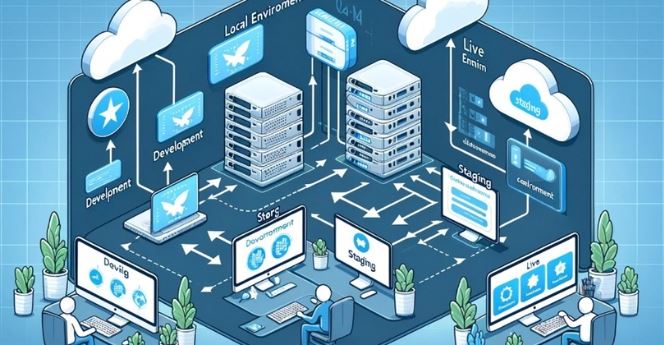
Understanding what is staging in software development is essential, but it’s equally important to see how it fits into the broader ecosystem of development environments. Most web projects move through multiple environments before reaching the live site, each serving a distinct purpose.
1. Local Environment
The local environment is where development begins. It runs on a developer’s personal machine and allows experimentation without affecting anyone else. Here, developers can test new tools, libraries, or code changes safely. Using version control systems like Git ensures that all changes are tracked and can be reverted if needed.
Why it matters:
Provides a safe space to test and debug early.
Cost-effective and offline, enabling work from anywhere.
Encourages innovation and experimentation without risk.
2. Development Environment
Next comes the development environment, often shared among the team. This environment is more comprehensive, with access to databases and services that resemble the live site. Developers can collaborate, review each other’s code, and use continuous integration (CI) tools to automate testing.
Why it matters:
Catches errors early in the development cycle.
Enables team collaboration and code quality checks.
Provides a preliminary real-world context for new features.
3. Staging Environment
The staging environment is the penultimate step before production. It mirrors the live site as closely as possible, allowing for thorough quality assurance (QA), performance testing, and user acceptance testing (UAT). Clients or selected users can review updates and provide feedback here, ensuring the final release meets expectations.
Why it matters:
Acts as the final checkpoint to prevent errors from reaching users.
Simulates the live experience, revealing issues that might not appear in development.
Ensures security, performance, and usability are up to standard.
4. Live / Production Environment
Finally, the live environment is the version users interact with. It requires careful monitoring, regular backups, and disaster recovery measures. By the time changes reach this stage, they should be fully tested, polished, and ready to deliver the best user experience.
Why it matters:
Provides users with a stable and reliable experience.
Minimizes downtime and operational risks.
Allows tracking of user behavior and site performance for continuous improvement.
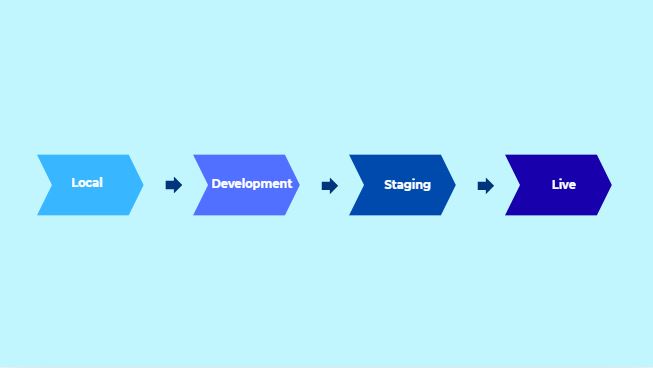
Suggested Diagram: Workflow of Development Environments
Local: Developer experiments and tests locally
Development: Team collaboration, early integration, CI tests
Staging: Final QA, UAT, performance & security checks
Live: Production, user interaction, monitored for reliability
Understanding the progression from local to development, staging, and live environments helps teams maintain quality, reduce risk, and deliver reliable software. The staging environment plays a critical role in this workflow, bridging the gap between development experiments and the polished live experience.
Staging Environment vs. Testing Environment
In software development, both staging and testing environments are critical for ensuring quality, but they serve distinct purposes. Understanding the difference helps teams reduce risk, improve workflow, and deliver reliable products.
1. Key Differences
A staging environment is a near-identical replica of the live site. It’s used for final verification before deployment, allowing developers, testers, and stakeholders including clients to evaluate the software in a realistic setting. All features, integrations, and configurations mirror production, making it the ultimate safety net before going live.
A testing environment, in contrast, is a flexible setup designed for early testing of specific features or code changes. It doesn’t have to replicate the live site perfectly. Developers use it to experiment, debug, and run automated tests quickly, without worrying about matching production exactly.
Comparison Table
Feature / Aspect
Staging Environment
Testing Environment
Purpose
Final verification before deployment; mirrors live site closely
Early testing of code, features, or bug fixes; flexible and fast
Similarity to Live Site
Almost identical to production
May differ from production; not all features or data replicated
Use Cases
QA, performance testing, security validation, User Acceptance Testing (UAT)
Unit testing, integration testing, feature testing, automated CI/CD tests
User Access
Developers, testers, stakeholders, sometimes clients
Mostly developers and testers
Deployment Risk
Very low risk if tested here
Low to medium; issues may still appear on staging/live
Iteration Speed
Slower; focused on accuracy and validation
Faster; allows rapid changes and experimentation
Why the Difference Matters:
Use the testing environment for rapid development, debugging, and automated checks.
Use the staging environment as the final safety net to catch any issues that could affect real users.
This separation ensures updates are reliable, secure, and high-quality before they reach production.
While testing environments help catch issues early, the staging environment ensures your updates are production-ready, bridging the gap between development experiments and the polished live experience. Understanding this distinction is central to grasping what is staging in software development and its value in delivering stable, user-friendly software.
How to Set Up a Staging Environment Step by Step
Setting up a staging environment may seem daunting, but breaking it down into clear steps makes the process manageable. A properly configured staging environment ensures your updates are thoroughly tested before reaching real users. Here’s a step-by-step guide:
1. Set Up the Server
The first step is to provision a separate server that mirrors your production environment as closely as possible. This includes the same operating system, web server, runtime versions, and software stack. Cloud platforms like AWS, Azure, or DigitalOcean make this process straightforward and scalable. The goal is to create an environment where your application behaves just like it does in production.
2. Clone the Database
Next, create a copy of your production database for testing purposes. Ensure sensitive data is anonymized if required. This allows developers and testers to work with real-world data while avoiding exposure of confidential information. Regularly updating the staging database from production ensures your tests reflect current usage patterns.
3. Sync Configuration Settings
Configurations such as API keys, environment variables, caching, and server settings should match production as closely as possible. Consistency here ensures that issues caused by environmental differences are caught before deployment. Tools like Docker or configuration management systems (Ansible, Puppet, Chef) can help maintain parity between environments efficiently.
4. Connect Third-Party Services
Finally, integrate external services like payment gateways, analytics tools, and third-party APIs into your staging environment. Use sandbox or test credentials whenever possible to avoid affecting real transactions or data. This step ensures that integrations work seamlessly in a safe environment, reducing the risk of errors in production.
5. Optional: Automate and Maintain
For more advanced setups, consider automating staging deployment using CI/CD pipelines. This ensures the staging environment is always up-to-date and mirrors production accurately. Regular maintenance, backups, and monitoring are essential to keep your staging environment reliable.
Conclusion
A staging environment is more than just a testing space it’s a critical step in delivering reliable, stable, and user-friendly software. By mirroring the live environment, teams can catch potential issues early, validate updates, and ensure smooth deployment. Skipping staging may save time upfront but often leads to costly errors, security risks, and disrupted user experiences.
For teams looking to streamline their development workflow, resources like guides and case studies from experienced software development partners can be invaluable. For instance, ONEXT DIGITAL provides practical insights and support for businesses implementing staging environments and managing the transition from development to production effectively. Learning from these examples can help teams avoid common pitfalls and adopt best practices more confidently.
Frequently Asked Questions About Staging in Software Development
1. What is the difference between staging and production environments?
A staging environment is a near-identical copy of the production environment used for final testing before deployment. Production is the live environment where real users interact with the software.
2. Do small projects really need a staging environment?
Yes. Even small projects benefit from staging because it helps catch errors, test integrations, and ensure updates don’t disrupt the live site.
3. How often should the staging environment be updated?
It should be updated regularly, ideally every time the production environment changes or before major updates, to reflect real-world data and configurations.
4. Can clients access the staging environment?
Yes, often clients or selected users are given access for User Acceptance Testing (UAT), providing valuable feedback before the full release.
5. What tools can help set up a staging environment?
Cloud platforms (AWS, Azure, DigitalOcean), containerization tools (Docker), CI/CD pipelines, and monitoring software all help maintain a reliable staging environment.
6. Is staging only for testing bugs?
No. Staging is also used to test performance, security, scalability, integrations, and overall user experience before deployment.
Need a Website or Mobile App From Experts?
We are ready to work and build on-demand solution for your business.

 Services
 Solutions
 Main platform
 Technology
 White Label
  Offshore
 Hire developers